

Utilities Windows
gnuplot for Windows
Plot mathematical functions and data in 2D or 3D with gnuplot, a free, command-driven graphing utility. This entry links to the Windows 64-bit 6.0.5 installer.
- Operating system
- Windows (64-bit package)
- Architecture
- x64
- Download package
- EXE installer (gp605-win64-mingw.exe)
The selected package is win64, not the separate Windows-on-ARM package. Minimum supported Windows version was not established from the release listing.
Link checked · Download guidance
What is gnuplot?
gnuplot turns mathematical functions and data into graphs using commands rather than a spreadsheet-style chart workflow. Scientists, students and anyone preparing technical plots can use it interactively or reuse plotting instructions in scripts. It supports 2D and 3D plots, with output to an on-screen window or files such as PDF, SVG and PNG.
The linked package is gp605-win64-mingw.exe, the Windows 64-bit installer for version 6.0.5. The publisher's release catalog also contains 6.0.6 source files, but its 6.0.6 folder did not list a Windows installer when checked. This entry identifies the available Windows package rather than presenting 6.0.5 as the newest release on every platform.
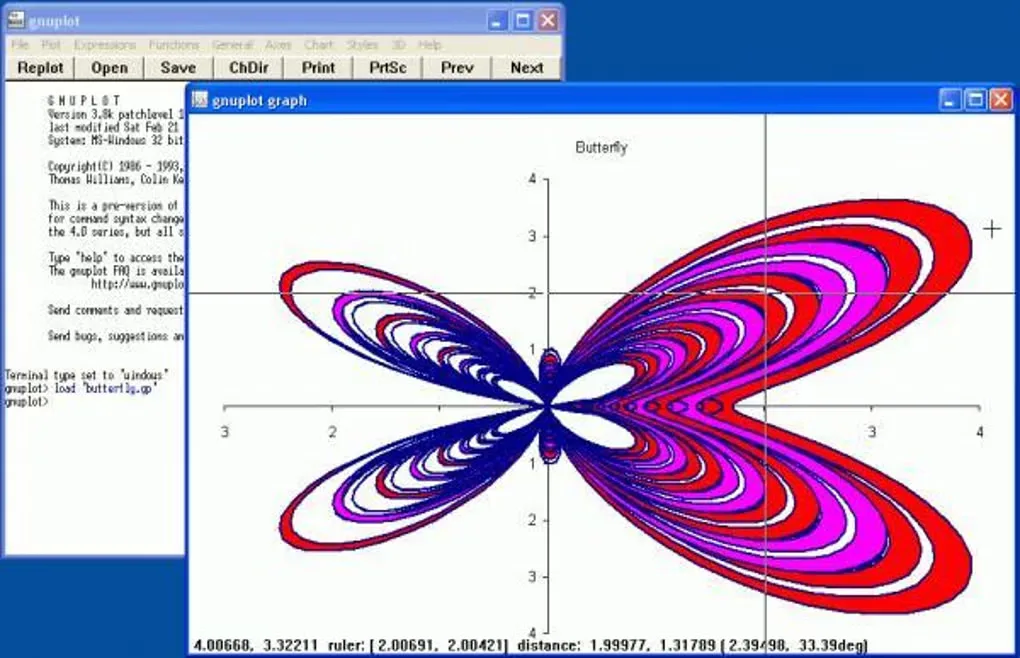
Expect to learn plotting commands and syntax; gnuplot is a command-driven tool, not a point-and-click spreadsheet replacement. The screenshot shows a historical Windows interface and butterfly plot from the source gallery, not the appearance of version 6.0.5.
What it offers
- Visualize mathematical functions and data with 2D and 3D plots.
- Work interactively or use scripts for non-interactive plotting.
- Display plots in an interactive window or export PDF, SVG, PNG and other supported formats.
- Use gnuplot as a plotting engine within third-party applications such as Octave.
Good to know
- The command-driven workflow requires learning plotting commands and syntax.
- The linked Windows installer is version 6.0.5; the observed 6.0.6 release folder contains source files but no Windows installer.
Product images
Sources
References used for this listing. Retrieval dates do not indicate hands-on testing.
- gnuplot - Download — Windows product page and screenshot gallery ↗Retrieved
- gnuplot homepage — publisher features and release links ↗Retrieved
- gnuplot Files — stable 6.0.5 release and Windows packages ↗Retrieved
- gnuplot Files — 6.0.6 source release ↗Retrieved
- gnuplot Git Repository — Copyright ↗Retrieved
More in utilities
View category ↗
1.1.1.1 with WARP 2026.8.2115.0
Encrypt traffic from your Mac to Cloudflare’s network with WARP, or use DNS-only mode for encrypted DNS queries to the 1.1.1.1 resolver.
1.1.1.1 with WARP 2026.8.2115.0
Encrypt traffic between your Windows PC and Cloudflare, or use encrypted DNS only, with the free 1.1.1.1 with WARP app.

3uTools 9.12.005
Manage iPhone and iPad photos, music, apps and backups from Windows with 3uTools, a free utility that also includes device checks and firmware flashing tools.