
Development Windows
Godot Launcher
Manage Godot 4 editor versions, custom builds and projects on Windows with a free companion app that keeps editor settings separate for each project.
- Operating system
- Windows 10 or later
- Architecture
- x64; separate ARM64 installer available
- Download package
- EXE installer
This link selects the x64 build. Manages Godot 4 and newer; C# projects additionally require the .NET SDK.
Link checked · Download guidance
What is Godot Launcher?
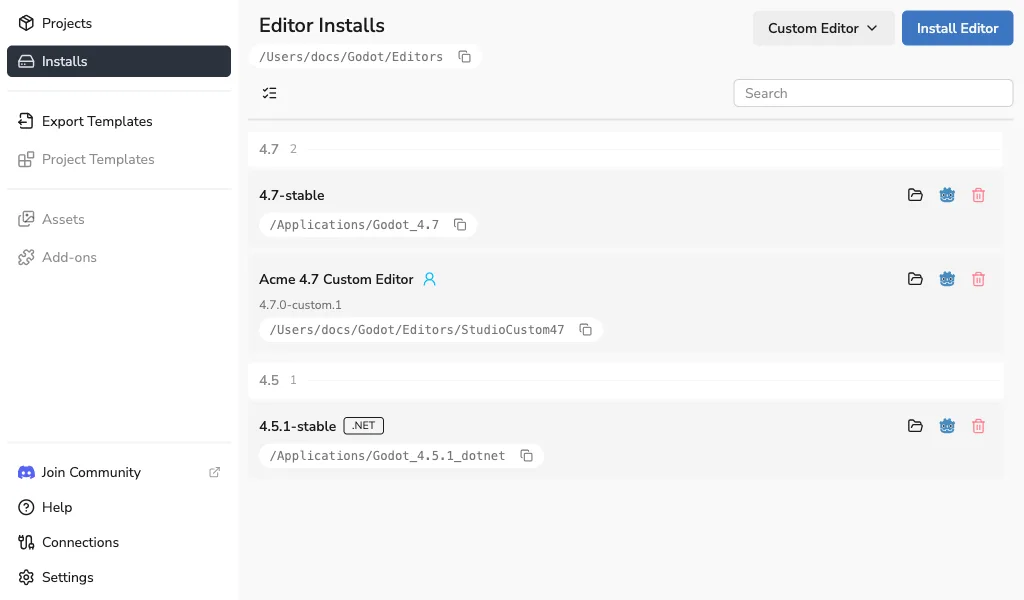
Godot Launcher organizes the setup around Godot Engine rather than replacing the engine itself. Install multiple official Godot editors, register a custom build and choose the editor for each project. Per-project editor preferences keep one project's setup separate from another, while Visual Studio Code or VSCodium integration and optional Git initialization help prepare a working project.
For a first setup, complete the launcher's appearance, storage and workflow preferences, then open Installs to add an editor. Choose Standard for GDScript or a .NET-enabled editor for C#; multiple releases and both variants can coexist. Existing projects can be added to the launcher instead of starting over.
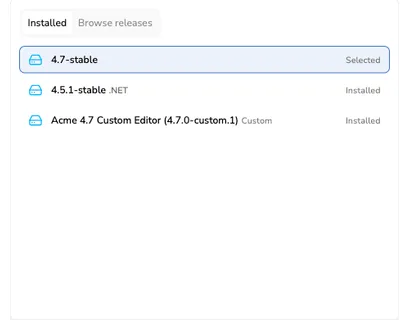
This entry links to the Windows x64 EXE for Godot Launcher 1.13.1. Windows 10 or later is required, and Windows on ARM has a separate ARM64 installer. The launcher supports Godot 4 and newer; C# projects also require the separately installed .NET SDK. Godot Launcher is an independent project, not an official Godot Engine release. The publisher screenshots illustrate the shared interface and contain example versions and macOS-style paths, not a Windows installation tested by SoftGalaxy.
What it offers
- Install multiple stable or prerelease Godot editors and choose Standard or .NET variants.
- Register custom Godot editor builds and choose an editor for each project.
- Keep Godot editor preferences isolated per project, with settings import and export.
- Configure Visual Studio Code or VSCodium as a default or per-project code editor.
- Initialize Git for projects and create or import projects through the supported GitHub integration.
Good to know
- Supports Godot 4 and newer editor builds; this is not a Godot 3 version manager.
- C# development requires both a .NET-enabled Godot editor and a separately installed .NET SDK.
- Windows 10 or later is required. The linked x64 installer is not the separate Windows ARM64 package.
Product images
Sources
References used for this listing. Retrieval dates do not indicate hands-on testing.
- Godot Launcher — publisher repository and README ↗Retrieved
- Install Godot Launcher — publisher documentation, version 1.13 ↗Retrieved
- Install a Godot Editor — publisher workflow and screenshot ↗Retrieved
- Godot Launcher v1.13.1 — official release ↗Retrieved
- Godot Launcher v1.13.1 — official asset list ↗Retrieved
- The Companion App for Godot Engine — publisher features ↗Retrieved
- Godot Launcher license and affiliation ↗Retrieved
- Godot Launcher documentation license ↗Retrieved
More in development
View category ↗

010 Editor 17.0
Inspect and edit binary files on Mac with 010 Editor, a paid text and hex editor with Binary Templates, file comparison and a 30-day trial.
010 Editor 17.0
Inspect and edit binary files with 010 Editor for Windows, a text and hex editor with Binary Templates, file comparison and scripting. Includes a 30-day trial.
10x Editor
Edit and navigate C++ projects on Windows with a built-in parser, workspace search and Visual Studio project support. A paid license is required after the 30-day trial.