

Utilities Windows
Google Earth Pro for Windows
Explore satellite imagery, import GIS data and compare historical imagery with Google Earth Pro for Windows. Google says desktop downloads will end on June 25, 2027.
- Operating system
- Windows; publisher requirements list Windows 7 as the minimum
- Architecture
- 64-bit Windows
- Download package
- EXE installer
This link is the publisher-listed 64-bit package; a separate 32-bit installer is offered. Requirements are publisher statements, not a compatibility test.
Link checked · Download guidance
What is Google Earth Pro?
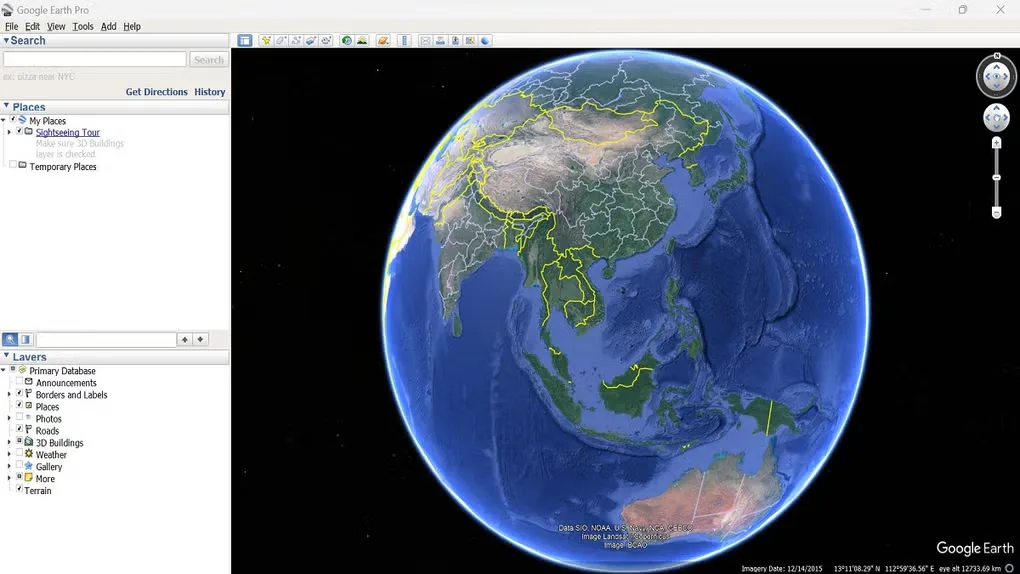
Google Earth Pro is a desktop mapping application for exploring the globe and working with geographic data. Its advanced tools let you import and export GIS data and inspect historical imagery to see how a location has changed. It suits desktop map exploration and projects that need more than a browser-based globe.
This entry links to Google's Windows 64-bit EXE installer for version 7.3.7, as listed on the publisher's direct-installers page. A separate 32-bit Windows installer is available there. Google says Earth Pro will no longer be available for download beginning June 25, 2027; that notice concerns download availability and does not establish when an existing installation will stop working. The publisher's requirements include an internet connection and compatible graphics hardware.
What it offers
- Explore the globe using satellite imagery and geographic layers.
- Import and export GIS data with the desktop application's advanced tools.
- Compare historical imagery to examine changes at a location.
Good to know
- Google says Earth Pro desktop downloads will no longer be available beginning June 25, 2027.
- The publisher lists an internet connection and DirectX 9 or OpenGL 1.4-compatible graphics among the Windows minimum requirements.
Product images
Sources
References used for this listing. Retrieval dates do not indicate hands-on testing.
More in utilities
View category ↗
1.1.1.1 with WARP 2026.8.2115.0
Encrypt traffic from your Mac to Cloudflare’s network with WARP, or use DNS-only mode for encrypted DNS queries to the 1.1.1.1 resolver.
1.1.1.1 with WARP 2026.8.2115.0
Encrypt traffic between your Windows PC and Cloudflare, or use encrypted DNS only, with the free 1.1.1.1 with WARP app.

3uTools 9.12.005
Manage iPhone and iPad photos, music, apps and backups from Windows with 3uTools, a free utility that also includes device checks and firmware flashing tools.