

Development Windows
Greenfoot for Windows
Learn object-oriented Java by creating actors, games and simulations in Greenfoot, a visual programming environment with a built-in code editor.
- Operating system
- Windows 10 and 11
- Architecture
- 64-bit Intel/AMD (x64)
- Download package
- MSI installer
Requires a 64-bit CPU and operating system. Publisher also offers a separate standalone ZIP; this link is the MSI.
Link checked · Download guidance
What is Greenfoot?
Greenfoot introduces object-oriented programming through Java projects that you can see and interact with. You create actors inside worlds to build games, simulations and other graphical programs. Its editor combines standard Java code with project management, syntax highlighting and auto-completion, so learners can connect their code to what happens in the visual world.
This is a programming environment, not a no-code game maker: actors are written in textual Java. The selected download is the publisher's Greenfoot 3.9.0 MSI for Windows 10 and 11. This release requires a 64-bit Intel/AMD processor and a 64-bit operating system; it is not the package for a 32-bit Windows computer. The publisher's installation instructions also say to uninstall a previous Greenfoot installation before installing.
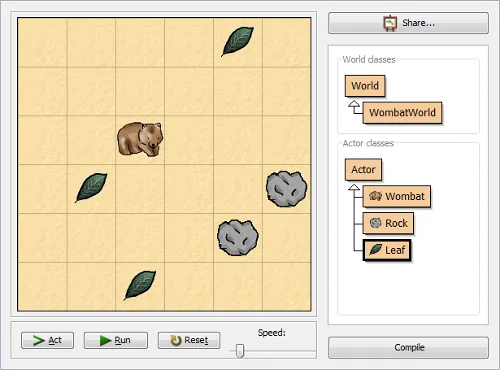
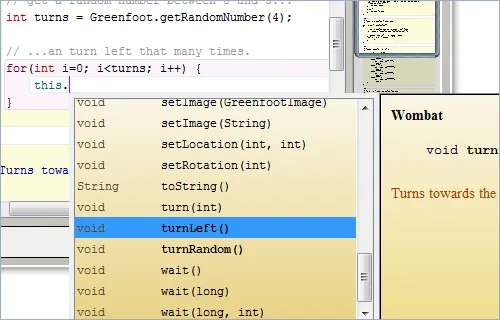
The screenshots are publisher overview illustrations showing a Wombat world and Java code completion. They demonstrate the application interface, not a verified capture of version 3.9.0 running on Windows 10 or 11.
What it offers
- Create actors in visual worlds for games, simulations and graphical programs.
- Write actors in standard Java while observing their visual execution.
- Manage projects and edit code with syntax highlighting and auto-completion.
- Use the publisher's tutorials and shared project gallery for learning resources.
Good to know
- Actors use textual Java code; Greenfoot is not a no-code authoring tool.
- The Windows 3.9.0 package requires a 64-bit Intel/AMD CPU and 64-bit operating system; it does not support 32-bit Windows.
- The publisher's Windows installation instructions require uninstalling a previous Greenfoot installation first.
Product images
Sources
References used for this listing. Retrieval dates do not indicate hands-on testing.
- Greenfoot | Download ↗Retrieved
- Greenfoot | About Greenfoot ↗Retrieved
- Greenfoot | Installation ↗Retrieved
More in development
View category ↗
010 Editor 17.0
Inspect and edit binary files on Mac with 010 Editor, a paid text and hex editor with Binary Templates, file comparison and a 30-day trial.
010 Editor 17.0
Inspect and edit binary files with 010 Editor for Windows, a text and hex editor with Binary Templates, file comparison and scripting. Includes a 30-day trial.
10x Editor
Edit and navigate C++ projects on Windows with a built-in parser, workspace search and Visual Studio project support. A paid license is required after the 30-day trial.