
Utilities Windows
grepWin
Search and replace text across files with grepWin, a free Windows utility with regular expressions, file filters and reusable search presets.
- Operating system
- Windows 10 22H2 or later
- Architecture
- x64
- Download package
- MSI installer
Selected download: grepWin-2.1.12-x64.msi. The release also lists separate portable archives; this link is the installer.
Link checked · Download guidance
What is grepWin?
grepWin searches for text in files and can replace matching text across a chosen folder. Its regular-expression support suits patterns that are harder to express as a simple word or phrase. The Windows shell context-menu entry lets you start from a selected folder rather than navigate to it again inside the application.
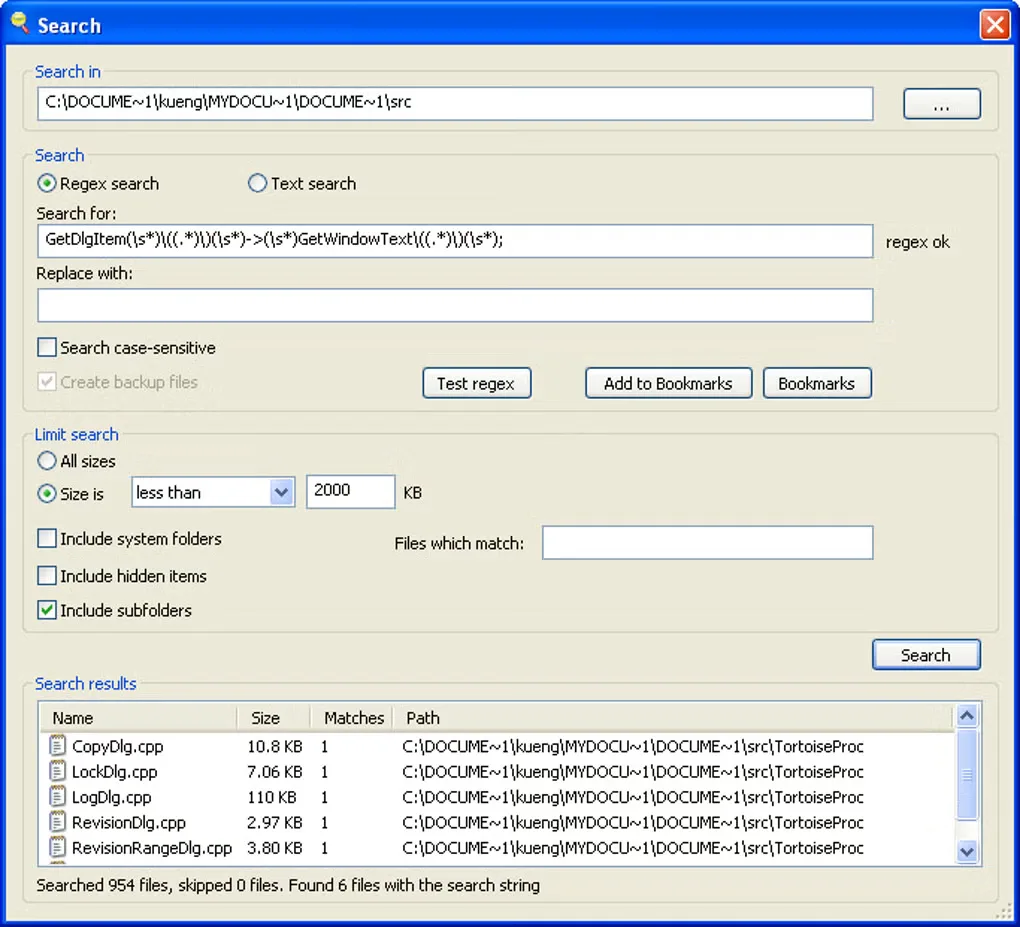
Narrow the search by file type or size to keep unrelated files out of the results. Frequently used expressions can be saved as presets and recalled from the presets dialog. Matching files appear in a results list: double-click a file to open it, or right-click for its normal Windows shell menu. These controls make grepWin useful for locating repeated text or carrying out a consistent replacement across a set of files.
Regular expressions can become complicated; the publisher provides a short tutorial, but understanding the pattern is still important before using replacement. The publisher currently requires Windows 10 22H2 or later. This entry links to the version 2.1.12 x64 MSI installer, not a portable package. The gallery image shows a historical Windows interface and is illustrative, not a verified screenshot of that release.
What it offers
- Search and replace using regular expressions.
- Launch a search from the Windows shell context menu for a selected folder.
- Limit searches by file type and file size.
- Save frequently used expressions as presets and retrieve them from a presets dialog.
- Open matching files from the results list or access their Windows shell context menu.
Good to know
- Requires Windows 10 22H2 or later according to the current publisher page.
- Complex regular expressions require care; the publisher notes that expressions can become complicated.
Product images
Sources
References used for this listing. Retrieval dates do not indicate hands-on testing.
More in utilities
View category ↗
1.1.1.1 with WARP 2026.8.2115.0
Encrypt traffic from your Mac to Cloudflare’s network with WARP, or use DNS-only mode for encrypted DNS queries to the 1.1.1.1 resolver.
1.1.1.1 with WARP 2026.8.2115.0
Encrypt traffic between your Windows PC and Cloudflare, or use encrypted DNS only, with the free 1.1.1.1 with WARP app.

3uTools 9.12.005
Manage iPhone and iPad photos, music, apps and backups from Windows with 3uTools, a free utility that also includes device checks and firmware flashing tools.