
Utilities Windows
GS Auto Clicker
Automate repeated mouse clicks on Windows with GS Auto Clicker. Choose a click interval, set a repeat count, or replay clicks at recorded screen positions.
- Operating system
- Windows 7, 8, 10 and 11 listed by MajorGeeks
- Architecture
- Not specified; publisher states compatibility with 64-bit systems
- Download package
- EXE download
Publisher also names Vista and Windows 7. Package bitness is not established by 64-bit compatibility. No installation or runtime test performed.
Link checked · Download guidance
What is GS Auto Clicker?
GS Auto Clicker replaces repetitive mouse input with timed clicks. It suits tasks that need the same click repeated or a sequence of clicks at several screen positions. Its Options menu lets you choose the mouse button and single or double clicks, while a hotkey starts the configured action. The publisher documents F8 as the default hotkey and provides a separate shortcut setting.
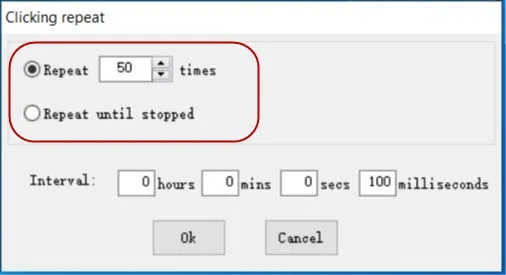
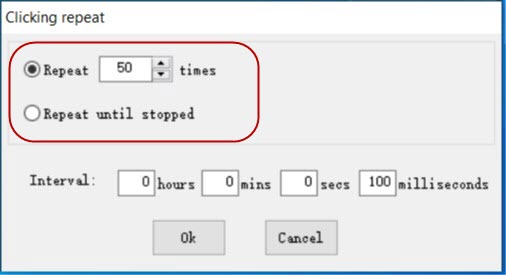
The Clicking repeat dialog offers two modes: repeat a specified number of times or keep clicking until stopped. Intervals can be entered in hours, minutes, seconds and milliseconds. For multi-point tasks, the recording dialog lets you pick screen positions and replay the resulting sequence.
The Windows download below is an EXE hosted by MajorGeeks, the download provider linked from the publisher homepage. MajorGeeks lists Windows 7, 8, 10 and 11; the publisher homepage itself names Vista, Windows 7 and compatibility with 64-bit systems. That compatibility statement does not establish that the EXE is a native 64-bit build.
What it offers
- Automate single or double mouse clicks with a selectable mouse button.
- Set a finite repeat count or continue clicking until stopped.
- Adjust click intervals in hours, minutes, seconds and milliseconds.
- Record and replay clicks at multiple picked screen positions.
- Use the default F8 hotkey or configure a different shortcut.
Good to know
- The documented automation handles mouse clicks; the publisher guides do not describe keyboard macro recording.
- Publisher Windows compatibility wording names Vista and Windows 7; support for Windows 10 and 11 is listed by the download provider, not explicitly confirmed in that publisher statement.
Product images
Sources
References used for this listing. Retrieval dates do not indicate hands-on testing.
- GS Auto Clicker - AutoClick — publisher homepage ↗Retrieved
- How to get started — official Windows usage guide ↗Retrieved
- How to automate multiple clicks — official guide ↗Retrieved
- How to set a shortcut — official guide ↗Retrieved
- Download GS Auto Clicker 3.1.4 — publisher-linked download provider ↗Retrieved
- GS Auto Clicker - Download — normal browser observation ↗Retrieved
More in utilities
View category ↗
1.1.1.1 with WARP 2026.8.2115.0
Encrypt traffic from your Mac to Cloudflare’s network with WARP, or use DNS-only mode for encrypted DNS queries to the 1.1.1.1 resolver.
1.1.1.1 with WARP 2026.8.2115.0
Encrypt traffic between your Windows PC and Cloudflare, or use encrypted DNS only, with the free 1.1.1.1 with WARP app.

3uTools 9.12.005
Manage iPhone and iPad photos, music, apps and backups from Windows with 3uTools, a free utility that also includes device checks and firmware flashing tools.