

Utilities Windows
HashMyFiles for Windows
Calculate and compare file hashes with HashMyFiles, a portable Windows utility supporting MD5, SHA1, CRC32 and SHA-2 hashes, clipboard copying and report export.
- Operating system
- Windows 11, 10, 8, 7, Vista, XP, 2003 and 2000, as listed by the publisher
- Architecture
- 64-bit Windows package
- Download package
- ZIP archive; portable executable
This entry links to the publisher's separate 64-bit package. No installation process or additional DLL files are required according to the publisher; software execution was not tested.
Link checked · Download guidance
What is HashMyFiles?
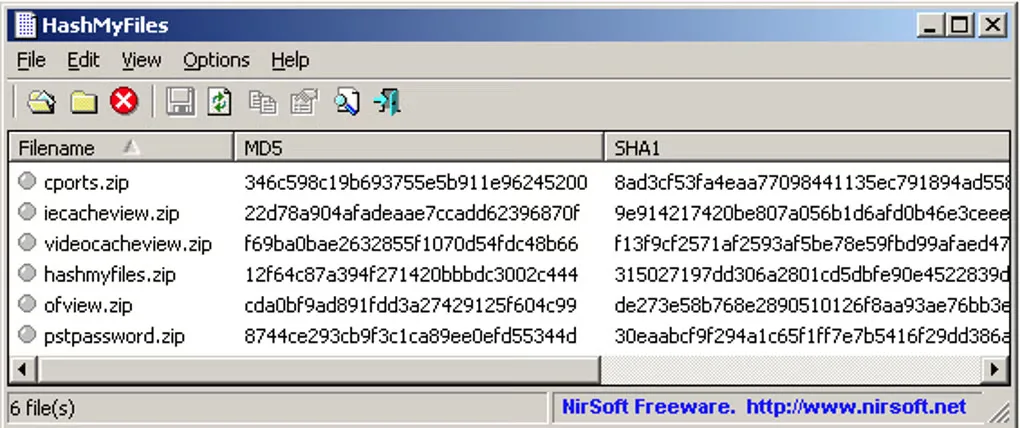
HashMyFiles calculates checksums for files and folders so you can compare their hashes with reference values or identify matching hashes in a file list. Add files through the File menu, drag them from Explorer or enable the optional Explorer context-menu entry. The utility supports MD5, SHA1, CRC32, SHA-256, SHA-512 and SHA-384, with selectable hash types.
Results can be copied to the clipboard or exported as text, HTML, XML or CSV. Command-line options cover file selection, hash types and report output, making the same tool useful for repeatable hashing tasks. The publisher says no installation process or additional DLL files are required; the linked download is its separate 64-bit ZIP package.
Explorer's static context menu has a documented multi-file limitation: selecting several files may open multiple HashMyFiles instances. For a group of files, the publisher recommends dragging them into the application or using Copy and Explorer Paste instead.
What it offers
- Calculate MD5, SHA1, CRC32, SHA-256, SHA-512 and SHA-384 hashes, with options to enable or disable individual hash types.
- Add files and folders through the menus, drag and drop, or optional Windows Explorer context-menu integration.
- Copy hashes to the clipboard, mark matching hashes and export results as text, HTML, XML or CSV.
- Use command-line options to select files or folders and save hash reports.
Good to know
- Using the Explorer context-menu entry on multiple files may open multiple instances. Use drag and drop or Copy and Explorer Paste for a group of files.
Product images
Sources
References used for this listing. Retrieval dates do not indicate hands-on testing.
More in utilities
View category ↗
1.1.1.1 with WARP 2026.8.2115.0
Encrypt traffic from your Mac to Cloudflare’s network with WARP, or use DNS-only mode for encrypted DNS queries to the 1.1.1.1 resolver.
1.1.1.1 with WARP 2026.8.2115.0
Encrypt traffic between your Windows PC and Cloudflare, or use encrypted DNS only, with the free 1.1.1.1 with WARP app.

3uTools 9.12.005
Manage iPhone and iPad photos, music, apps and backups from Windows with 3uTools, a free utility that also includes device checks and firmware flashing tools.