
Utilities Windows
HDSDR
Tune and analyze radio signals with HDSDR, a free Windows SDR application with spectrum and waterfall displays, audio filtering, and scheduled WAV recording.
- Operating system
- Windows 2000, XP, Vista, 7, 8, 10 and 11, as listed by the publisher
- Architecture
- Installer CPU architecture not specified on the inspected publisher pages
- Download package
- EXE installer
Live reception requires a compatible receiver/input setup; hardware integration uses an appropriate ExtIO DLL. Publisher compatibility statements were not independently installation-tested.
Link checked · Download guidance
What is HDSDR?
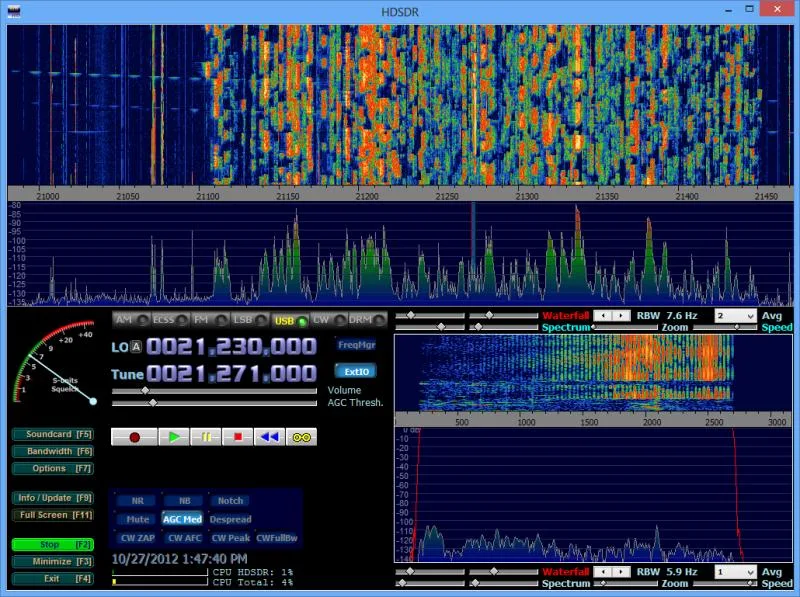
HDSDR is a software-defined radio application for Windows. It gives radio listeners and amateur-radio operators separate RF and audio spectrum and waterfall views, with AM, ECSS, FM, SSB and CW demodulation. Frequency lists and receiver profiles help organize listening sessions, while noise reduction, notch filters and adjustable band-pass filtering help work with received signals.
RF, IF and audio signals can be recorded as WAV files and played back later. A recording scheduler supports unattended captures; full-spectrum recordings can be replayed and tuned to individual signals within the recorded band.
Live reception depends on compatible radio hardware and its input setup. Hardware integration uses an ExtIO DLL, and support for a particular receiver depends on its manufacturer or community. Digital modes such as DRM, DMR and PSK require additional decoding software and virtual audio routing rather than built-in decoders. The publisher-hosted screenshot illustrates an older HDSDR interface, not a verified view of version 2.81a.
What it offers
- View separate RF and audio spectrum and waterfall displays with adjustable zoom.
- Demodulate AM, ECSS, FM, SSB and CW signals.
- Apply noise reduction, noise blanking, band-pass filtering and automatic or manual notch filters.
- Record and replay RF, IF and audio WAV files, including scheduled recordings.
- Organize frequencies and receiver profiles; integrate supported hardware through ExtIO and Omni-Rig.
Good to know
- Receiver support depends on compatible hardware and an appropriate ExtIO DLL; some radios may not be supported.
- Digital modes such as DRM, DMR and PSK need separate decoding software and virtual audio routing.
Product images
Sources
References used for this listing. Retrieval dates do not indicate hands-on testing.
- HDSDR Homepage — Windows application, features and installer ↗Retrieved
- HDSDR — Frequently Asked Questions ↗Retrieved
- HDSDR — Whats new ↗Retrieved
- HDSDR — Screenshots ↗Retrieved
More in utilities
View category ↗
1.1.1.1 with WARP 2026.8.2115.0
Encrypt traffic from your Mac to Cloudflare’s network with WARP, or use DNS-only mode for encrypted DNS queries to the 1.1.1.1 resolver.
1.1.1.1 with WARP 2026.8.2115.0
Encrypt traffic between your Windows PC and Cloudflare, or use encrypted DNS only, with the free 1.1.1.1 with WARP app.


3uTools 9.12.005
Manage iPhone and iPad photos, music, apps and backups from Windows with 3uTools, a free utility that also includes device checks and firmware flashing tools.