

Utilities Windows
HiBit System Information for Windows
Inspect PC hardware and software details, check storage and battery health, and export an HTML report with HiBit System Information for Windows.
- Operating system
- Windows Vista, 7, 8, 10 and 11
- Architecture
- 32-bit and 64-bit Windows, as listed by the publisher
- Download package
- EXE installer
The publisher also offers a separate portable ZIP. Compatibility is publisher-declared; the installer was not downloaded or run.
Link checked · Download guidance
What is HiBit System Information?
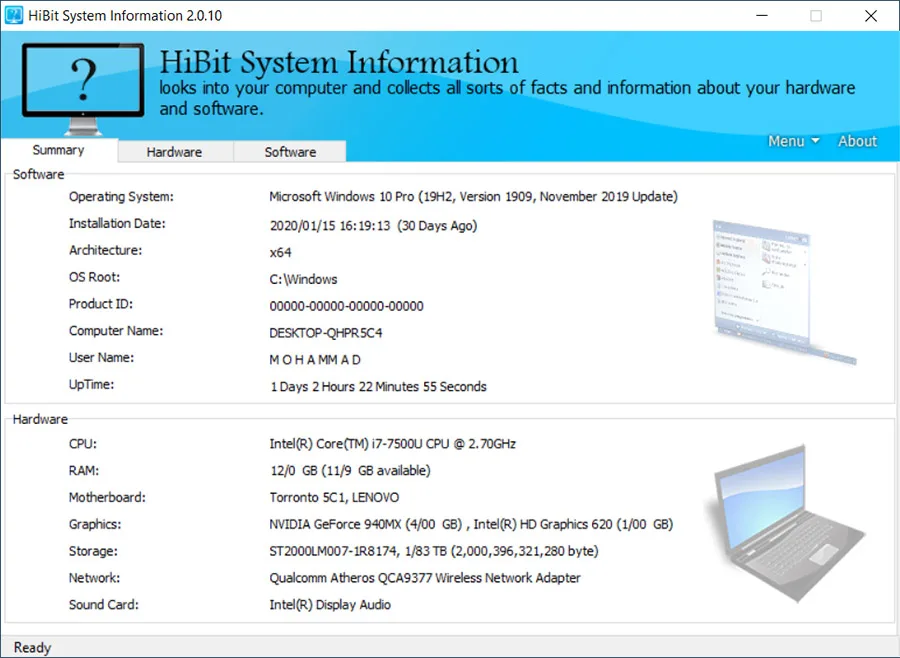
HiBit System Information gathers Windows PC specifications into a Summary view and separate Hardware and Software sections. Use it to identify components, look up operating-system details, or collect information for a support conversation without copying each specification separately.
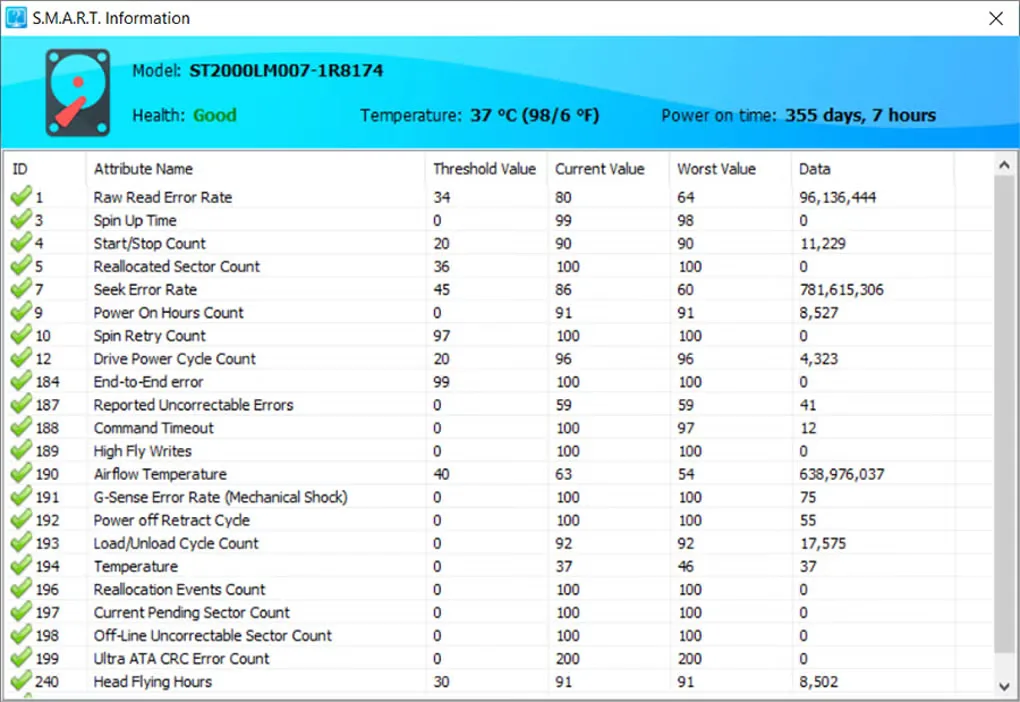
The publisher lists storage-device and laptop-battery health information alongside running processes, services, drivers, startup entries and installed software. Reports can be exported to HTML. The linked download is the publisher's EXE installer; a separate portable ZIP is also offered on its product page.
Report export is limited to HTML, according to Softonic's product description; it does not provide a choice of other report formats. The screenshots illustrate an older interface, including version 2.0.10 in the Summary image, rather than proving the appearance of the linked 2.1.30 release.
What it offers
- View a summary of the PC and detailed hardware and software information.
- Inspect storage-device health and laptop-battery health information.
- List running processes, services, system drivers, startup entries and installed programs.
- Export computer information to an HTML report.
Good to know
- Report export is HTML-only; Softonic documents no other report output format.
- Windows XP support was removed in version 2.0.10, according to the publisher's changelog.
Product images
Sources
References used for this listing. Retrieval dates do not indicate hands-on testing.
More in utilities
View category ↗
1.1.1.1 with WARP 2026.8.2115.0
Encrypt traffic from your Mac to Cloudflare’s network with WARP, or use DNS-only mode for encrypted DNS queries to the 1.1.1.1 resolver.
1.1.1.1 with WARP 2026.8.2115.0
Encrypt traffic between your Windows PC and Cloudflare, or use encrypted DNS only, with the free 1.1.1.1 with WARP app.

3uTools 9.12.005
Manage iPhone and iPad photos, music, apps and backups from Windows with 3uTools, a free utility that also includes device checks and firmware flashing tools.