

Utilities Windows
HiddeX for Windows
Hide selected Windows applications from the desktop and taskbar without closing them. HiddeX is a portable freeware utility with keyboard and mouse shortcuts.
- Operating system
- Windows; Softonic lists Windows Vista
- Architecture
- Not specified by the consulted sources
- Download package
- ZIP archive; portable application
Publisher identifies a portable Windows utility. Current Windows 10/11 compatibility is unconfirmed; no software was installed or run.
Link checked · Download guidance
What is HiddeX?
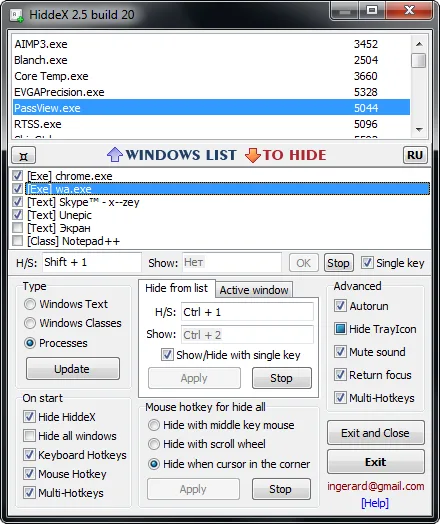
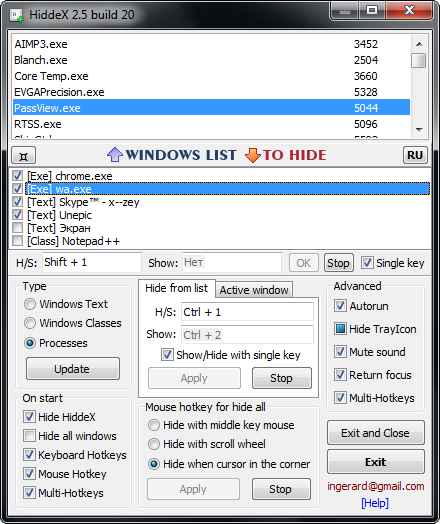
HiddeX hides application windows while leaving them running, so you can restore them rather than reopen the programs. Choose windows by their title, window class or process name, then use keyboard shortcuts or mouse actions to hide and show the selected group. Separate shortcuts can handle individual windows or the active window.
The publisher also documents system sound muting, password protection and startup options. The download is a ZIP archive of the portable Windows utility; the publisher identifies it as version 2.5 build 22. The illustrated interface is the publisher's older build 20 screenshot, not a capture of build 22 running here.
Restoration depends on how a window was hidden: the group Show shortcut does not restore windows hidden with individual or active-window shortcuts. The exit controls also differ: Exit restores hidden windows, while Exit and Close closes them. Current Windows 10 and 11 compatibility is not confirmed by the consulted sources.
What it offers
- Hide windows from the desktop and taskbar without closing their applications.
- Select targets by window title, window class or process name.
- Assign keyboard shortcuts to a group, individual windows or the active window.
- Use mouse buttons, the scroll wheel or screen corners to hide and restore the configured group.
- Configure system sound muting, password protection and startup behavior.
Good to know
- The group Show shortcut does not restore windows hidden with individual-window or active-window shortcuts; use the corresponding restore control.
- Exit and Close closes hidden windows; use Exit when you want to restore them instead.
- Windows 10/11 compatibility and CPU architecture are not established by the consulted publisher documentation.
Product images
Sources
References used for this listing. Retrieval dates do not indicate hands-on testing.
More in utilities
View category ↗
1.1.1.1 with WARP 2026.8.2115.0
Encrypt traffic from your Mac to Cloudflare’s network with WARP, or use DNS-only mode for encrypted DNS queries to the 1.1.1.1 resolver.
1.1.1.1 with WARP 2026.8.2115.0
Encrypt traffic between your Windows PC and Cloudflare, or use encrypted DNS only, with the free 1.1.1.1 with WARP app.

3uTools 9.12.005
Manage iPhone and iPad photos, music, apps and backups from Windows with 3uTools, a free utility that also includes device checks and firmware flashing tools.