

Utilities macOS
HopToDesk for macOS
Share a Mac screen, control a remote device, transfer files and chat with HopToDesk, a free, open-source remote desktop client for personal and business use.
What is HopToDesk?
HopToDesk brings screen sharing and remote control to Mac, with file transfer and live chat in the same remote-access tool. It suits helping someone with a computer task or connecting to another device across the platforms supported by HopToDesk. The publisher lists clients for Windows, macOS, Linux, Android, iOS and Raspberry Pi.
The client is free for personal and business use, without session time limits, and the publisher says it works without an account. HopToDesk states that screen sharing, file transfers and chats use end-to-end encryption. This is the publisher's description of the connection design, not an independent security audit.
The free remote desktop client is distinct from the optional HopToDesk Dashboard for fleet monitoring and device management. That service has a free tier and paid plans for larger fleets and team features; downloading the Mac client does not include every Dashboard capability. The publisher also notes that enabling the full feature set on Mac may require installation rather than portable use.
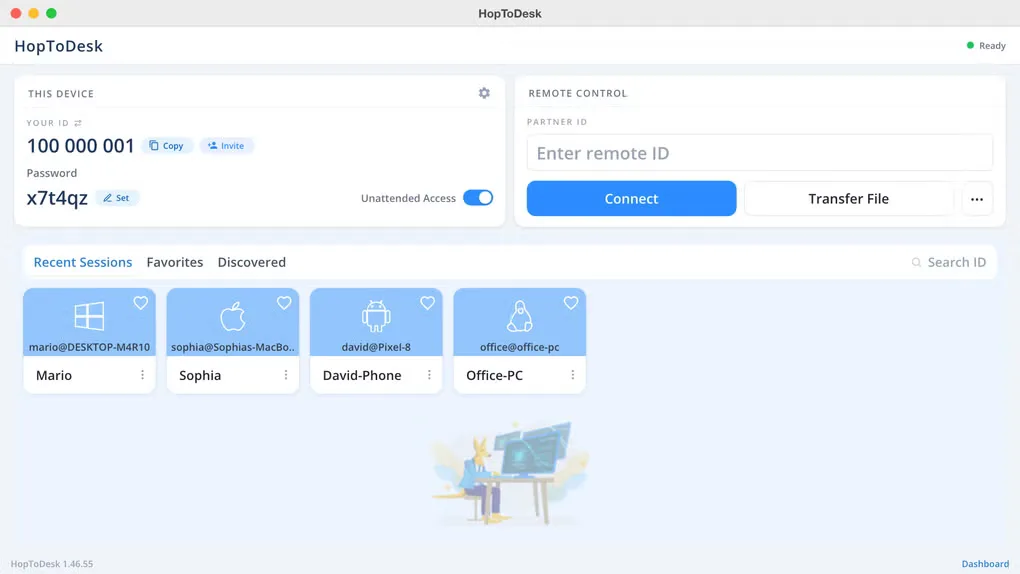
The download here is the macOS DMG linked by the publisher. Its current version, CPU architecture and minimum macOS requirement were not confirmed for that exact file, so they are not asserted. The gallery screenshot illustrates the Mac interface; its visible version label is not a version claim for the download.
What it offers
- Share a screen and remotely control another device for support or access.
- Transfer files and use live chat during remote work.
- Connect across supported platforms, including macOS, Windows and Linux.
- Use the free client for personal or business purposes without session time limits or a required account.
- Publisher-described end-to-end encryption covers screen sharing, file transfers and chats.
Good to know
- Fleet management and team capabilities belong to the separate Dashboard service, which has a free tier and paid plans rather than including every feature with the free client.
- The publisher notes that enabling the full feature set on Mac may require installation rather than portable use.
Product images
Sources
References used for this listing. Retrieval dates do not indicate hands-on testing.
More in utilities
View category ↗
1.1.1.1 with WARP 2026.8.2115.0
Encrypt traffic from your Mac to Cloudflare’s network with WARP, or use DNS-only mode for encrypted DNS queries to the 1.1.1.1 resolver.
1.1.1.1 with WARP 2026.8.2115.0
Encrypt traffic between your Windows PC and Cloudflare, or use encrypted DNS only, with the free 1.1.1.1 with WARP app.

3uTools 9.12.005
Manage iPhone and iPad photos, music, apps and backups from Windows with 3uTools, a free utility that also includes device checks and firmware flashing tools.