

Utilities Windows
HopToDesk for Windows
Control a remote computer, share its screen, transfer files and chat with HopToDesk, a Windows remote desktop app that is free for personal and business use.
- Operating system
- Windows 7, 8, 10 and 11
- Architecture
- 64-bit; separate 32-bit and ARM64 downloads
- Download package
- EXE application with optional in-app installation
This link is the 64-bit Windows package. XP, Vista and Server 2003 require the separate legacy build.
Link checked · Download guidance
What is HopToDesk?
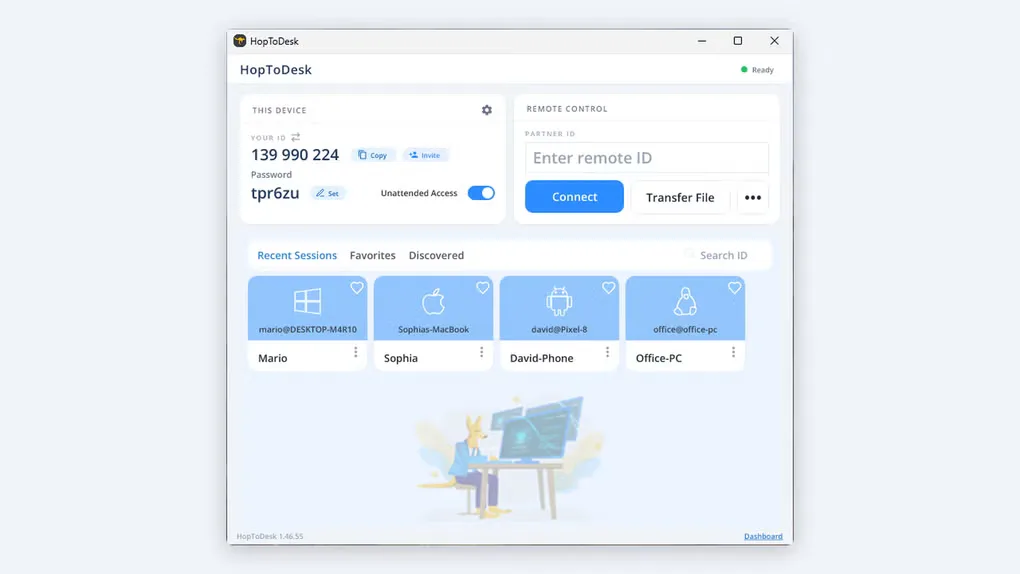
HopToDesk connects computers for remote support or access to your own devices. Open the app on both computers, enter the remote device's ID in the Partner ID field, and supply its password to connect. Screen sharing, remote control, file transfer and chat are available in the free client, without creating an account. The publisher states that screen, file and chat traffic is end-to-end encrypted.
The linked Windows download is the publisher's 64-bit EXE. It can run without installation, with an install option inside the app. The publisher lists Windows 7, 8, 10 and 11; separate downloads cover 32-bit and ARM64 systems, while XP, Vista and Server 2003 use a separate legacy build. Other operating systems have their own clients rather than sharing this Windows package.
Portable use is not the same as persistent access across restarts: the publisher says installation is required to run HopToDesk as a startup service and accept connections before login. Fleet management, ticketing and reporting belong to the separate Dashboard, which requires an account and has both free and paid tiers. Grant remote access only to someone whose identity you have verified; connected parties can see information on screen and access files.
What it offers
- Share a screen and remotely control another computer using its HopToDesk ID and password.
- Transfer files and exchange chat messages during remote support.
- Run the Windows client in portable mode without an account, or install it from inside the app.
- Use end-to-end encrypted screen, file and chat traffic, as described by the publisher.
Good to know
- Installation is required for startup-service operation and access before login or across reboots; portable mode alone does not provide that persistence.
- Dashboard fleet management, ticketing and reporting require a separate account; larger-device and team features can require a paid plan.
- Remote access exposes screen content and files to the connected party; verify the recipient's identity before sharing access.
Product images
Sources
References used for this listing. Retrieval dates do not indicate hands-on testing.
More in utilities
View category ↗
1.1.1.1 with WARP 2026.8.2115.0
Encrypt traffic from your Mac to Cloudflare’s network with WARP, or use DNS-only mode for encrypted DNS queries to the 1.1.1.1 resolver.
1.1.1.1 with WARP 2026.8.2115.0
Encrypt traffic between your Windows PC and Cloudflare, or use encrypted DNS only, with the free 1.1.1.1 with WARP app.

3uTools 9.12.005
Manage iPhone and iPad photos, music, apps and backups from Windows with 3uTools, a free utility that also includes device checks and firmware flashing tools.