

Utilities Windows
HTerm for Windows
Send and inspect serial-port data in ASCII, hexadecimal, decimal or binary with HTerm for Windows, with file transfers and configurable port settings.
Version 0.8.9 · Direct publisher file
Link checked · Download guidance
What is HTerm?
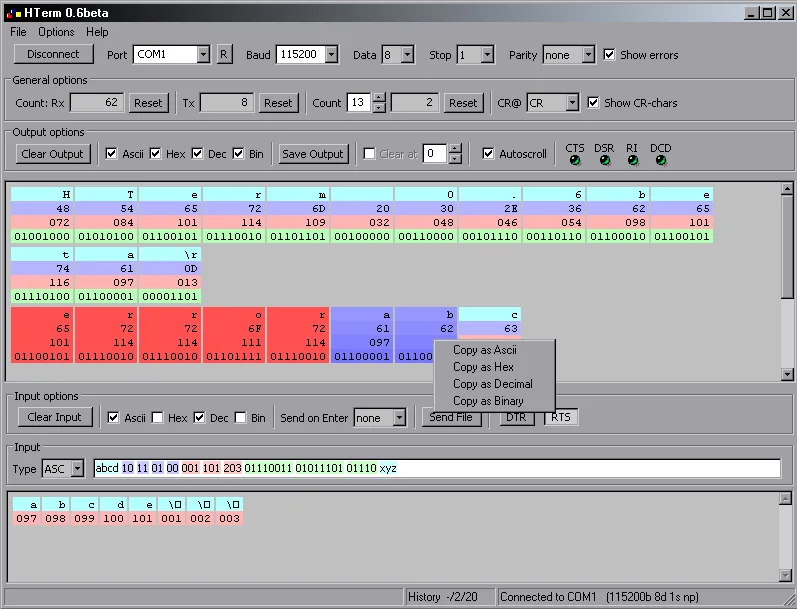
HTerm is a serial communication terminal for Windows. It connects to hardware serial ports and virtual USB serial ports, letting you enter and inspect data in ASCII, hexadecimal, decimal and binary. It is useful when you need to examine the bytes exchanged with a serial device rather than work only with readable text.
Port settings include baud rate, parity and flow control. HTerm can send and receive files, and its XML configuration files let you retain customized settings. The publisher README also documents commands for changing DTR and RTS signals and inserting a wait into an input sequence.
A custom baud rate only works if the port hardware supports it; unsupported values produce an error. The publisher also documents a Windows startup error involving VCRUNTIME140_1.dll and points to the Microsoft Visual C++ x86 runtime. The linked Windows download is the publisher's ZIP package.
The screenshot is an older Windows interface illustration supplied by the publisher, visibly titled HTerm 0.6beta, not a capture of version 0.8.9. The current product page lists 0.8.9. The publisher permits commercial use but forbids selling or modifying the program and requires written permission for redistribution; this entry links to the publisher-hosted package rather than mirroring it.
What it offers
- Communicate through hardware serial ports and virtual USB serial ports.
- Enter and display serial data in ASCII, hexadecimal, decimal and binary.
- Send and receive files over the serial connection.
- Configure baud rate, parity and flow control, with customization through XML configuration files.
- Use documented input commands to change DTR or RTS signals and insert waits in a sequence.
Good to know
- Custom baud rates depend on port hardware support; HTerm reports an error for unsupported values.
- The publisher documents a possible VCRUNTIME140_1.dll startup error on Windows and directs affected users to Microsoft's Visual C++ x86 runtime.
- Selling or modifying HTerm is forbidden by the publisher's terms; redistribution requires written permission.
Product images
Sources
References used for this listing. Retrieval dates do not indicate hands-on testing.
More in utilities
View category ↗
1.1.1.1 with WARP 2026.8.2115.0
Encrypt traffic from your Mac to Cloudflare’s network with WARP, or use DNS-only mode for encrypted DNS queries to the 1.1.1.1 resolver.
1.1.1.1 with WARP 2026.8.2115.0
Encrypt traffic between your Windows PC and Cloudflare, or use encrypted DNS only, with the free 1.1.1.1 with WARP app.


3uTools 9.12.005
Manage iPhone and iPad photos, music, apps and backups from Windows with 3uTools, a free utility that also includes device checks and firmware flashing tools.