
Utilities Windows
Hue Sync
Synchronize Philips Hue color lights with PC games, music and video using the free Hue Sync desktop app. A Hue Bridge and compatible lighting are required.
- Operating system
- Windows 10 (publisher-listed)
- Architecture
- x64
- Download package
- EXE installer
The official catalog labels the Windows download Windows 10 (x64). No minimum Windows build or ARM support is established by the retained publisher evidence.
Link checked · Download guidance
What is Hue Sync?
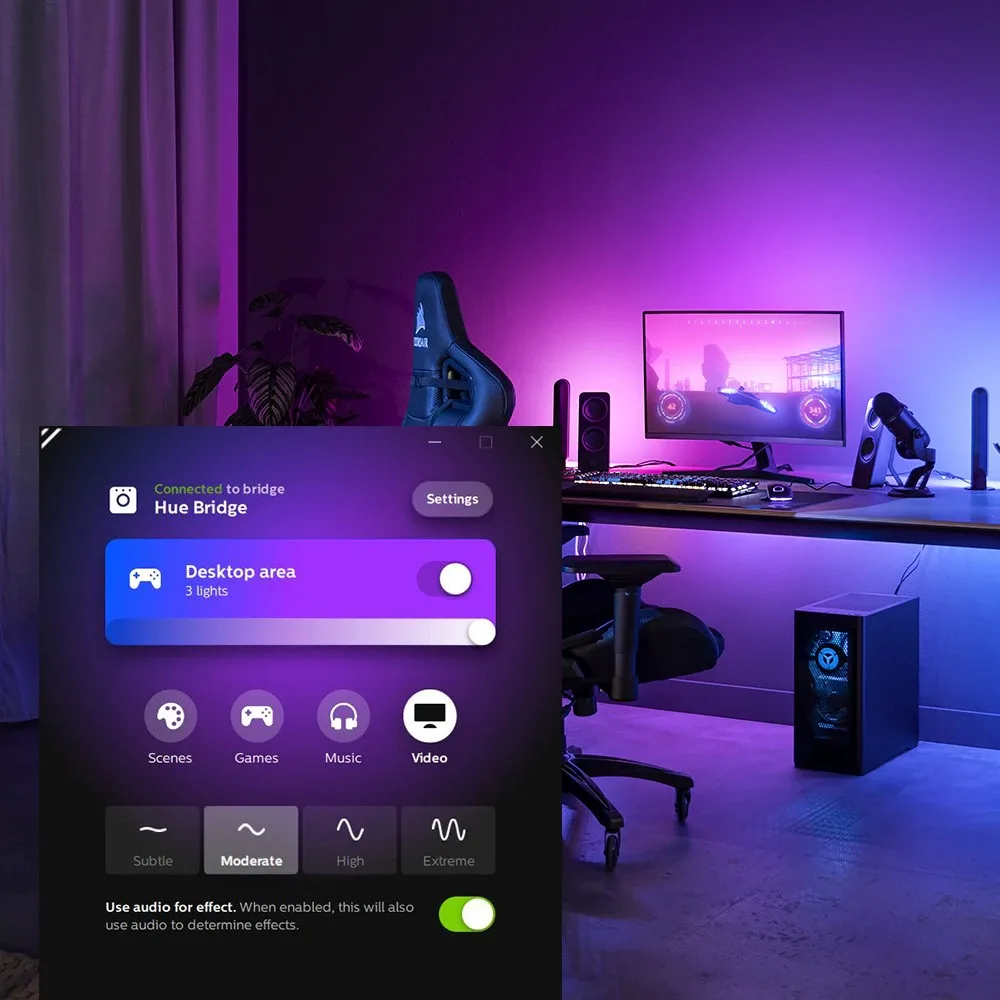
Hue Sync turns content on your Windows PC into changing colors on compatible Philips Hue lights. It is designed for a desk or entertainment area where lighting should follow games, music or video rather than stay at a fixed color. The desktop app provides separate media modes and controls for the intensity of the lighting response.
The publisher's setup starts with Hue color lighting and a Hue Bridge or Bridge Pro. Create an entertainment area in the mobile Philips Hue app so the system knows where the lights are positioned, then choose that area in the desktop app and start synchronization. The mobile app handles that setup step; this download is the separate Windows desktop application.
The software is free to download, but it does not replace the required lighting hardware and Bridge. It synchronizes content on the PC, not an unrelated console or streaming device. The publisher describes its Play HDMI sync box as a separate hardware approach for compatible HDMI-connected content. No installation, lighting performance or device compatibility was tested for this entry.
What it offers
- Synchronize compatible Hue color lights with content on the computer screen.
- Choose Games, Music or Video modes for different types of PC entertainment.
- Select a configured entertainment area from the desktop application.
- Adjust lighting intensity; the publisher's Windows UI image also shows an audio-for-effect control.
Good to know
- Requires compatible Philips Hue color lighting and a Hue Bridge or Bridge Pro; the free app alone cannot provide room lighting.
- Create the entertainment area in the mobile Philips Hue app before selecting it on the desktop.
- This desktop download targets PC content; console and other HDMI-source synchronization is a separate hardware workflow.
Product images
Sources
References used for this listing. Retrieval dates do not indicate hands-on testing.
More in utilities
View category ↗
1.1.1.1 with WARP 2026.8.2115.0
Encrypt traffic from your Mac to Cloudflare’s network with WARP, or use DNS-only mode for encrypted DNS queries to the 1.1.1.1 resolver.
1.1.1.1 with WARP 2026.8.2115.0
Encrypt traffic between your Windows PC and Cloudflare, or use encrypted DNS only, with the free 1.1.1.1 with WARP app.


3uTools 9.12.005
Manage iPhone and iPad photos, music, apps and backups from Windows with 3uTools, a free utility that also includes device checks and firmware flashing tools.