
Utilities Windows
Icon to Any
Convert Windows icons, cursors and Mac icons to PNG, JPEG and other formats with Icon to Any, a Windows conversion wizard available as a 30-day trial.
- Operating system
- Windows 95/98/ME/2000/NT/XP/2003/Vista/7/8/10, as listed by publisher
- Architecture
- Not specified by publisher
- Download package
- EXE installer
Publisher lists 12 MB of disk space. Windows 11 support is not stated. The installer was not downloaded or run.
Link checked · Download guidance
What is Icon to Any?
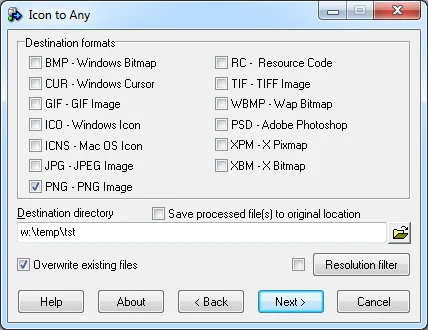
Icon to Any converts icon and cursor files into images for documents, websites or other graphics work. Aha-soft's Windows wizard accepts Windows icons, Windows cursors and Mac icons, with output choices including PNG, JPEG, BMP, GIF, TIFF and PSD, as well as ICO, ICNS and CUR. It also converts between Windows and Mac icon formats.
The wizard can process multiple files, resize icons and split an icon's embedded images into separate files grouped by size. The trial is limited to five files per conversion batch, displays a nag screen and lasts 30 days. The publisher lists Windows versions through Windows 10; it does not state Windows 11 support. Version 3.29 is dated March 23, 2019 in the publisher's history, so this listing does not imply a recent release.
What it offers
- Convert Windows icons, cursors and Mac icons into image formats including PNG, JPEG, BMP, GIF, TIFF and PSD.
- Convert between Windows ICO and Mac ICNS icon formats.
- Process multiple source files through a step-by-step conversion wizard.
- Resize icons and split embedded icon images into files grouped by size.
Good to know
- The 30-day trial displays a nag screen and converts no more than five files at once.
- The publisher lists Windows support through Windows 10 but does not state Windows 11 compatibility.
Product images
Sources
References used for this listing. Retrieval dates do not indicate hands-on testing.
- Icon to Any - Icon Converter ↗Retrieved
- Icon to Any - Screens ↗Retrieved
More in utilities
View category ↗
1.1.1.1 with WARP 2026.8.2115.0
Encrypt traffic from your Mac to Cloudflare’s network with WARP, or use DNS-only mode for encrypted DNS queries to the 1.1.1.1 resolver.
1.1.1.1 with WARP 2026.8.2115.0
Encrypt traffic between your Windows PC and Cloudflare, or use encrypted DNS only, with the free 1.1.1.1 with WARP app.


3uTools 9.12.005
Manage iPhone and iPad photos, music, apps and backups from Windows with 3uTools, a free utility that also includes device checks and firmware flashing tools.