
Utilities Windows
ImDisk Virtual Disk Driver
Mount image files or create memory-backed virtual drives with ImDisk for Windows. Includes a Control Panel applet and command-line tools, but its legacy volume design limits modern Windows integration.
- Operating system
- Windows; publisher does not recommend the legacy design for recent Windows versions.
- Architecture
- 32-bit and 64-bit Windows setup; ARM/ARM64 require manual setup.
- Download package
- EXE installer, version 2.1.2, packaged 11 May 2026.
Match OS, architecture and driver-signing requirements. Newer signed drivers do not load on x64 Windows Vista or Server 2008 under normal signature enforcement. AWEAlloc is separate.
Link checked · Download guidance
What is ImDisk Virtual Disk Driver?
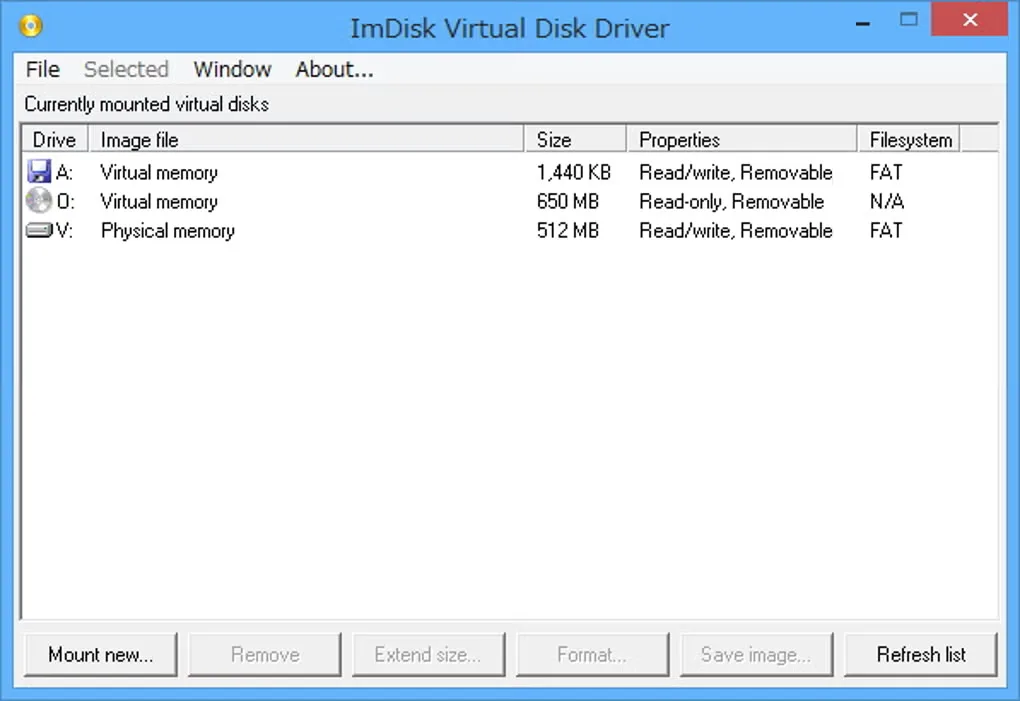
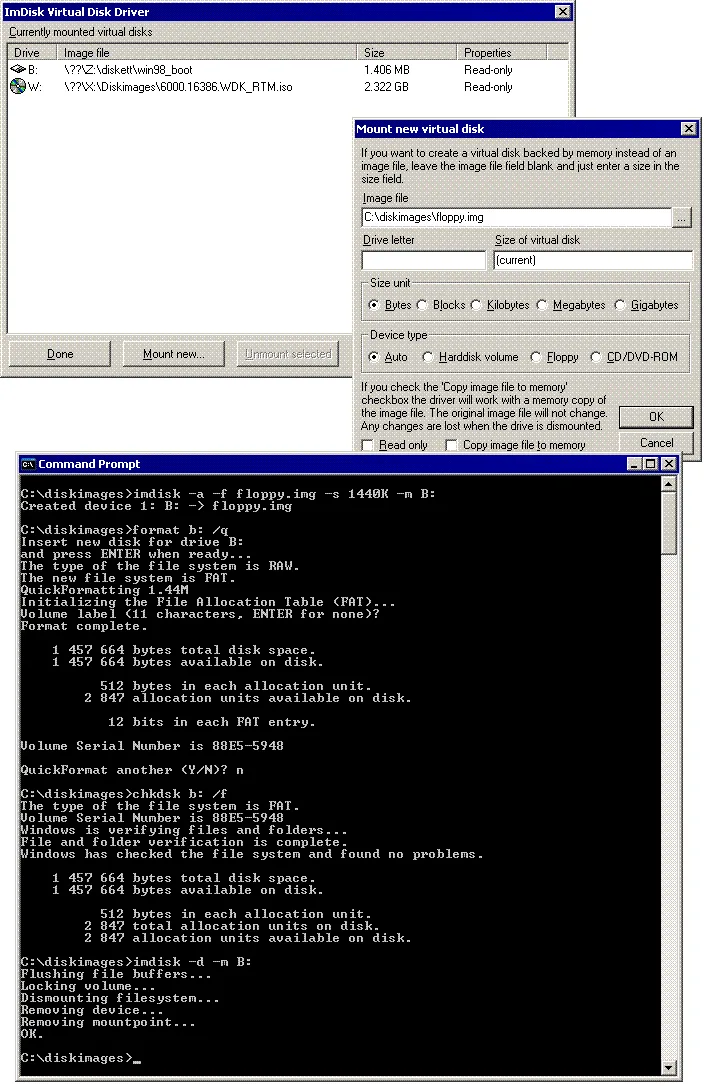
ImDisk Virtual Disk Driver turns image files or system memory into virtual hard disk volumes, floppy drives or CD/DVD drives. It is useful when an existing disk-image workflow needs a drive letter, or when an experienced user needs a memory-backed volume. The package includes the imdisk.exe console tool, a Control Panel applet and a Windows Explorer context-menu entry for mounting an image. It is not a command-line-only utility.
The important distinction is volume emulation rather than complete disk emulation. ImDisk receives maintenance fixes, but the publisher plans no new features and does not recommend its legacy design for recent Windows versions. Its drives cannot be managed through Disk Management or mountvol and do not support shadow copies. Applications that depend on those Windows disk interfaces may not work as expected. The publisher points users who need full disk integration toward Arsenal Image Mounter.
The selected download is the publisher’s 2.1.2 EXE setup package, packaged on 11 May 2026 for 32-bit and 64-bit Windows. This is not a promise that the current signed drivers load on every historical Windows release. ARM and ARM64 require manual setup. Physical-memory RAM disks also need the separate AWEAlloc driver, which is no longer bundled with ImDisk from the May 2026 release. The screenshots illustrate the interface and do not establish the installed version or current Windows compatibility.
What it offers
- Mount image files as virtual hard disk volumes, floppy drives or CD/DVD drives.
- Create memory-backed virtual drives; physical-memory mode requires the separate AWEAlloc driver.
- Manage virtual drives through the Control Panel applet or imdisk.exe command-line tool.
- Mount an image from its Windows Explorer context menu.
- Forward I/O to third-party image-format handlers or network services through supported proxy workflows.
Good to know
- Emulates volumes, not complete disks: Disk Management and mountvol cannot manage ImDisk drives, and shadow copies are unavailable.
- Maintenance fixes only; no new features are planned, and the publisher does not recommend this legacy design for recent Windows versions.
- AWEAlloc and DevIoDrv are no longer bundled from the May 2026 release; physical-memory RAM disks require a separately installed AWEAlloc driver.
- Driver-signing and OS compatibility vary by package; ARM/ARM64 require manual setup.
Installation and removal
The publisher advises saving setup packages in a new, empty directory rather than running them beside unrelated files. After installation, open the ImDisk Control Panel applet or enter imdisk without parameters to see command syntax. These are publisher instructions, not steps tested on this site.
Remove the driver, service and control program through Add/Remove Programs in Control Panel. The publisher says installation and removal normally avoid a reboot, but one can be required while components remain in use.
ImDisk Driver versus ImDisk Toolkit
ImDisk Toolkit is a separate package maintained by v77, not another name for this driver download. It adds a more modern interface, automatic memory-disk creation at startup and support for mounting additional image formats. The driver itself already has a Control Panel interface.
Choose based on the required integration rather than the screenshot’s appearance: the publisher recommends Arsenal Image Mounter when full disk emulation and integration with Disk Management, mountvol, diskpart or Volume Shadow Copy Services are required. No alternative was installed or compared here.
Product images
Sources
References used for this listing. Retrieval dates do not indicate hands-on testing.
More in utilities
View category ↗
1.1.1.1 with WARP 2026.8.2115.0
Encrypt traffic from your Mac to Cloudflare’s network with WARP, or use DNS-only mode for encrypted DNS queries to the 1.1.1.1 resolver.
1.1.1.1 with WARP 2026.8.2115.0
Encrypt traffic between your Windows PC and Cloudflare, or use encrypted DNS only, with the free 1.1.1.1 with WARP app.

3uTools 9.12.005
Manage iPhone and iPad photos, music, apps and backups from Windows with 3uTools, a free utility that also includes device checks and firmware flashing tools.