
Utilities Windows
iMyFone AnyTo for Windows
Change a connected iPhone or Android device's GPS location from Windows with iMyFone AnyTo. Choose map destinations, simulate routes or use joystick movement; full functionality requires a paid license.
- Operating system
- Windows 11, 10, 8 and 7, as listed by the publisher
- Architecture
- Publisher lists 32-bit or 64-bit CPUs; installer architecture not independently verified
- Download package
- EXE installer
Windows desktop edition controls a connected iOS or Android device. Device setup and supported connection methods vary by mode; consult the publisher's guide.
Link checked · Download guidance
What is iMyFone AnyTo?
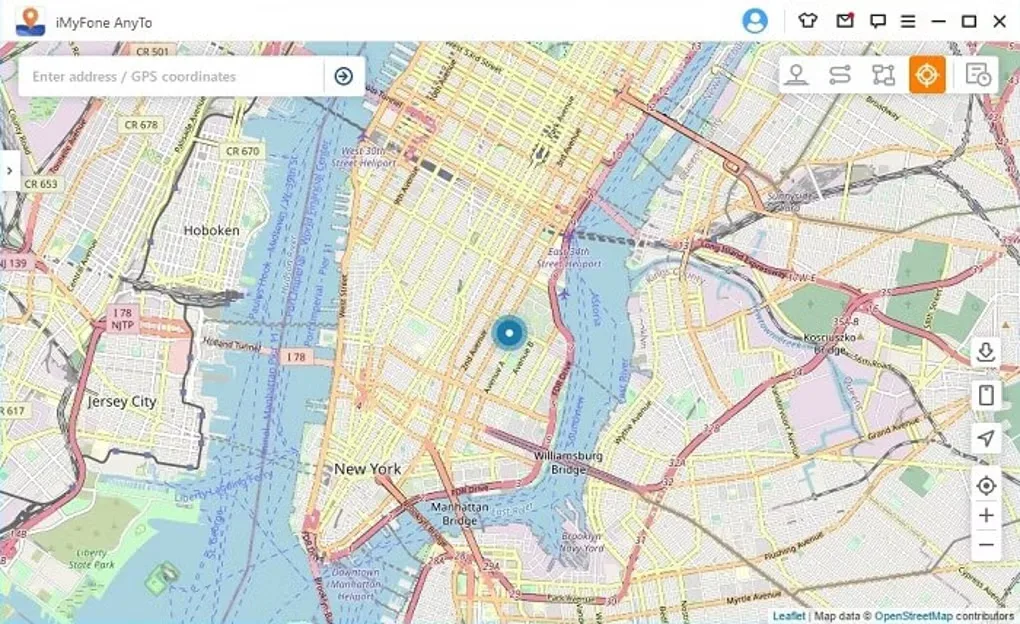
iMyFone AnyTo is a Windows desktop tool for changing the GPS location reported by a connected iOS or Android device. Its map lets you search for an address or coordinates, select a destination and simulate movement rather than physically follow a route. Teleport, two-spot, multi-spot and joystick modes cover different location-simulation tasks, while GPX import and export let you reuse routes.
The desktop edition needs a phone connection and device-side setup. The publisher's guide calls for a USB connection and a Trust This Computer confirmation for the first iOS connection, with same-network Wi-Fi available afterward. Android setup includes USB debugging; Universal Mode also uses a GPS Assistant mock-location app. Connection options and additional requirements vary by device and operating mode.
This is commercial software with a trial, not an unrestricted free utility. GPS spoofing may conflict with an app or game's usage policies. The publisher also warns that Android Gaming Mode can be unavailable during server maintenance or updates. Check the relevant app's rules and device-specific instructions before relying on a simulated location.
What it offers
- Select a destination on a map or search by address and GPS coordinates.
- Jump to a selected location with Teleport Mode.
- Simulate travel between two points or along a multi-stop route.
- Control simulated movement with a joystick and adjustable speed.
- Import and export GPX routes for reuse.
Good to know
- The trial does not include full functionality; a paid license is required for full access.
- Desktop use requires a connected mobile device and device-side permissions or setup; Android instructions include USB debugging and a mock-location helper.
- GPS spoofing may violate the usage policies of some apps or games.
- The publisher says Android Gaming Mode may be unavailable during server maintenance or updates.
Product images
Sources
References used for this listing. Retrieval dates do not indicate hands-on testing.
More in utilities
View category ↗
1.1.1.1 with WARP 2026.8.2115.0
Encrypt traffic from your Mac to Cloudflare’s network with WARP, or use DNS-only mode for encrypted DNS queries to the 1.1.1.1 resolver.
1.1.1.1 with WARP 2026.8.2115.0
Encrypt traffic between your Windows PC and Cloudflare, or use encrypted DNS only, with the free 1.1.1.1 with WARP app.

3uTools 9.12.005
Manage iPhone and iPad photos, music, apps and backups from Windows with 3uTools, a free utility that also includes device checks and firmware flashing tools.