
Development Windows
Incus
Manage containers and virtual machines on a remote Linux server from Windows with the free Incus command-line client. The Windows package is not a container or VM host.
- Operating system
- Windows; exact minimum version not established by reviewed official documentation
- Architecture
- x64 (x86_64)
- Download package
- MSI installer for the Incus command-line client
Requires an Incus server running on Linux for remote workloads. Separate ARM64 client builds are available; this link is the x64 MSI.
Link checked · Download guidance
What is Incus?
Incus for Windows is the command-line client for an Incus server. It suits administrators and developers who work on Windows but keep their containers and virtual machines on Linux infrastructure. The server handles the instances; the Windows client sends management commands through the remote API.
Connect to an existing server before expecting to manage workloads. The server administrator must configure network access and authorize your client, for example with a TLS trust token. Installing the Windows package alone does not create a Linux host, enable local containers or install a desktop hypervisor.
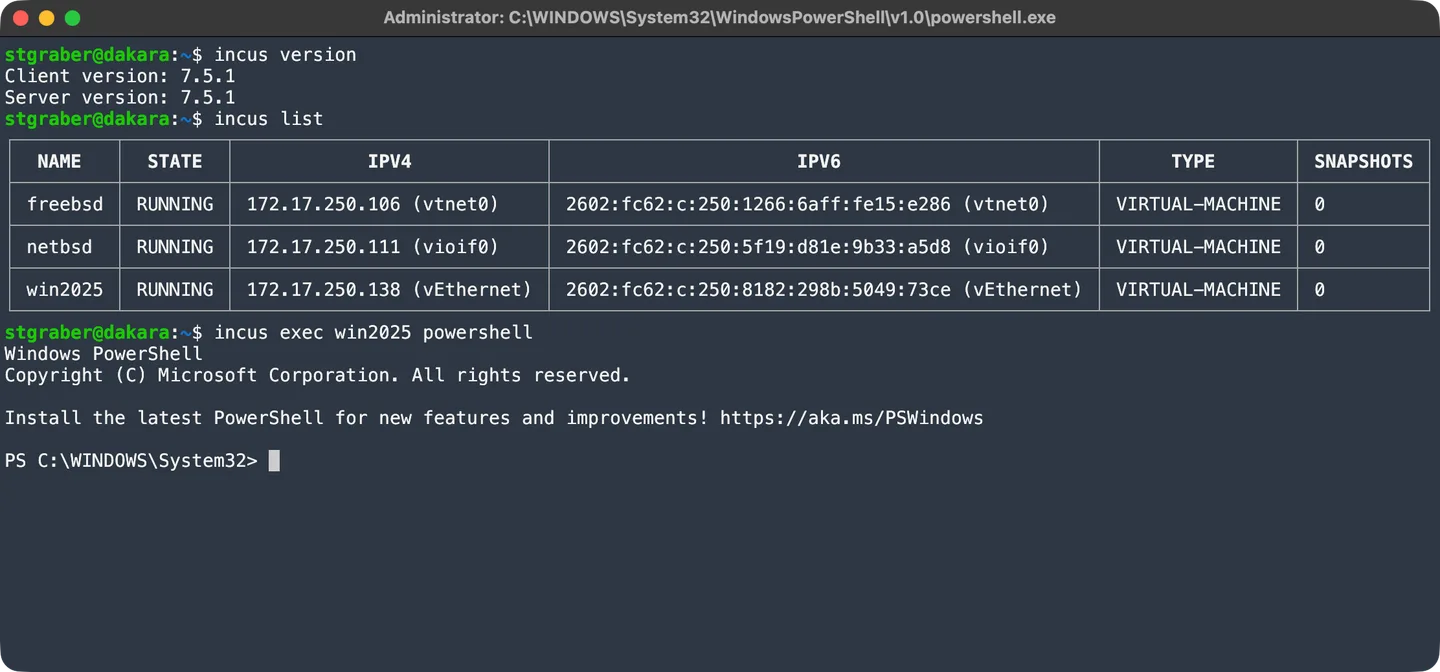
This entry links to the official 7.6.0 Windows x64 MSI. The project also documents Winget and Chocolatey installation and offers separate ARM64 client builds. The screenshot is the publisher’s 7.5.1 terminal demonstration: it shows version information, a VM list and a PowerShell session inside a Windows guest, not a native Windows server daemon.
What it offers
- Manage a remote Incus environment from the Windows command line.
- Use the same Incus management interface for containers and virtual machines hosted by a Linux server.
- Connect to authorized remote servers using the documented TLS certificate and trust-token workflow.
- Obtain the Windows client as an official x64 MSI; separate ARM64 builds and package-manager installation are also available.
Good to know
- The Incus daemon runs only on Linux. This Windows download contains the client, not a local container or virtual-machine host.
- Remote management requires a reachable, configured Incus server and client authorization; the default server configuration is not network-accessible.
- The reviewed official installation documentation does not specify an exact minimum Windows version for this MSI. No installation or workload test was performed.
Product images
Sources
References used for this listing. Retrieval dates do not indicate hands-on testing.
- Incus - Download ↗Retrieved
- Incus — official repository ↗Retrieved
- How to install Incus — official documentation ↗Retrieved
- Official Incus 7.6.0 release metadata ↗Retrieved
- How to expose Incus to the network ↗Retrieved
- Incus 7.5 release announcement — publisher screenshot ↗Retrieved
- Linux Containers Forum — media rights terms ↗Retrieved
More in development
View category ↗
010 Editor 17.0
Inspect and edit binary files on Mac with 010 Editor, a paid text and hex editor with Binary Templates, file comparison and a 30-day trial.
010 Editor 17.0
Inspect and edit binary files with 010 Editor for Windows, a text and hex editor with Binary Templates, file comparison and scripting. Includes a 30-day trial.
10x Editor
Edit and navigate C++ projects on Windows with a built-in parser, workspace search and Visual Studio project support. A paid license is required after the 30-day trial.