
Utilities Windows
InFile Seeker
Find words and phrases inside text and source-code files with InFile Seeker, a free Windows utility with extension filters and highlighted result previews.
- Operating system
- Windows XP, Vista, 7, 8, 8.1, 10 and 11 listed by publisher
- Architecture
- 32-bit and 64-bit Windows, as listed by publisher
- Download package
- EXE installer
.NET Framework 2.0 or newer required. Publisher lists testing on XP through Windows 10 and explicitly marks Windows 11 untested. No independent installation test performed.
Link checked · Download guidance
What is InFile Seeker?
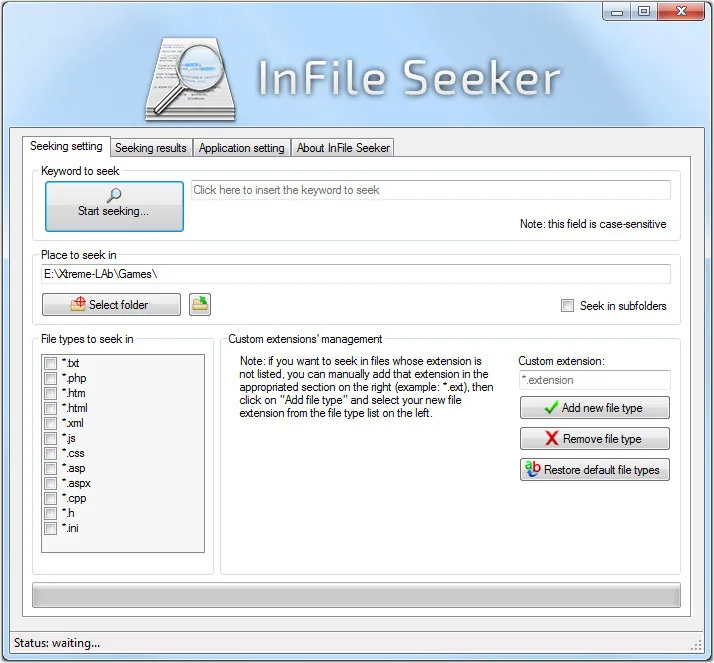
InFile Seeker searches the contents of text-based files in a chosen folder, with an option to include subfolders. It is useful when you remember a word or code fragment but not which file contains it: choose the folder, select the file extensions to include and enter the string to find. The built-in extension list covers formats such as TXT, CPP, PHP, HTM and XML; custom extensions can be added for other text-based files.
Matching files appear in a separate results tab. Select a file to preview its text with the matches highlighted, or open it in an external application. The publisher lists English and Italian interfaces and describes the software as free.
The listed release is 1.8.0.200, dated 18 January 2016, and it requires .NET Framework 2.0 or newer. Although the publisher includes Windows 11 in its platform list, it explicitly marks Windows 11 as untested. Treat that listing as a publisher claim rather than verified modern-Windows compatibility; this entry does not claim an installation or performance test.
What it offers
- Search for words, phrases or strings inside text-based files in a selected folder and optional subfolders.
- Filter the search by built-in file extensions or add custom extensions.
- Browse matching files in a results tab with highlighted text previews.
- Open a result with its default application, Notepad or a custom application.
- Use an English or Italian interface.
Good to know
- Windows 11 is listed by the publisher but explicitly marked untested.
- The listed release dates to January 2016 and requires .NET Framework 2.0 or newer.
- The documented search targets text-based files; the cited sources do not establish support for searching PDF or Office document contents.
Product images
Sources
References used for this listing. Retrieval dates do not indicate hands-on testing.
More in utilities
View category ↗
1.1.1.1 with WARP 2026.8.2115.0
Encrypt traffic from your Mac to Cloudflare’s network with WARP, or use DNS-only mode for encrypted DNS queries to the 1.1.1.1 resolver.
1.1.1.1 with WARP 2026.8.2115.0
Encrypt traffic between your Windows PC and Cloudflare, or use encrypted DNS only, with the free 1.1.1.1 with WARP app.


3uTools 9.12.005
Manage iPhone and iPad photos, music, apps and backups from Windows with 3uTools, a free utility that also includes device checks and firmware flashing tools.