
Utilities Windows
InSpectre
Inspect Windows Meltdown and Spectre protection status with InSpectre, GRC's free utility for explaining operating-system and CPU mitigation support.
- Operating system
- Windows; publisher claims all versions, without a current build-specific support matrix
- Architecture
- 32-bit application; publisher documents an additional 64-bit probe
- Download package
- EXE executable
GRC also mentions WINE. No independent Windows-build, ARM or WINE compatibility testing was performed; this entry is for Windows.
Link checked · Download guidance
What is InSpectre?
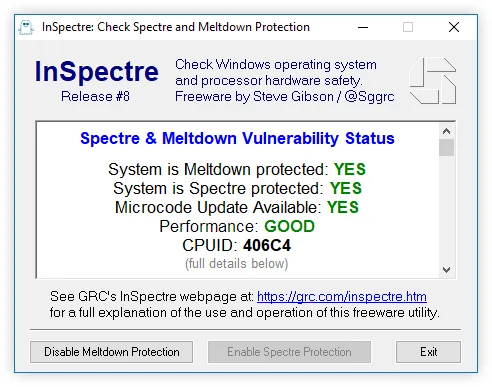
InSpectre explains a Windows PC's protection against the Meltdown and Spectre vulnerabilities disclosed in 2018. Its summary reports protection status, processor CPUID, Intel microcode-update availability and a performance assessment, with explanatory text below. Use it to understand which parts of the operating system and processor firmware contribute to those mitigations, rather than treating a single status label as a complete security audit.
The system menu exposes raw technical details and clipboard copying. A silent probe mode returns a status bitmask for scripts instead of showing the window. Protection controls are available only where the system already supports the relevant mitigation: InSpectre cannot supply missing Windows or firmware updates. Disabling a mitigation removes that protection; the controls are not a repair for an unpatched PC. Release #8 uses a 2018 Intel microcode list, so its results should not be presented as comprehensive coverage of later processor vulnerabilities or independently verified compatibility with current Windows builds.
What it offers
- Summarize Meltdown and Spectre protection status with explanatory text.
- Display processor CPUID and Intel microcode availability from the list incorporated in Release #8.
- Open raw technical data through the system menu's Show Technical Details option.
- Copy selected results or the full textual report to the clipboard.
- Run with the probe argument to return a status bitmask without displaying the application window.
Good to know
- Release #8's Intel microcode reference is based on 2018 information, not a comprehensive check for later CPU vulnerabilities.
- The utility cannot replace missing operating-system or firmware updates; protection buttons may be unavailable when the underlying system cannot support the change.
- Disabling Meltdown or Spectre mitigation removes that protection. The publisher's broad Windows claim is not independent verification of current builds.
Product images
Sources
References used for this listing. Retrieval dates do not indicate hands-on testing.
More in utilities
View category ↗
1.1.1.1 with WARP 2026.8.2115.0
Encrypt traffic from your Mac to Cloudflare’s network with WARP, or use DNS-only mode for encrypted DNS queries to the 1.1.1.1 resolver.
1.1.1.1 with WARP 2026.8.2115.0
Encrypt traffic between your Windows PC and Cloudflare, or use encrypted DNS only, with the free 1.1.1.1 with WARP app.


3uTools 9.12.005
Manage iPhone and iPad photos, music, apps and backups from Windows with 3uTools, a free utility that also includes device checks and firmware flashing tools.