
Utilities Windows
Interactive Calendar
Display appointments on your Windows desktop wallpaper with Interactive Calendar, a free calendar and day planner with customizable cells and printable schedules.
- Operating system
- Windows Vista, 7, 8.x, 10 and 11
- Architecture
- 32-bit or 64-bit Windows, as listed by the publisher
- Download package
- EXE installer
Publisher lists one Interactive Calendar installer for these systems; native executable architecture was not inspected.
Link checked · Download guidance
What is Interactive Calendar?
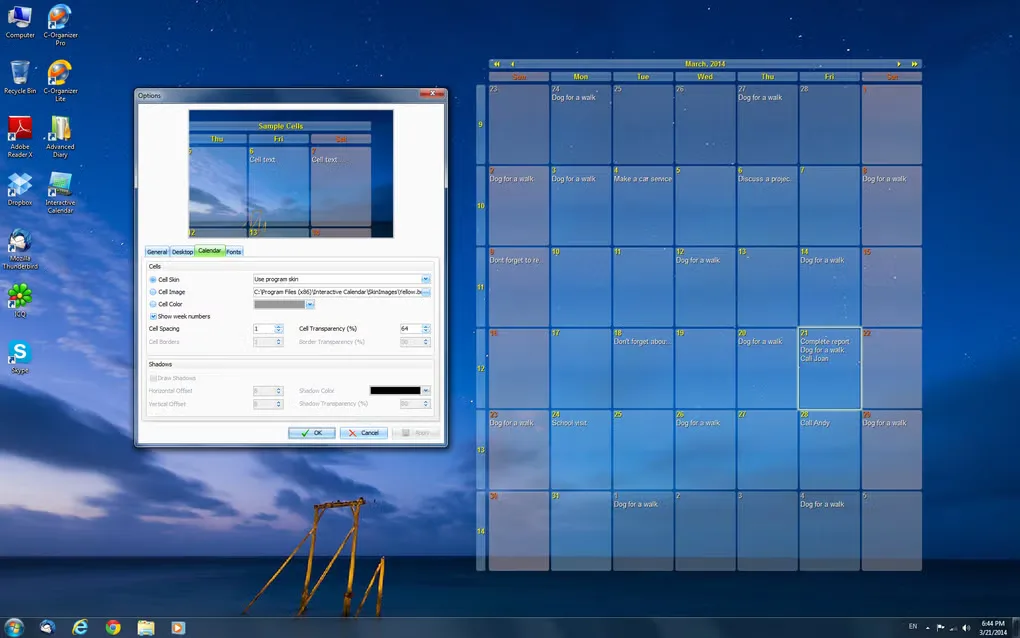
Interactive Calendar puts a monthly calendar and scheduled appointments directly on your Windows desktop wallpaper. It is designed for keeping a personal schedule visible while using your PC, with clickable calendar cells and a separate planner window for organizing entries. You can adjust the calendar's position, size, colors, transparency and fonts to suit the background.
Beyond the desktop view, CSoftLab lists recurring entries, progress tracking, database search, rich-text descriptions and a built-in wallpaper changer. Printing templates support reports and wall calendars, while import, export and backup tools provide ways to move or preserve your information.
This is a desktop planner rather than a synchronized calendar service: Softonic's product review reports no synchronization with other calendars and no alarm support. If those are essential to your workflow, do not assume that displaying an appointment on the wallpaper provides a timed notification. The publisher lists version 2.2 for Windows Vista through Windows 11; the linked package is its EXE installer.
What it offers
- Show a monthly calendar and appointments on desktop wallpaper, with cells that respond to mouse clicks.
- Customize calendar placement, cell size, transparency, fonts and colors; choose the display on a dual-monitor setup.
- Organize recurring entries with progress tracking, searchable records and rich-text descriptions.
- Print reports or wall calendars using templates, and import, export, back up or restore calendar data.
- Rotate selected desktop backgrounds at a configured interval with the built-in wallpaper changer.
Good to know
- Softonic's review reports no synchronization with other calendars and no alarm support; do not rely on this planner for synced schedules or timed alerts.
Product images
Sources
References used for this listing. Retrieval dates do not indicate hands-on testing.
- Download products - C-Organizer, Advanced Diary, Interactive Calendar | CSoftLab ↗Retrieved
- Interactive Calendar - free desktop calendar software and day planner | CSoftLab ↗Retrieved
- Interactive Calendar software - Features | CSoftLab ↗Retrieved
- Interactive Calendar - Download ↗Retrieved
- Interactive Calendar software - Screenshots | CSoftLab ↗Retrieved
- Press Kit | CSoftLab ↗Retrieved
More in utilities
View category ↗
1.1.1.1 with WARP 2026.8.2115.0
Encrypt traffic from your Mac to Cloudflare’s network with WARP, or use DNS-only mode for encrypted DNS queries to the 1.1.1.1 resolver.
1.1.1.1 with WARP 2026.8.2115.0
Encrypt traffic between your Windows PC and Cloudflare, or use encrypted DNS only, with the free 1.1.1.1 with WARP app.

3uTools 9.12.005
Manage iPhone and iPad photos, music, apps and backups from Windows with 3uTools, a free utility that also includes device checks and firmware flashing tools.