
Utilities Windows
Internet Check
Log internet outages on Windows with Internet Check, a free, open-source utility that checks connections at a chosen interval and can monitor custom servers.
Version 1.6.4 · Direct publisher file
Link checked · Download guidance
What is Internet Check?
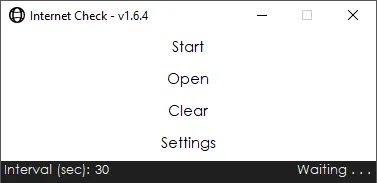
Internet Check records when a Windows computer loses its internet connection. Choose a checking interval, press Start to collect data and use Open to view the results. By default, the log records offline periods rather than every successful check; a setting can include both successful and unsuccessful results. This makes it useful for keeping a connection-outage history, not for measuring download speed.
For a specific host, enable Use Custom Servers and add its IP address in Edit Servers. The publisher instructs users to enter IP addresses, not domain names, and save both the server list and settings. Optional double-check methods can retry a server or compare a custom host with Google's server. A failed check is not conclusive evidence of an ISP outage: routers or hosts can block the ping protocol, and the project documents an alternative checking method for that case.
The Windows interface offers dark mode, system-tray operation and an optional Start with Windows task. The publisher lists .NET Framework 4.7.2 as a requirement. The linked package is the 1.6.4 MSI release dated May 24, 2021; compatibility with current Windows releases has not been independently verified. Internet Check does not measure latency or packet-loss statistics. Back up connection_issues.txt before updating: the 1.6.4 release notes warn that recorded pings and advanced settings are lost during an update. Clearing results is also irreversible.
What it offers
- Check connection availability at a user-selected interval and log offline time.
- View collected results through Open; optionally log successful checks as well as failures.
- Monitor custom server IP addresses with configurable double-check behavior.
- Use dark mode, minimize to the system tray or configure startup through Windows Task Scheduler.
Good to know
- Does not measure latency, packet-loss statistics or download speed; it is a connection-availability logger.
- Blocked ping traffic can produce apparent outages even while other internet access works; the publisher documents an alternative checking method.
- The 1.6.4 release notes warn that updates lose recorded pings and advanced settings. Back up connection_issues.txt first; clearing results cannot be undone.
- The selected release dates from 2021. Current Windows compatibility and installer execution have not been independently tested.
Product images
Sources
References used for this listing. Retrieval dates do not indicate hands-on testing.
More in utilities
View category ↗
1.1.1.1 with WARP 2026.8.2115.0
Encrypt traffic from your Mac to Cloudflare’s network with WARP, or use DNS-only mode for encrypted DNS queries to the 1.1.1.1 resolver.
1.1.1.1 with WARP 2026.8.2115.0
Encrypt traffic between your Windows PC and Cloudflare, or use encrypted DNS only, with the free 1.1.1.1 with WARP app.


3uTools 9.12.005
Manage iPhone and iPad photos, music, apps and backups from Windows with 3uTools, a free utility that also includes device checks and firmware flashing tools.