
Utilities Windows
Invisible Man XRay
Manage Xray-core proxy configurations through a free Windows GUI. This entry links to the x64 ZIP; you need a working server configuration to use it.
- Operating system
- Windows; Softonic lists Windows 11
- Architecture
- x64
- Download package
- ZIP archive
Selected package: InvisibleManXRay-x64.zip, release 3.2.5. Separate x86 ZIP available. Exact minimum Windows build and packaged runtime requirements are not established by the retained sources.
Link checked · Download guidance
What is Invisible Man XRay?
Invisible Man XRay is a graphical client for Xray-core, rather than a separate proxy server service. It provides a Windows interface for configuring proxies and switching between configured server locations. Choose it when you want to manage an Xray setup through a desktop window instead of working only with the core.
The publisher's release history documents subscription links, configuration sharing through QR codes, system-proxy controls and TUN mode. Version 3.2.5 adds automatic connection and hiding the window at startup. These are publisher-documented capabilities, not results of hands-on connection tests.
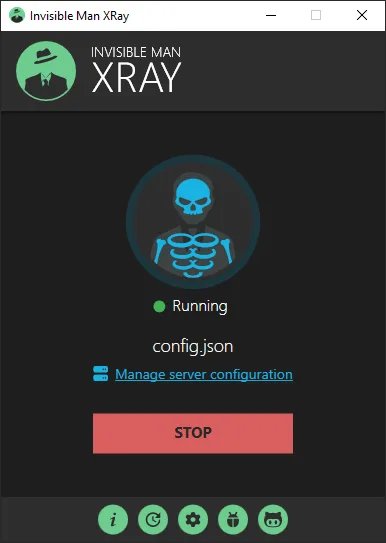
The selected download is InvisibleManXRay-x64.zip from the publisher's v3.2.5 release; a separate x86 ZIP is also listed. A usable proxy/server configuration remains necessary: installing a client alone does not establish a working remote connection. The supplied publisher screenshot shows the main window with a configuration file, a Manage server configuration link and a Stop button. Its Running indicator is not independent proof of internet connectivity.
Release 3.2.5 dates from February 2, 2025, and its notes identify Xray-core v25.1.30. Do not assume that this package contains the current upstream core. Softonic lists Windows 11, but the sources retained here do not establish an exact minimum Windows build for this release.
What it offers
- Configure and manage Xray-core proxies through a graphical Windows client.
- Switch between configured server locations.
- Import subscription links and share configurations through QR codes, as documented in the release history.
- Use publisher-documented system-proxy controls and TUN mode.
- Set automatic connection and hide the window at startup in version 3.2.5.
Good to know
- Requires a usable proxy/server configuration; this client is not a bundled remote VPN service.
- Version 3.2.5 lists Xray-core v25.1.30; the download must not be assumed to include the current upstream core.
- Exact minimum Windows build and runtime requirements for the packaged release are not established here.
Product images
Sources
References used for this listing. Retrieval dates do not indicate hands-on testing.
- Invisible Man XRay - Download ↗Retrieved
- Invisible Man - XRay Client — publisher README (retained discovery evidence) ↗Retrieved
- Invisible Man XRay — publisher release history (retained discovery evidence) ↗Retrieved
- Publisher release metadata — InvisibleMan-XRay v3.2.5 ↗Retrieved
- Invisible Man XRay — MIT License ↗Retrieved
More in utilities
View category ↗
1.1.1.1 with WARP 2026.8.2115.0
Encrypt traffic from your Mac to Cloudflare’s network with WARP, or use DNS-only mode for encrypted DNS queries to the 1.1.1.1 resolver.
1.1.1.1 with WARP 2026.8.2115.0
Encrypt traffic between your Windows PC and Cloudflare, or use encrypted DNS only, with the free 1.1.1.1 with WARP app.

3uTools 9.12.005
Manage iPhone and iPad photos, music, apps and backups from Windows with 3uTools, a free utility that also includes device checks and firmware flashing tools.