

Utilities Windows
IPVanish for Windows
Connect a Windows PC to IPVanish's subscription VPN, choose a server location and use WireGuard, OpenVPN or IKEv2 connections.
- Operating system
- Windows 10 and Windows 11
- Architecture
- Not specified for the selected standard installer
- Download package
- EXE installer
The publisher lists an ARM64 beta separately. This link is the standard Windows installer, not that beta.
Link checked · Download guidance
What is IPVanish?
IPVanish is a VPN client for Windows 10 and 11. It routes your internet connection through a VPN server to encrypt traffic and replace the IP address websites see. You can connect using the default location or choose a country and city from the server list. The Windows app supports WireGuard, OpenVPN and IKEv2.
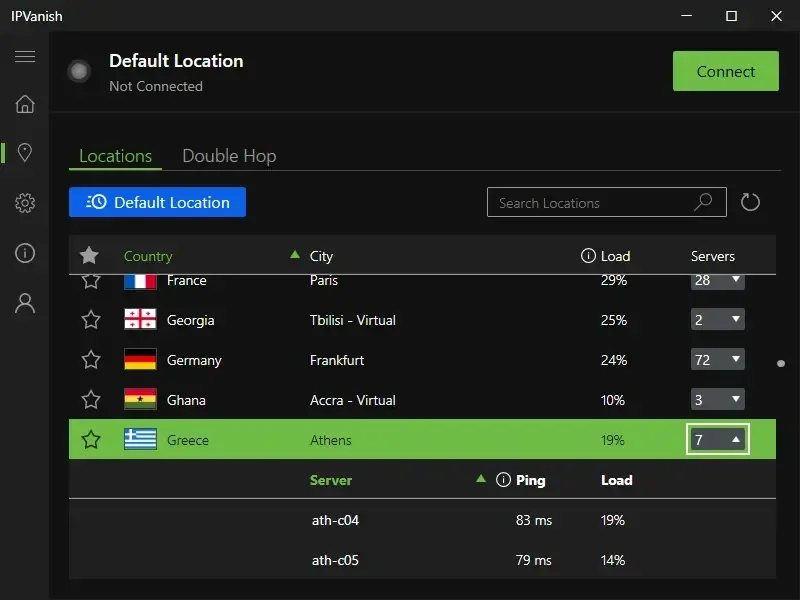
The publisher lists automatic connections at startup or on untrusted networks, a customizable kill switch and Double Hop routing through two VPN servers. These are documented features, not independently tested performance or privacy guarantees. The screenshot shows the publisher's Windows Locations interface; its server loads and ping values are illustrative, not live measurements.
Using the VPN requires an IPVanish account and a paid plan. Secure Browser is an Advanced-plan feature, not an entitlement included with every subscription. The download here is the publisher's standard EXE installer; its Windows page lists a separate ARM64 beta for CoPilot+ PCs.
What it offers
- Connect to the default VPN location or choose a server location manually.
- Use WireGuard, OpenVPN or IKEv2 on Windows.
- Configure automatic connections at startup or when an untrusted network is detected.
- Use the publisher-documented customizable kill switch and Double Hop routing.
Good to know
- An IPVanish account and paid subscription are required to use the VPN.
- Secure Browser requires the Advanced plan.
- The publisher offers ARM64 support through a separately linked beta, not the standard installer selected here.
Product images
Sources
References used for this listing. Retrieval dates do not indicate hands-on testing.
More in utilities
View category ↗
1.1.1.1 with WARP 2026.8.2115.0
Encrypt traffic from your Mac to Cloudflare’s network with WARP, or use DNS-only mode for encrypted DNS queries to the 1.1.1.1 resolver.
1.1.1.1 with WARP 2026.8.2115.0
Encrypt traffic between your Windows PC and Cloudflare, or use encrypted DNS only, with the free 1.1.1.1 with WARP app.


3uTools 9.12.005
Manage iPhone and iPad photos, music, apps and backups from Windows with 3uTools, a free utility that also includes device checks and firmware flashing tools.