
Utilities Windows
iSlide Tools
Format presentation text, arrange objects and insert templates with iSlide Tools, a PowerPoint and WPS add-in for Windows. Free access is available, with paid membership for additional resources and allowances.
- Operating system
- Publisher lists Windows 7 minimum; Windows 8/8.1/10 or later recommended.
- Architecture
- 32-bit and 64-bit Windows/Office environments listed; selected installer CPU target not specified.
- Download package
- EXE installer
Requires supported PowerPoint or WPS. Office 2010/2013 minimum; Office 2016 or later recommended, preferably 32-bit Office. No installation or runtime compatibility test performed.
Link checked · Download guidance
What is iSlide Tools?
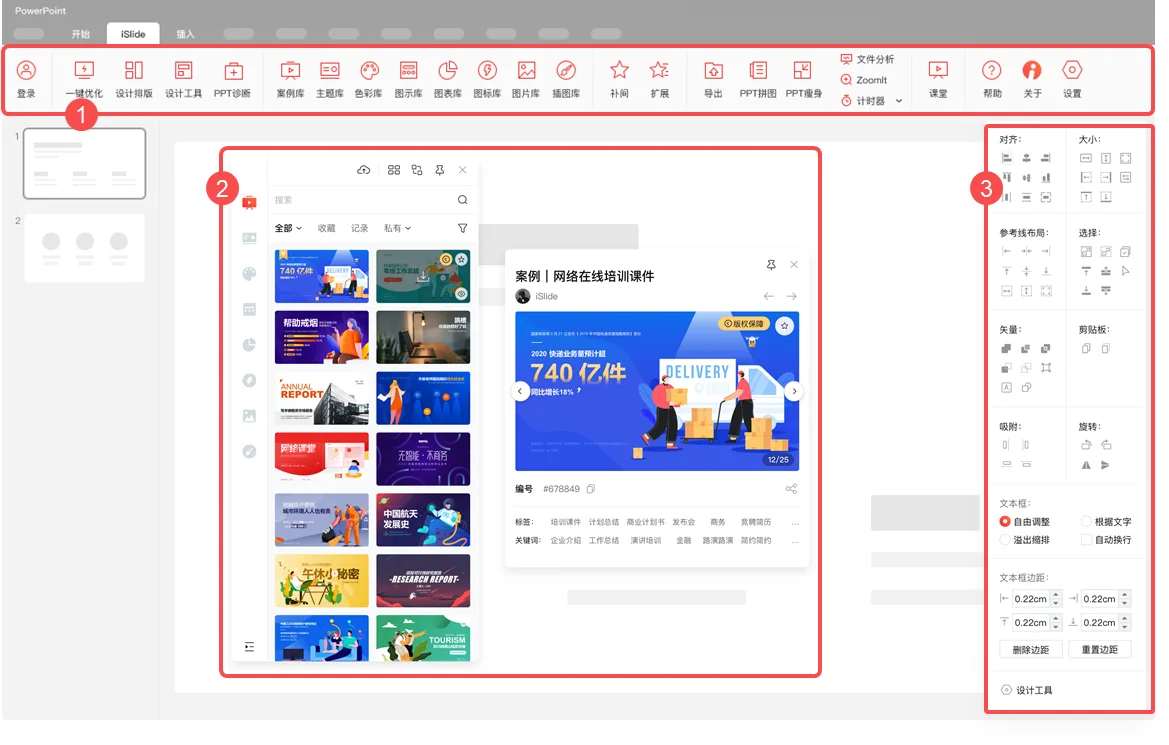
iSlide Tools adds presentation-design controls to the PowerPoint or WPS interface rather than replacing your presentation editor. It is useful when a deck needs consistent typography, evenly arranged objects or reusable visual material. Its toolbar opens formatting commands, a resource-library window and a design-tools sidebar, keeping those tasks alongside the slides you are editing.
For a formatting pass, the documented tools can standardize fonts, paragraph spacing and theme colors. Matrix and circular layouts arrange repeated shapes, while image-cropping tools make a group of pictures consistent in size and proportions. Online libraries provide templates, diagrams, charts, icons, pictures and illustrations that can be inserted into a presentation. The publisher describes the desktop design aids as usable offline; that is distinct from browsing its online libraries.
Check your office suite before installing. The publisher lists Windows 7 or later and 32-bit or 64-bit environments, with Microsoft Office 2010/2013 as its minimum and Office 2016 or later recommended. Office 2010 can have compatibility problems, and both Office 2010 and WPS lack some functions. This is an add-in for an existing supported office suite, not a standalone replacement for PowerPoint.
The publisher offers free use after installation and account login, but its membership comparison limits ordinary-user resource access and AI allowances. Paid personal and enterprise plans expand those entitlements; free download does not mean every template or service is unrestricted. The screenshot below is the publisher’s historical Windows interface illustration, not a capture of the current installer running.
What it offers
- Standardize presentation fonts, paragraph spacing and theme colors.
- Arrange shapes in matrix or circular layouts and crop multiple images consistently.
- Insert templates, diagrams, charts, icons and other assets from online libraries.
- Access tools through the PowerPoint/WPS toolbar, resource window and design sidebar.
Good to know
- Requires a supported PowerPoint or WPS installation; it is not a standalone presentation editor.
- Office 2010 may have compatibility instability, and Office 2010 and WPS do not support every feature.
- Ordinary-user accounts have limited resource access and AI allowances; additional entitlements require paid membership.
Product images
Sources
References used for this listing. Retrieval dates do not indicate hands-on testing.
- iSlide Tools - Download — third-party listing ↗Retrieved
- iSlide client downloads — official platform comparison ↗Retrieved
- iSlide official product overview ↗Retrieved
- iSlide official operating-system and Office requirements ↗Retrieved
- iSlide official interface guide — Windows illustration ↗Retrieved
- iSlide official installation and login guide ↗Retrieved
- iSlide official membership comparison ↗Retrieved
- iSlide official copyright statement ↗Retrieved
- iSlide official static download configuration ↗Retrieved
More in utilities
View category ↗
1.1.1.1 with WARP 2026.8.2115.0
Encrypt traffic from your Mac to Cloudflare’s network with WARP, or use DNS-only mode for encrypted DNS queries to the 1.1.1.1 resolver.
1.1.1.1 with WARP 2026.8.2115.0
Encrypt traffic between your Windows PC and Cloudflare, or use encrypted DNS only, with the free 1.1.1.1 with WARP app.


3uTools 9.12.005
Manage iPhone and iPad photos, music, apps and backups from Windows with 3uTools, a free utility that also includes device checks and firmware flashing tools.