
Utilities Windows
iTunes Backup Explorer
Browse, search and export files from iPhone and iPad backups with this free, open-source Windows utility. It also supports replacing files in encrypted and unencrypted backups.
- Operating system
- Windows; Softonic lists Windows 11
- Architecture
- x64 (64-bit)
- Download package
- MSI installer with bundled Java runtime
The publisher does not specify a minimum Windows version in the read sources. Default installation is per-user without administrator privileges; older JAR instructions apply to releases before 1.7.
Link checked · Download guidance
What is iTunes Backup Explorer?
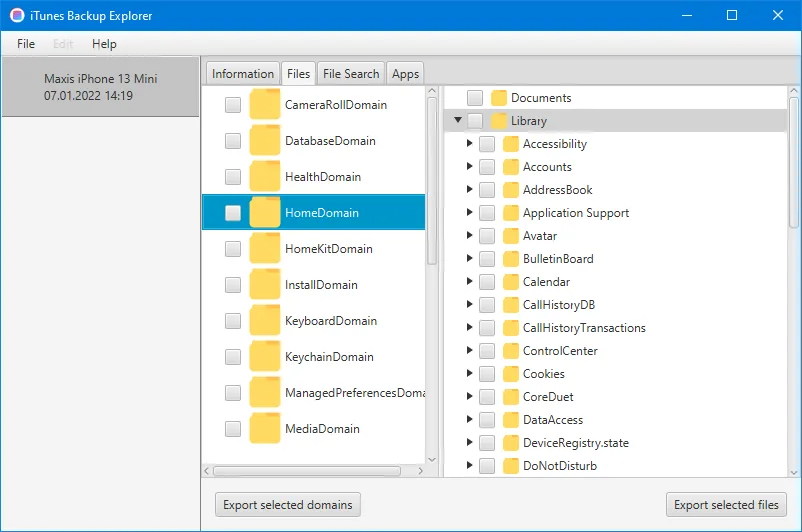
iTunes Backup Explorer opens iPhone and iPad backups as a browsable file hierarchy. It is useful when you need individual files rather than a whole-device restore: select a backup domain, inspect its folders, and export selected files or domains. The publisher documents support for encrypted and unencrypted backups from iOS 10.2 onwards.
The File Search tab filters by domain and relative path using case-insensitive SQLite LIKE patterns. For example, CameraRollDomain with Media/DCIM/% finds files beneath the camera-roll DCIM folder; using % as the domain and %.sqlite as the path finds SQLite database files. Results can be sorted by column, and Export matching saves the files returned by a query.
This download is the version 1.7 Windows x64 MSI, which bundles the required Java runtime. The publisher says its default installation is per-user and does not require administrator privileges. This is a backup-file utility, not the iTunes media player. Its documented backup support begins at iOS 10.2, and the selected installer is not a native Windows ARM64 or 32-bit build. Replacing or deleting files changes the backup; keep an untouched copy before using those editing actions.
What it offers
- Browse backup domains and folders in a hierarchical Files view.
- Show, extract and replace files in encrypted and unencrypted iPhone and iPad backups.
- Search domains and relative paths with SQLite LIKE wildcards, then sort the results.
- Export selected files, selected domains or all files matching a search.
- Install the Windows x64 package with its Java runtime included.
Good to know
- The publisher documents backup-format support from iOS 10.2 onwards, not older iOS backups.
- This linked MSI is for Windows x64; the release does not list a separate Windows x86 or ARM64 installer.
- Replace and delete actions modify backup contents. Keep an untouched copy before editing.
Product images
Sources
References used for this listing. Retrieval dates do not indicate hands-on testing.
More in utilities
View category ↗
1.1.1.1 with WARP 2026.8.2115.0
Encrypt traffic from your Mac to Cloudflare’s network with WARP, or use DNS-only mode for encrypted DNS queries to the 1.1.1.1 resolver.
1.1.1.1 with WARP 2026.8.2115.0
Encrypt traffic between your Windows PC and Cloudflare, or use encrypted DNS only, with the free 1.1.1.1 with WARP app.


3uTools 9.12.005
Manage iPhone and iPad photos, music, apps and backups from Windows with 3uTools, a free utility that also includes device checks and firmware flashing tools.