
Utilities macOS
JDiskReport
See which files and folders occupy disk space with JDiskReport, a free Java-based analyzer. This legacy Mac OS X package is version 1.4.1 and requires Java 7 or 8.
- Operating system
- Mac OS X; exact supported OS versions unspecified
- Architecture
- Not specified by publisher for the Mac package
- Download package
- Mac OS X ZIP archive
Requires Java 7/8 installed separately. Modern macOS and Apple Silicon compatibility unverified. Separate JDiskReport 2 beta is not this download.
Link checked · Download guidance
What is JDiskReport?
JDiskReport analyzes the space used by files and directories, presenting the results as overview charts and detailed tables. It helps you understand where storage is going and identify old files or folders worth reviewing. The publisher describes it as ad-free, no-charge software with no expiry.
This download is the publisher's JDiskReport 1.4.1 ZIP for Mac OS X, listed for Java 7/8. It is separate from the JDiskReport 2 beta, whose Java requirements and feature set differ. Java must already be installed; the publisher does not specify a current macOS version range or Intel/Apple Silicon support for this legacy package. Do not assume that a verified download link establishes compatibility with your Mac.
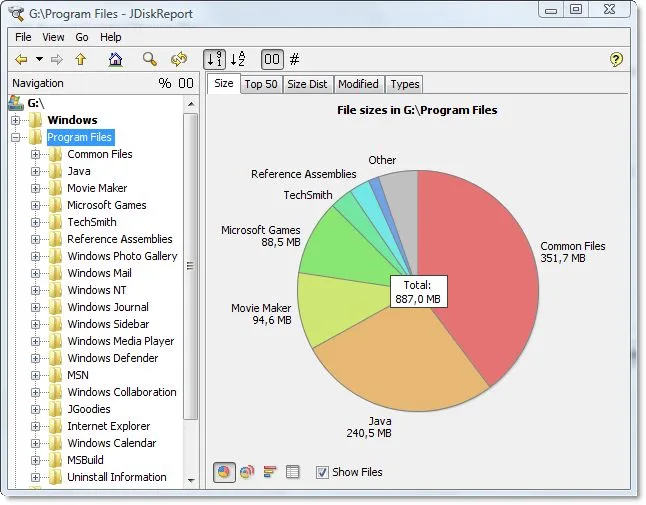
The screenshot is the publisher's representative JDiskReport interface on Windows, showing a folder tree and disk-usage pie chart. It illustrates the application's reporting layout, not a tested Mac installation.
What it offers
- Analyze how much disk space files and directories consume.
- View collected statistics as overview charts and detailed tables.
- Use space-usage reports to identify obsolete files and folders for review.
Good to know
- The selected 1.4.1 Mac OS X package requires Java 7 or 8, installed separately.
- The publisher does not specify current macOS version compatibility or Intel/Apple Silicon support for this package; neither has been verified here.
- The representative publisher screenshot shows Windows, not the Mac interface.
Product images
Sources
References used for this listing. Retrieval dates do not indicate hands-on testing.
- JDiskReport – JGoodies ↗Retrieved
- JDiskReport Downloads – JGoodies ↗Retrieved
More in utilities
View category ↗
1.1.1.1 with WARP 2026.8.2115.0
Encrypt traffic from your Mac to Cloudflare’s network with WARP, or use DNS-only mode for encrypted DNS queries to the 1.1.1.1 resolver.
1.1.1.1 with WARP 2026.8.2115.0
Encrypt traffic between your Windows PC and Cloudflare, or use encrypted DNS only, with the free 1.1.1.1 with WARP app.

3uTools 9.12.005
Manage iPhone and iPad photos, music, apps and backups from Windows with 3uTools, a free utility that also includes device checks and firmware flashing tools.