
Utilities Windows
JoyToKey
Map gamepad buttons and sticks to keyboard keys and mouse movements with JoyToKey, a shareware controller-mapping utility for Windows.
- Operating system
- Windows 11, 10, 8, 7 and Vista
- Architecture
- Not specified in the publisher download catalog
- Download package
- English EXE installer
Publisher also offers a separate ZIP archive. Installer profiles default to Documents/JoyToKey.
Link checked · Download guidance
What is JoyToKey?
JoyToKey lets a PC game controller send keyboard and mouse input to Windows applications and web games. It is useful when a game lacks native controller support, or when you want controller buttons to trigger keyboard shortcuts in another application. Button presses and stick movements become the keystrokes or mouse actions you assign.
Use profiles for different applications and associate them with an application path or window title for automatic switching. Keyboard(Multi) assignments can change according to how long a button is pressed. The interface also supports dark mode and high-DPI displays.
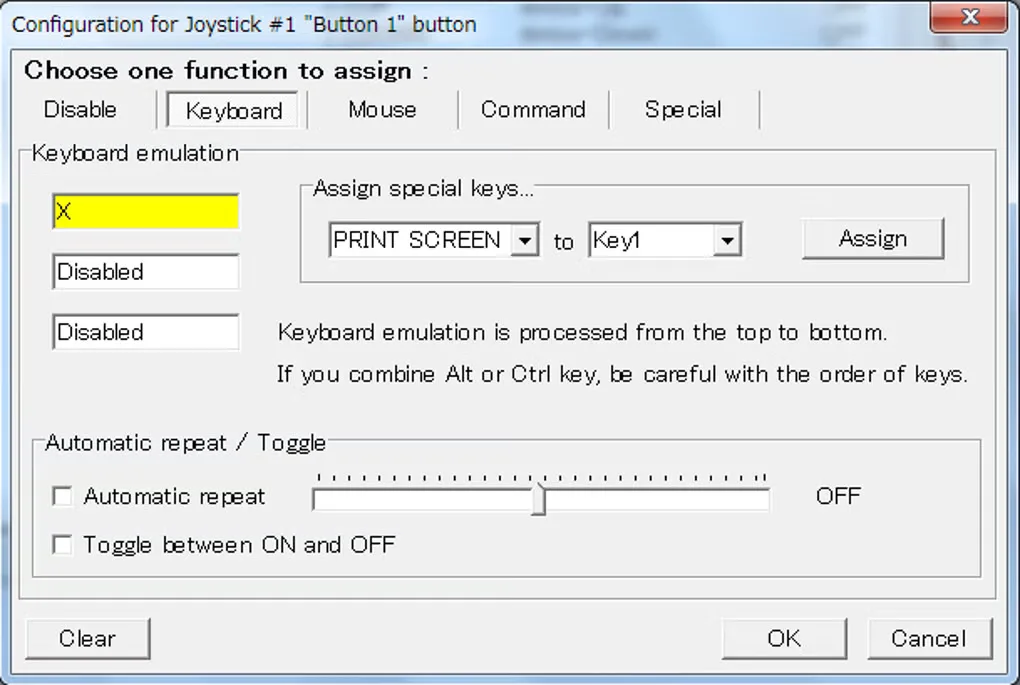
JoyToKey is shareware, not freeware. The publisher permits evaluation without functional limits and asks users who continue after the trial to consider buying a license. The linked download is the publisher-hosted English EXE installer; a ZIP package is available separately from the publisher. The gallery image shows a button-assignment dialog from the source listing and is not evidence of the appearance of version 7.4.
What it offers
- Translate controller buttons and sticks into keyboard strokes and mouse movements.
- Keep application-specific profiles and switch them automatically using application paths or window titles.
- Use Keyboard(Multi) assignments that respond differently to short and long button presses.
- Use dark mode and high-DPI display support.
Good to know
- Shareware evaluation has no functional restrictions, but the publisher asks users continuing after the trial to consider purchasing a license; commercial use requires a separate license per device.
- Vibration notifications when switching profiles are currently limited to the first XInput device.
Product images
Sources
References used for this listing. Retrieval dates do not indicate hands-on testing.
- JoyToKey Official Homepage ↗Retrieved
- JoyToKey - Download ↗Retrieved
- JoyToKey - End User License Agreement ↗Retrieved
- JoyToKey - Download ↗Retrieved
More in utilities
View category ↗
1.1.1.1 with WARP 2026.8.2115.0
Encrypt traffic from your Mac to Cloudflare’s network with WARP, or use DNS-only mode for encrypted DNS queries to the 1.1.1.1 resolver.
1.1.1.1 with WARP 2026.8.2115.0
Encrypt traffic between your Windows PC and Cloudflare, or use encrypted DNS only, with the free 1.1.1.1 with WARP app.

3uTools 9.12.005
Manage iPhone and iPad photos, music, apps and backups from Windows with 3uTools, a free utility that also includes device checks and firmware flashing tools.