

Utilities Windows
JTDX for Windows
Decode weak amateur-radio signals and work digital modes including FT8, FT4 and JT65 with JTDX, a free, open-source Windows application derived from WSJT-X.
- Operating system
- Windows 7 and later, as listed in the publisher's installer README
- Architecture
- x64
- Download package
- EXE installer; 16-bit-audio edition
Publisher catalog also offers a separate x86 installer and separate 32-bit-audio builds. The catalog README recommends 16-bit audio for most setups. No software installation or Windows-version test was performed.
Link checked · Download guidance
What is JTDX?
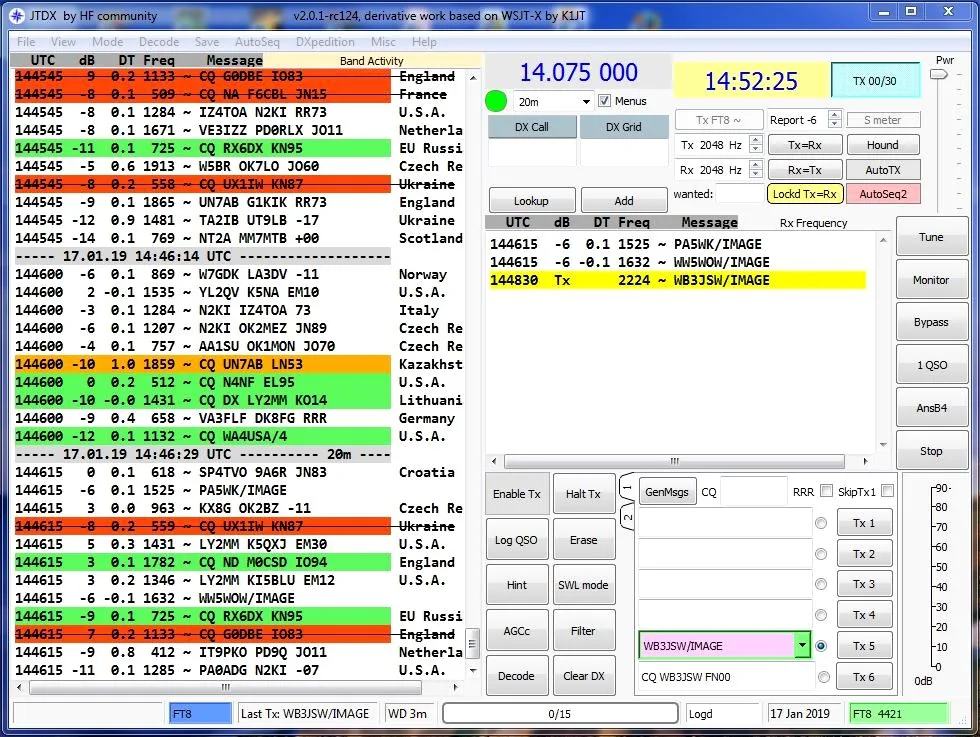
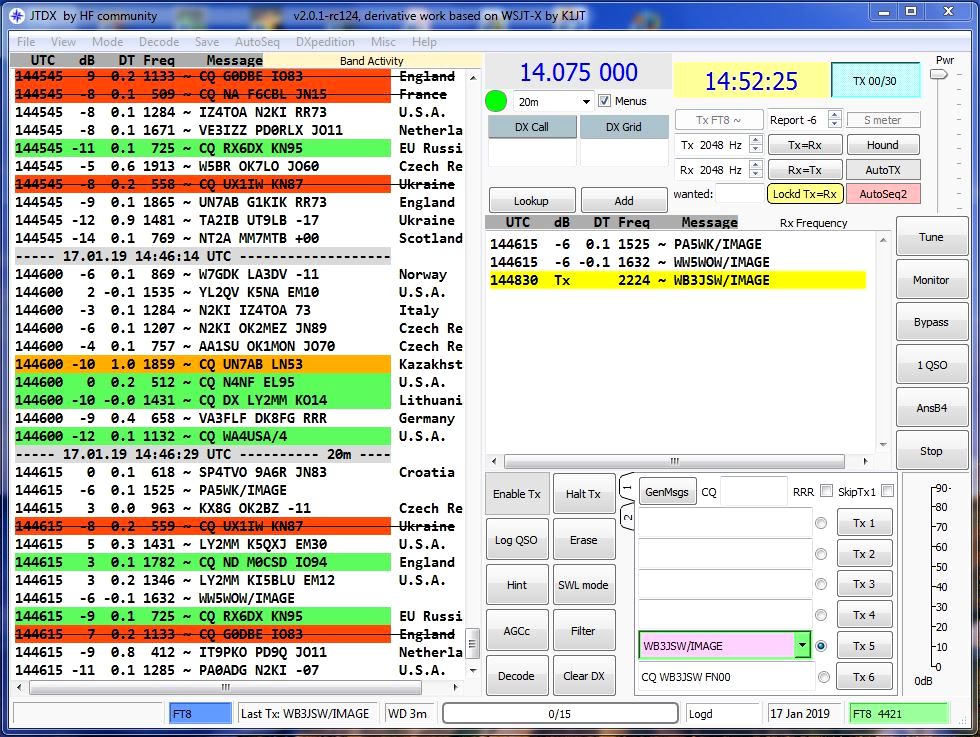
JTDX is a digital-mode amateur-radio application for communicating with weak signals. Derived from WSJT-X, it supports FT8, FT4, JT65, JT9, T10 and WSPR2. Its operating interface brings decoded band activity, receive-frequency messages and transmit controls into one workspace. Contact records can be saved in CSV and ADIF formats, with ADIF suitable for import into other amateur-radio logging programs.
This entry links to the publisher project's JTDX 2.2.159 Windows x64 EXE installer with 16-bit audio. The project recommends the 16-bit-audio edition for most setups; audio bit depth is separate from the installer's 64-bit Windows architecture. A separate x86 installer is available in the same catalog.
For on-air operation, JTDX needs a radio, antenna and appropriate audio and transmit/receive-control connections. The repository's setup guidance also calls for computer-clock synchronization to within one second of UTC. It is not a standalone substitute for that station hardware. The screenshot is a historical Windows capture of JTDX v2.0.1-rc124 from WB3JSW's setup guide, not a capture of the linked 2.2.159 release.
What it offers
- Operate digital modes including FT8, FT4, JT65, JT9, T10 and WSPR2.
- View decoded band activity and receive-frequency messages alongside transmit controls.
- Save logged contacts in CSV and ADIF formats for use with other amateur-radio logging tools.
- Run separate named instances using the --rig-name option, with a unique name for each station configuration.
Good to know
- On-air operation requires suitable radio hardware, audio and transmit/receive-control connections, plus an accurately synchronized computer clock.
- The linked installer is for x64 Windows, not 32-bit Windows; 16-bit audio describes audio processing rather than CPU architecture.
- The illustrated interface is an older JTDX v2.0.1-rc124 Windows screenshot; it does not document the exact appearance of version 2.2.159.
Product images
Sources
References used for this listing. Retrieval dates do not indicate hands-on testing.
- JTDX - Download — Windows discovery page ↗Retrieved
- JTDX — publisher README ↗Retrieved
- JTDX — publisher manual ↗Retrieved
- JTDX 2.2.159 — Windows installer catalog and README ↗Retrieved
- JTDX repository — inherited radio setup requirements ↗Retrieved
- WB3JSW — JTDX Help/Setup Images ↗Retrieved
More in utilities
View category ↗
1.1.1.1 with WARP 2026.8.2115.0
Encrypt traffic from your Mac to Cloudflare’s network with WARP, or use DNS-only mode for encrypted DNS queries to the 1.1.1.1 resolver.
1.1.1.1 with WARP 2026.8.2115.0
Encrypt traffic between your Windows PC and Cloudflare, or use encrypted DNS only, with the free 1.1.1.1 with WARP app.

3uTools 9.12.005
Manage iPhone and iPad photos, music, apps and backups from Windows with 3uTools, a free utility that also includes device checks and firmware flashing tools.