
Utilities Windows
Just Color Picker
Pick screen colors, copy HEX or RGB values and keep reusable palettes with Just Color Picker, a free portable Windows utility for designers.
- Operating system
- Windows 7, 8, 10 and 11
- Architecture
- 64-bit; separate 32-bit download available from the publisher
- Download package
- Portable EXE; no installation required
This link selects the 64-bit executable. Use a writable folder so the adjacent settings and color-list files can be saved.
Link checked · Download guidance
What is Just Color Picker?
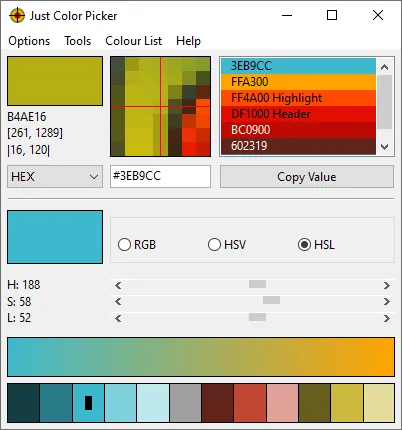
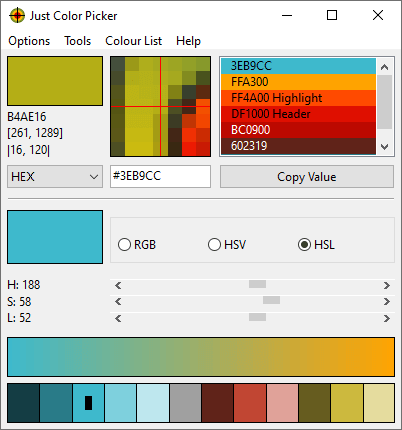
Just Color Picker captures colors from the screen and turns them into codes you can reuse in a design or stylesheet. Choose a color format, point at the pixel you want and press Alt+X to add it to the color list. Copy Value sends the selected code to the clipboard. A magnified view and averaged sampling help when a single pixel is difficult to target or an image contains color noise.
The color list can hold notes alongside picked colors, while RGB, HSV and HSL controls let you adjust a selection. Color wheels, suggested combinations and a gradient between two colors provide ways to develop a palette. The app can also open and save Photoshop ACO swatches and GIMP GPL palettes.
The linked download is the publisher's 64-bit portable EXE, not an installer. Keep it in a writable folder: settings and the automatically saved color list are stored beside the executable. A protected location such as Program Files can prevent those files from being saved. The publisher also notes that conversions between color formats can introduce small rounding differences; displayed CMYK values use a simple conversion rather than a perfect screen-to-print match.
What it offers
- Capture screen colors with a configurable hotkey; Windows also supports mouse-click capture and screen freeze.
- Copy HEX, RGB, HSL, HSV, HWB, CMYK, Oklab and other supported color codes, with optional CSS syntax.
- Use 3x, 9x or 15x magnification and averaged sampling over small pixel areas.
- Keep color lists with comments and exchange Photoshop ACO swatches or GIMP GPL palettes.
- Adjust colors with RGB, HSV or HSL controls and explore color wheels, suggested schemes and gradients.
Good to know
- Saving settings and the automatic color list requires write access to the executable's folder; protected folders can prevent persistence.
- Color-format conversions can produce small rounding differences. CMYK uses a simple conversion and does not guarantee matching printed output.
Product images
Sources
References used for this listing. Retrieval dates do not indicate hands-on testing.
More in utilities
View category ↗
1.1.1.1 with WARP 2026.8.2115.0
Encrypt traffic from your Mac to Cloudflare’s network with WARP, or use DNS-only mode for encrypted DNS queries to the 1.1.1.1 resolver.
1.1.1.1 with WARP 2026.8.2115.0
Encrypt traffic between your Windows PC and Cloudflare, or use encrypted DNS only, with the free 1.1.1.1 with WARP app.

3uTools 9.12.005
Manage iPhone and iPad photos, music, apps and backups from Windows with 3uTools, a free utility that also includes device checks and firmware flashing tools.