
Development Windows
K9s
Navigate Kubernetes resources, inspect pod logs and manage cluster workloads from a terminal with K9s. This entry links to the Windows x64 ZIP package.
- Operating system
- Windows; specific Windows version requirements not established by the cited sources
- Architecture
- x64 (amd64)
- Download package
- ZIP archive
Separate Windows ARM64 archive available. Requires Kubernetes cluster access and a suitable terminal; no installation or runtime test was performed.
Link checked · Download guidance
What is K9s?
K9s puts Kubernetes resource lists and common management commands in a keyboard-driven terminal interface. It watches for cluster changes while you browse pods, switch namespaces or contexts, filter resources and inspect YAML or logs. It suits developers and cluster operators who want to investigate workloads without repeatedly typing separate commands.
The selected download is the Windows x64 ZIP for version 0.51.0; the publisher also provides a separate Windows ARM64 archive. K9s is free and open source under Apache License 2.0.
Cluster permissions still control what K9s can do. Its documentation calls for read privileges at cluster and namespace level to display resources and metrics; editing or deleting resources needs additional permissions. Read-only mode disables cluster modification commands. This is a terminal application, not a standalone Kubernetes environment.
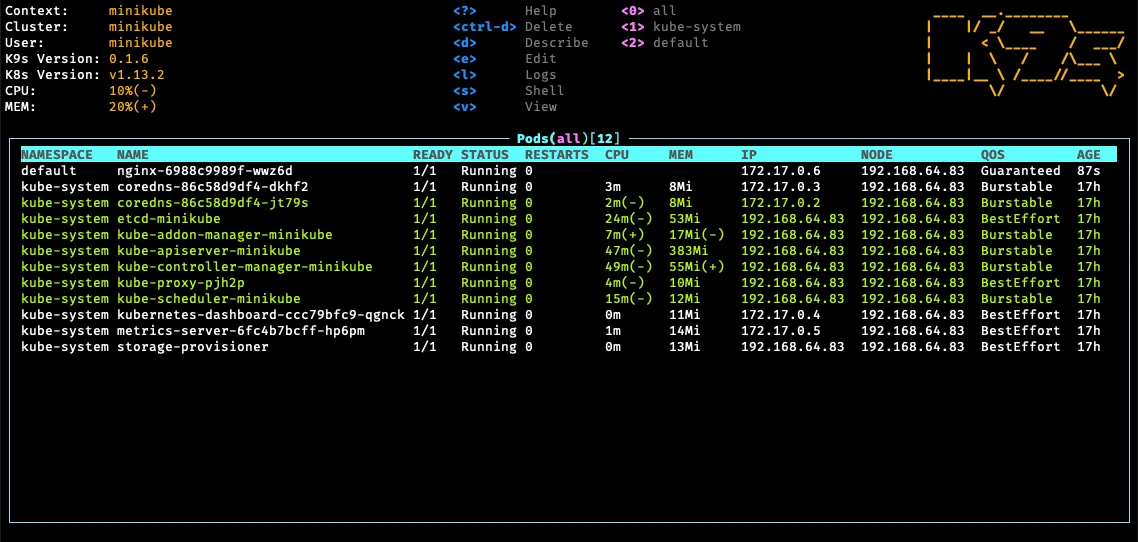
The screenshot is the publisher's historical pod-list example, visibly labeled K9s 0.1.6. It illustrates the terminal interface rather than the selected release, and the host operating system is not identified.
What it offers
- Watch Kubernetes resources update in a terminal-based interface.
- Switch Kubernetes contexts and namespaces using keyboard commands.
- Filter resource lists by text patterns or labels.
- Inspect resource YAML, descriptions and resource-specific logs.
- Use read-only mode to disable cluster modification commands.
Good to know
- Requires access to a Kubernetes cluster with suitable permissions; read access is needed to display resources and metrics, and editing or deleting requires additional privileges.
- Uses a terminal interface with 256-color support rather than a conventional desktop GUI.
Product images
Sources
References used for this listing. Retrieval dates do not indicate hands-on testing.
More in development
View category ↗

010 Editor 17.0
Inspect and edit binary files on Mac with 010 Editor, a paid text and hex editor with Binary Templates, file comparison and a 30-day trial.
010 Editor 17.0
Inspect and edit binary files with 010 Editor for Windows, a text and hex editor with Binary Templates, file comparison and scripting. Includes a 30-day trial.
10x Editor
Edit and navigate C++ projects on Windows with a built-in parser, workspace search and Visual Studio project support. A paid license is required after the 30-day trial.