
Development Windows
KDiff3 for Windows
Compare two or three text files or folders, inspect highlighted differences and resolve merge conflicts with KDiff3, a free, open-source diff and merge tool.
- Operating system
- Windows; minimum OS version not confirmed by the publisher sources consulted
- Architecture
- x86_64 (64-bit)
- Download package
- EXE installer
This entry links to the stable Windows x86_64 EXE, not the separate sideload APPX or a nightly build. Installer execution was not tested.
Link checked · Download guidance
What is KDiff3?
KDiff3 compares text files and folders side by side so you can see which lines and characters changed. It suits reviewing source-code edits, comparing directory trees and combining separate revisions of a file. A three-way comparison uses one file as a common base and the other two as modified versions.
The merge editor can select straightforward changes automatically, while conflicting edits can be chosen from inputs A, B or C or edited directly in the output. Options for whitespace and comments help focus the comparison, and Unicode and UTF-8 support accommodates different text encodings.
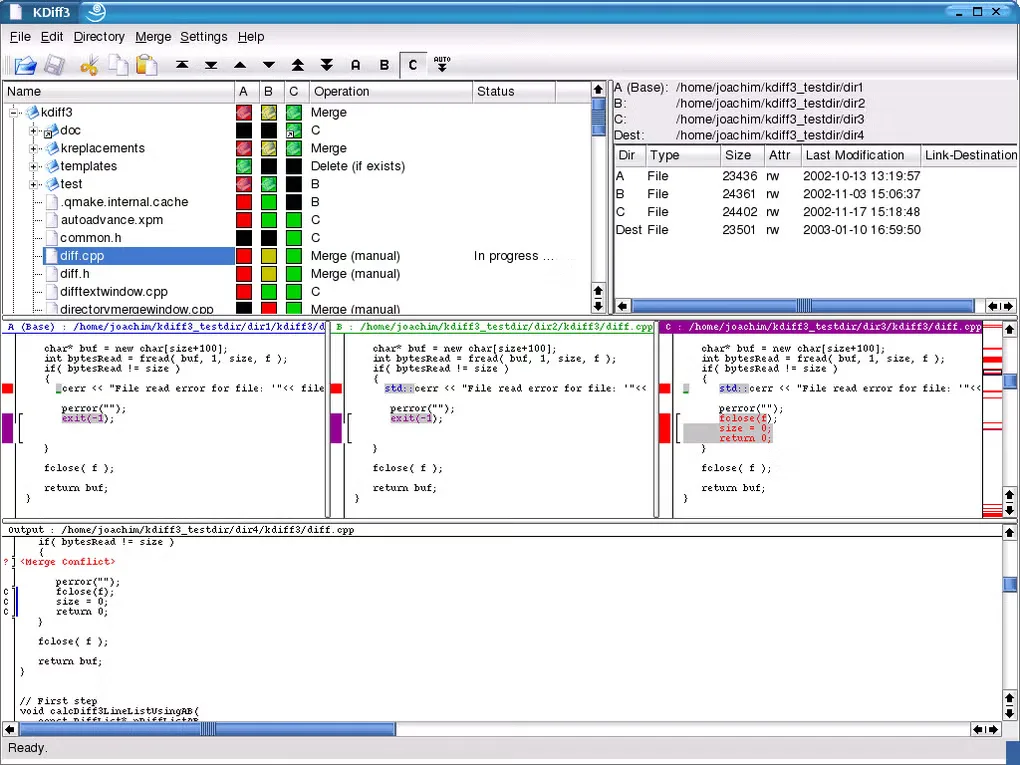
Automatic merging does not remove the need to resolve conflicts: saving the merged output is disabled until every conflict is resolved. With two input files, each difference requires a manual decision. The linked package is the Windows x86_64 EXE installer for version 1.12.6 from KDE’s stable download directory. The gallery image illustrates an older KDiff3 interface, not a verified view of this Windows release.
What it offers
- Compare two or three text files or folders.
- Inspect differences at both line and character level.
- Combine automatic merging with an editable output pane and A/B/C source choices.
- Highlight or hide whitespace and comment changes.
- Work with Unicode, UTF-8 and other supported text encodings.
Good to know
- Merged output cannot be saved until all conflicts are resolved.
- With only two input files, every difference is a conflict that must be resolved manually.
Product images
Sources
References used for this listing. Retrieval dates do not indicate hands-on testing.
More in development
View category ↗
010 Editor 17.0
Inspect and edit binary files on Mac with 010 Editor, a paid text and hex editor with Binary Templates, file comparison and a 30-day trial.
010 Editor 17.0
Inspect and edit binary files with 010 Editor for Windows, a text and hex editor with Binary Templates, file comparison and scripting. Includes a 30-day trial.
10x Editor
Edit and navigate C++ projects on Windows with a built-in parser, workspace search and Visual Studio project support. A paid license is required after the 30-day trial.