

Utilities Android
KeePassDX for Android
Manage passwords in a local KeePass database on Android, fill sign-in forms and generate one-time codes with the free, open-source KeePassDX.
Version 4.5.6 · Direct publisher file
Link checked · Download guidance
What is KeePassDX?
KeePassDX is an Android password manager for people who want to keep credentials in an encrypted database file rather than a hosted password-manager account. It opens and edits KeePass .kdb and .kdbx files, organizes entries into groups and provides Autofill and Magikeyboard for entering credentials into forms. HOTP and TOTP support lets you manage one-time codes alongside your saved entries.
The file-based approach gives you control over where the database lives, but it also makes backups your responsibility. Moving a vault between devices means keeping a copy of the database available; cloud file access and synchronization depend on a separate file manager or storage provider. Biometric unlocking is a convenience, not a replacement for remembering your master password and retaining any required keyfile.
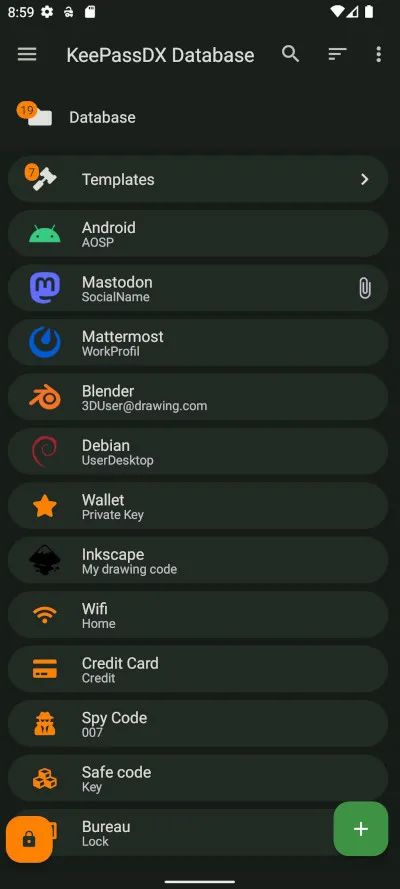
This download is the publisher's KeePassDX 4.5.6 Libre APK from its GitHub release. The application is free and open source under GPL-3.0; the publisher also offers contribution-supported visual customization. The screenshot shows the publisher's example database interface, not a vault created or tested by SoftGalaxy.
What it offers
- Open and edit KeePass .kdb and .kdbx databases, with support for database formats 1 through 4.
- Organize credentials into entries and group trees, with entry history and templates.
- Fill forms using Android Autofill or the app's Magikeyboard.
- Manage HOTP and TOTP one-time codes for two-factor authentication.
- Use biometric unlocking on supported devices while retaining the database's master credentials.
Good to know
- The database cannot be opened without its required master password and/or keyfile; biometric unlocking does not replace those credentials.
- Back up the database file yourself. Cloud access and synchronization rely on a separate file manager or storage provider rather than a built-in cloud account.
Product images
Sources
References used for this listing. Retrieval dates do not indicate hands-on testing.
- KeePassDX — official website ↗Retrieved
- Android KeePassDX — publisher repository ↗Retrieved
- KeePassDX — publisher FAQ ↗Retrieved
- KeePassDX 4.5.6 — Beautiful Butterfly release ↗Retrieved
- KeePassDX 4.5.6 — publisher release assets ↗Retrieved
More in utilities
View category ↗
1.1.1.1 with WARP 2026.8.2115.0
Encrypt traffic from your Mac to Cloudflare’s network with WARP, or use DNS-only mode for encrypted DNS queries to the 1.1.1.1 resolver.
1.1.1.1 with WARP 2026.8.2115.0
Encrypt traffic between your Windows PC and Cloudflare, or use encrypted DNS only, with the free 1.1.1.1 with WARP app.

3uTools 9.12.005
Manage iPhone and iPad photos, music, apps and backups from Windows with 3uTools, a free utility that also includes device checks and firmware flashing tools.