
Utilities Windows
KeePassRDP
Launch Windows Remote Desktop connections from KeePass entries, choose stored credentials and configure connection options with this plugin for KeePass 2.x.
Version 2.3 · Direct publisher file
Link checked · Download guidance
What is KeePassRDP?
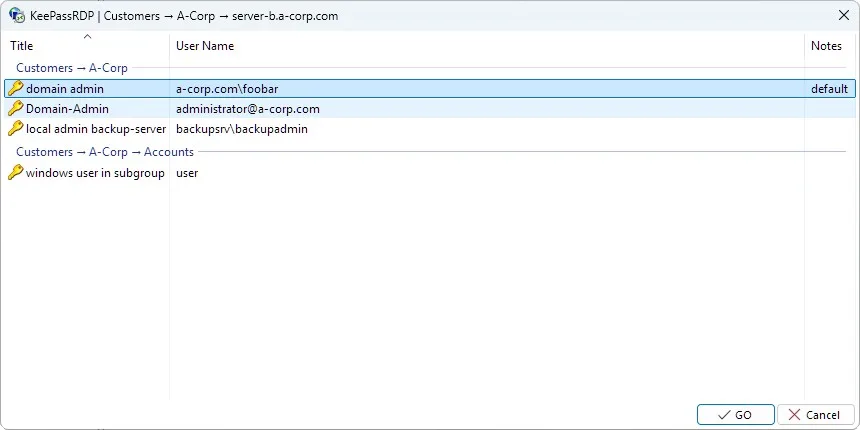
KeePassRDP connects KeePass 2.x entries to the Windows Remote Desktop client. Select entries containing hostnames or IP addresses, then use the KeePassRDP context menu or a keyboard shortcut to start a connection. When several matching accounts are available, a credential picker lets you choose which one to use. This suits people who already organize remote-computer details and account credentials in KeePass.
The plugin supports administrator sessions, configurable shortcuts and toolbar items, per-entry settings and advanced options through .rdp files. It launches mstsc.exe rather than replacing the Remote Desktop client. Connections using stored credentials place the selected credentials in Windows Credential Manager; their removal depends on the plugin's credential-lifetime settings.
KeePassRDP is not a standalone remote desktop application: it requires KeePass 2.x and Windows Remote Desktop, and the destination must accept RDP connections. The linked package is the publisher's version 2.3 MSI setup for the plugin. The publisher labels launching the executable on a secure desktop experimental and warns that clipboard content remains shared within a window station.
What it offers
- Start RDP connections from one or more KeePass entries containing target hostnames or IP addresses.
- Choose among matching stored accounts with the credential-selection dialog.
- Configure keyboard shortcuts, context-menu items, toolbar items and per-entry settings.
- Use RDP administrator sessions, supported mstsc.exe parameters and advanced .rdp-file options.
- Control credential lifetime in Windows Credential Manager and access session-shadowing options.
Good to know
- Requires KeePass 2.x and Windows Remote Desktop; it is a plugin, not a standalone RDP client.
- Selected credentials are placed in Windows Credential Manager for the connection; removal timing depends on configuration.
- Launching the executable on a secure desktop is experimental, and the publisher warns that clipboard content remains shared within a window station.
Product images
Sources
References used for this listing. Retrieval dates do not indicate hands-on testing.
More in utilities
View category ↗
1.1.1.1 with WARP 2026.8.2115.0
Encrypt traffic from your Mac to Cloudflare’s network with WARP, or use DNS-only mode for encrypted DNS queries to the 1.1.1.1 resolver.
1.1.1.1 with WARP 2026.8.2115.0
Encrypt traffic between your Windows PC and Cloudflare, or use encrypted DNS only, with the free 1.1.1.1 with WARP app.


3uTools 9.12.005
Manage iPhone and iPad photos, music, apps and backups from Windows with 3uTools, a free utility that also includes device checks and firmware flashing tools.