
Utilities Windows
Key Manager
Remap keys and mouse buttons, record macros, and trigger text or program shortcuts with ATNSOFT Key Manager for Windows. A trial is available; full functionality requires a paid license.
- Operating system
- Windows 11, 10, 8.1, 8, 7, Vista, XP and 2000; Windows Server also listed by publisher
- Architecture
- Not explicitly specified on the reviewed publisher product and download pages
- Download package
- EXE installer
Version and release date come from publisher history; installer version and CPU architecture were not inspected. Publisher product and catalog pages differ on the newest listed Windows Server release.
Link checked · Download guidance
What is Key Manager?
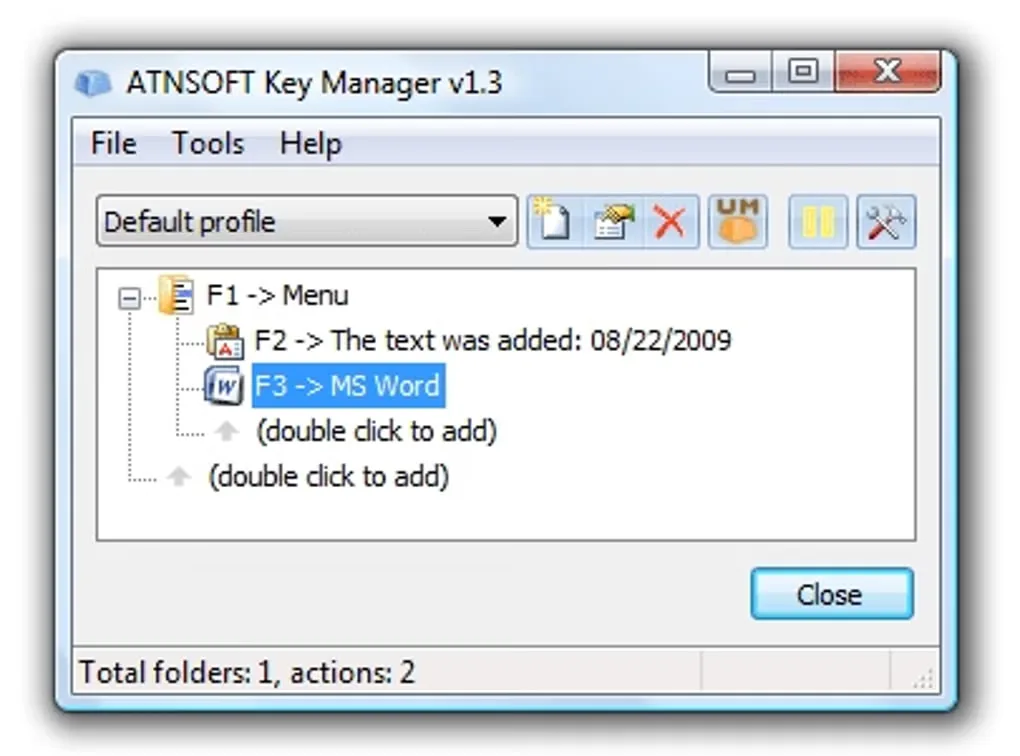
Key Manager turns keyboard and mouse inputs into shortcuts for repetitive Windows tasks. Assign an action to a key combination, a sequence of presses or a long press; use it to insert text, launch a program, run a recorded key sequence or open a pop-up menu of actions. Profiles organize different sets of shortcuts, while application and window exceptions let you limit where a mapping applies.
Beyond simple key replacement, it can paste plain or formatted text with date templates, emulate mouse clicks, move windows and adjust volume. It is a separate ATNSOFT product from Key Remapper, with additional action and macro options.
The mouse support is not unlimited: the publisher lists five buttons plus vertical and horizontal scrolling. Extra vendor-specific buttons may need the mouse manufacturer's software to map them to a keyboard key first. Some hardware-controlled laptop keys may not be readable. The trial has functional limitations that the publisher says are removed after purchase.
The publisher's version history lists 1.15 build 460 dated August 4, 2022; Softonic still lists the older 1.13.0.416. This entry uses the publisher's release information and direct installer link, not Softonic's package version. The screenshot is a historical Key Manager v1.3 interface example, not a capture of the current installer.
What it offers
- Remap keys, mouse buttons and modifier combinations, including sequences and long presses.
- Record and edit key-sequence macros, including mouse clicks and cursor positioning.
- Insert plain or formatted text with templates such as the current date and time.
- Organize shortcuts into profiles and pop-up action menus, with application or window restrictions.
- Assign shortcuts to launch programs, open files, move or resize windows, and adjust volume.
Good to know
- Commercial software with a trial; the publisher says purchase removes functional limitations, but the reviewed pages do not specify every trial restriction.
- Direct mouse-button recognition covers left, middle, right, X1 and X2; other buttons may require the mouse vendor's remapping software first.
- Some hardcoded laptop or specialized keyboard keys may not be identifiable or remappable.
- If multiple actions are assigned to the same key, only the top action in the list is performed.
Product images
Sources
References used for this listing. Retrieval dates do not indicate hands-on testing.
- Key Manager - Download ↗Retrieved
- ATNSOFT Key Manager — Key, mouse button and key combination remapper and action assigner ↗Retrieved
- Key Manager — FAQ ↗Retrieved
- Key Manager — Version History ↗Retrieved
- ATNSOFT Downloads ↗Retrieved
- ATNSOFT Purchase — Key Manager ↗Retrieved
More in utilities
View category ↗
1.1.1.1 with WARP 2026.8.2115.0
Encrypt traffic from your Mac to Cloudflare’s network with WARP, or use DNS-only mode for encrypted DNS queries to the 1.1.1.1 resolver.
1.1.1.1 with WARP 2026.8.2115.0
Encrypt traffic between your Windows PC and Cloudflare, or use encrypted DNS only, with the free 1.1.1.1 with WARP app.

3uTools 9.12.005
Manage iPhone and iPad photos, music, apps and backups from Windows with 3uTools, a free utility that also includes device checks and firmware flashing tools.