
Utilities Windows
Kingston SSD Manager
Check Kingston SSD health, export status reports and update supported drive firmware on Windows 10 or 11 with Kingston SSD Manager.
- Operating system
- Windows 10 and Windows 11
- Architecture
- x64 (64-bit)
- Download package
- EXE setup installer
Requires a Kingston SSD and administrator privileges. USB enclosures unsupported. Some older models need the separate legacy 1.1.x branch. Setup may require a reboot.
Link checked · Download guidance
What is Kingston SSD Manager?
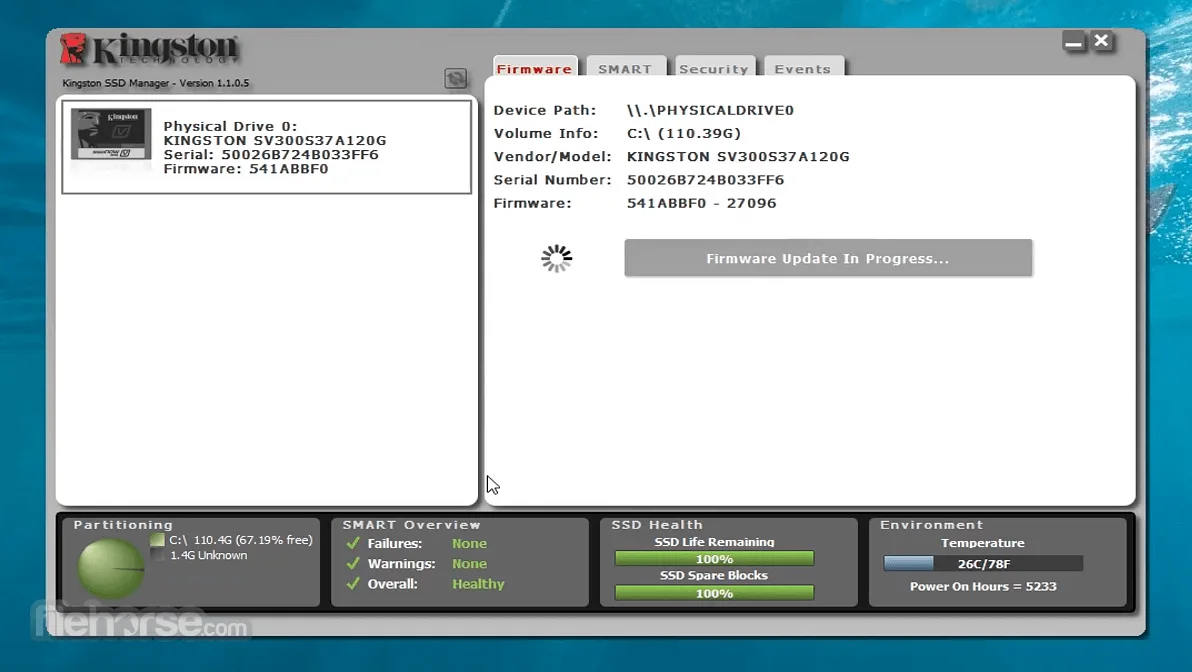
Kingston SSD Manager gives owners of Kingston solid-state drives a Windows interface for checking drive condition and managing supported firmware updates. Select a drive to view its model, serial number and firmware version, then use the health view to inspect status information or export a report. The overview includes disk usage, remaining write endurance, spare blocks, temperature and power-on hours.
The linked 1.5.6.5 installer is the x64 branch for Windows 10 and 11. It requires a Kingston SSD and Windows administrator privileges; it is not a general-purpose manager for every SSD brand. Kingston recommends the drive's native interface and does not support USB enclosures. Some older Kingston models need the separate legacy branch rather than this installer.
For a routine health check, choose the intended SSD in the left panel and refresh the health data before exporting a report. Firmware updates appear only when available for that drive. Advanced operations depend on the SSD: secure erase and TCG revert delete data, and HPA overprovisioning is limited to supported Data Center series drives. These operations are not necessary just to inspect health.
The screenshot illustrates the older 1.1.0.5 interface supplied by FileHorse, including a firmware update in progress. It is not a screenshot of the linked 1.5.6.5 release or evidence of a test performed by SoftGalaxy.
What it offers
- Monitor drive health, disk usage, remaining write endurance, spare blocks, temperature and power-on hours.
- Identify a selected Kingston SSD by model, serial number and firmware version.
- Refresh health attributes and export drive health/status reports.
- Apply firmware updates when Kingston offers one for the selected drive.
- Access model-dependent security operations and HPA overprovisioning on supported Data Center series SSDs.
Good to know
- The linked 1.5.x branch supports Windows 10 and 11 x64, not macOS or Linux; it requires administrator privileges and a Kingston SSD.
- USB enclosures are unsupported; Kingston recommends connecting through the SSD's native interface.
- Some older Kingston SSDs require the separate 1.1.x legacy branch, not the linked installer.
- Advanced operations vary by drive and system. ATA secure erase and TCG revert erase data; overprovisioning requires removing existing partitions.
Product images
Sources
References used for this listing. Retrieval dates do not indicate hands-on testing.
- Kingston SSD Manager — official features, requirements and downloads ↗Retrieved
- Kingston SSD Manager User Guide (V. 1.5.X.X), revision 490KSM-UG15.A03, 2024-04-02 ↗Retrieved
- Download Kingston SSD Manager 1.5.6.5 — MajorGeeks ↗Retrieved
- Kingston SSD Manager — FileHorse full-size screenshot gallery ↗Retrieved
More in utilities
View category ↗
1.1.1.1 with WARP 2026.8.2115.0
Encrypt traffic from your Mac to Cloudflare’s network with WARP, or use DNS-only mode for encrypted DNS queries to the 1.1.1.1 resolver.
1.1.1.1 with WARP 2026.8.2115.0
Encrypt traffic between your Windows PC and Cloudflare, or use encrypted DNS only, with the free 1.1.1.1 with WARP app.


3uTools 9.12.005
Manage iPhone and iPad photos, music, apps and backups from Windows with 3uTools, a free utility that also includes device checks and firmware flashing tools.