
Utilities Windows
Krut
Record a selected screen area with sound, take snapshots and schedule captures with Krut, a Java-based screen recorder for Windows.
Version 0.9.4 · Direct publisher file
Link checked · Download guidance
What is Krut?
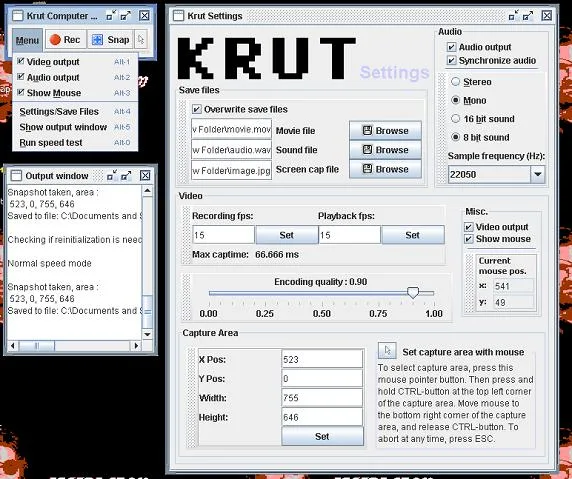
Krut Computer Recorder captures a chosen part of your screen for tutorials, demonstrations and other screencasts. Its compact control window starts recordings and takes snapshots, while a separate settings window lets you adjust the capture area, frame rates and audio options. You can preview a recording, include the mouse pointer or let the capture area follow it. A timer provides scheduled recording.
Krut saves movies in QuickTime MOV format and also keeps separate MOV video and WAV audio files for use in external editing or encoding software. Snapshots are saved as JPG images. Use another encoder if you need a different delivery format.
The Windows launch instructions require Java: extract the ZIP archive and launch krut.bat or KRUT.jar. This is a legacy recorder: the publisher project lists its last update as August 25, 2015. Compatibility with current Windows and Java releases has not been established here. The publisher also warns that the live preview can strain slower computers and reduce recording quality.
What it offers
- Record a selected screen region with audio to QuickTime MOV files.
- Take JPG snapshots and keep separate WAV audio and MOV video files.
- Schedule recordings with a timer and preview ongoing capture.
- Include the mouse pointer or move the capture area during recording.
- Set recording and playback frame rates separately.
Good to know
- Requires Java; compatibility with current Windows and Java releases is not established by the publisher documentation.
- MOV and WAV are the documented recording formats; other output formats require an external encoder.
- The publisher warns that previewing on slower systems can affect recording quality.
Product images
Sources
References used for this listing. Retrieval dates do not indicate hands-on testing.
- Krut Computer Recorder download | SourceForge.net ↗Retrieved
- Krut Computer Recorder — publisher file feed ↗Retrieved
- Krut Computer Recorder — features ↗Retrieved
- Krut — Windows launch, files and video/audio formats ↗Retrieved
- Krut — publisher screenshots ↗Retrieved
- About Krut — authors and license ↗Retrieved
- Krut - Download ↗Retrieved
More in utilities
View category ↗
1.1.1.1 with WARP 2026.8.2115.0
Encrypt traffic from your Mac to Cloudflare’s network with WARP, or use DNS-only mode for encrypted DNS queries to the 1.1.1.1 resolver.
1.1.1.1 with WARP 2026.8.2115.0
Encrypt traffic between your Windows PC and Cloudflare, or use encrypted DNS only, with the free 1.1.1.1 with WARP app.


3uTools 9.12.005
Manage iPhone and iPad photos, music, apps and backups from Windows with 3uTools, a free utility that also includes device checks and firmware flashing tools.