
Utilities Windows
Lanceur
Open applications, files and web pages with typed aliases in Lanceur, a free, open-source Windows launcher with configurable commands and optional Everything file search.
- Operating system
- Windows 11 listed by Softonic; .NET 9 Windows application
- Architecture
- Not established by the inspected publisher evidence
- Download package
- EXE installer
Source target: net9.0-windows10.0.19041.0; not a tested OS support floor. Exact supported Windows build range, CPU architecture and runtime installation behavior were not verified. Everything is separate for file search.
Link checked · Download guidance
What is Lanceur?
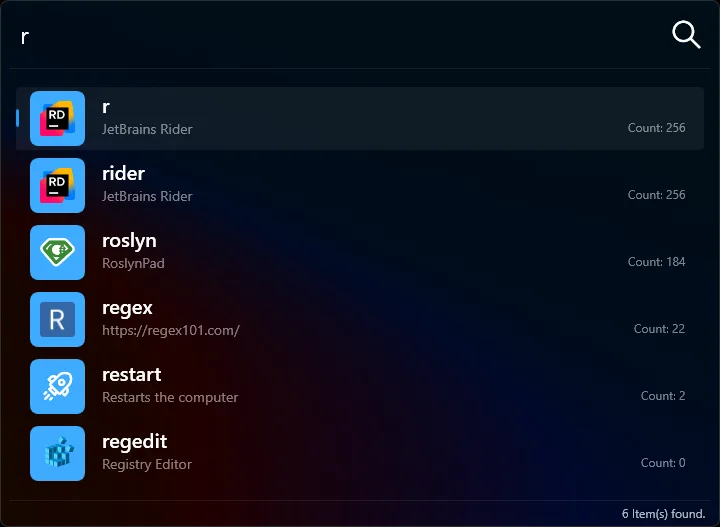
Lanceur puts named shortcuts in a keyboard-driven search window. Type an alias and press Enter to open its application, file or web page. It suits repeated tasks that would otherwise mean locating the same program or folder each time. Aliases can have several names, custom launch parameters and a working directory.
To add a command, type add followed by the alias name and press Enter, or open Settings from the system tray. Configure the target and save it. Options include asking for confirmation before executing an alias, choosing how the target window opens and running a Lua script before the command.
File search is an integration with Voidtools Everything, not a self-contained disk index: Everything must be installed and running or that search returns no results. The installer also offers experimental scheduled-task startup, which the manual says can close Lanceur when a laptop switches to battery power; registry startup is the documented alternative.
This entry links to the publisher’s 3.11.0 EXE installer. Windows 11 is listed by the discovery catalog, and the versioned application source targets .NET 9 for Windows. CPU architecture and the exact supported Windows build range were not established. The installer was checked with HEAD requests only; it was not downloaded, installed or tested.
What it offers
- Launch applications, files and web pages by typing an alias and pressing Enter.
- Assign multiple names, launch parameters and a working directory to an alias.
- Choose window start mode and optional confirmation before a command runs.
- Run a Lua script before an alias executes.
- Search files through the optional Voidtools Everything integration.
Good to know
- File search requires Voidtools Everything to be installed and running; otherwise it returns no results.
- The manual documents an experimental scheduled-task startup issue when switching to battery power; registry startup is the alternative.
Product images
Sources
References used for this listing. Retrieval dates do not indicate hands-on testing.
- Lanceur - Download ↗Retrieved
- Lanceur Bis — publisher repository and README ↗Retrieved
- Lanceur 3.11.0 — publisher release notes ↗Retrieved
- Lanceur 3.11.0 — explicit release assets ↗Retrieved
- Lanceur user manual — create and configure aliases ↗Retrieved
- Lanceur installation prerequisites — Everything file search ↗Retrieved
- Lanceur manual — installation and startup options ↗Retrieved
- Lanceur 3.11.0 — versioned Windows project target ↗Retrieved
- Lanceur 3.11.0 — versioned installer definition ↗Retrieved
- Lanceur repository license — GNU GPL version 3 ↗Retrieved
More in utilities
View category ↗
1.1.1.1 with WARP 2026.8.2115.0
Encrypt traffic from your Mac to Cloudflare’s network with WARP, or use DNS-only mode for encrypted DNS queries to the 1.1.1.1 resolver.
1.1.1.1 with WARP 2026.8.2115.0
Encrypt traffic between your Windows PC and Cloudflare, or use encrypted DNS only, with the free 1.1.1.1 with WARP app.


3uTools 9.12.005
Manage iPhone and iPad photos, music, apps and backups from Windows with 3uTools, a free utility that also includes device checks and firmware flashing tools.