
Utilities Windows
LaunchBar Commander
Organize Windows programs and folders into custom docked bars, hierarchical menus and tray launchers with LaunchBar Commander.
- Operating system
- Windows 2000, XP, 7, 8 and 10, as listed by the publisher
- Architecture
- Not specified by the publisher sources inspected
- Download package
- EXE installer
Publisher release date is May 13, 2020. Windows 11 support is unconfirmed; the separate portable ZIP is not the selected download. No installation or runtime compatibility test was performed.
Link checked · Download guidance
What is LaunchBar Commander?
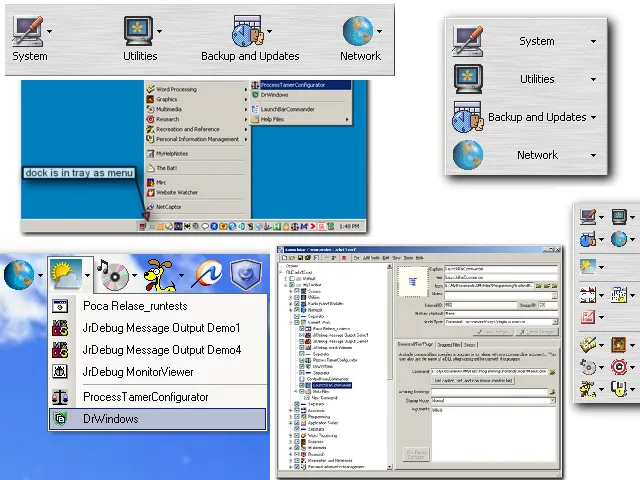
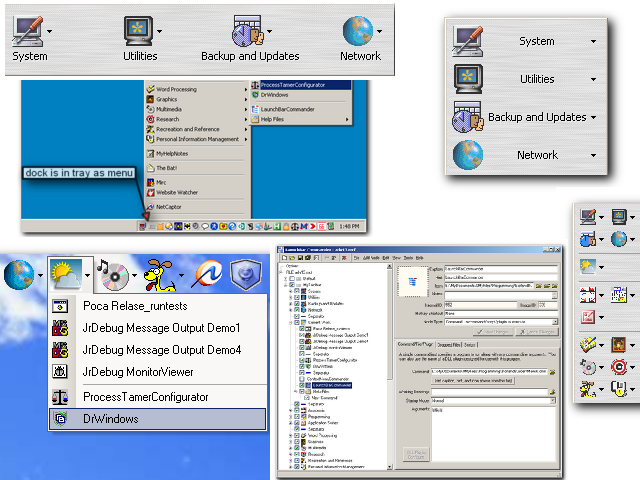
LaunchBar Commander puts configurable program buttons and menus on the edge of your Windows desktop. It suits a collection of tools or folders that needs more structure than a row of shortcuts: hierarchical menus can group related applications, and virtual file menus provide access to a chosen folder. One running instance can manage several docks and tray menus.
Its tree-based configuration editor supports copy and paste, drag and drop, and temporarily disabling entries. Dock configurations are stored in self-contained files for backup or transfer between computers. You can also drop a file onto a configured program button to open it with that application. Switch a launchbar to tray mode when you do not want it occupying desktop space.
This is an efficiency-focused launcher, not an animated mac-style dock. The archived publisher page lists version 1.160.02, dated May 13, 2020, with Windows support through Windows 10; it does not establish Windows 11 compatibility. DonationCoder's licensing page says the site reached end of life in April 2026 and supplies a public permanent key for its key-based software. Older donation and account instructions remain in the archive, so they should not be treated as working services. The link here selects the publisher's EXE installer, not its separately offered portable ZIP.
What it offers
- Create hierarchical launch menus for related programs and virtual file menus for selected folders.
- Run multiple docks and tray menus from one application instance; toggle launchbars to tray mode.
- Edit launch entries in a configuration tree with copy and paste, drag and drop, and temporary disabling.
- Keep dock configurations in self-contained files for backup, transfer or switching between layouts.
- Drop files onto configured application buttons to open them with the associated program.
Good to know
- The publisher lists Windows 2000, XP, 7, 8 and 10; Windows 11 compatibility is not established by these sources.
- DonationCoder is an end-of-life archive; forms, comments and logins no longer work. Its licensing page provides a public permanent key instead of a working account-based key service.
- The publisher explicitly prioritizes efficiency over animated dock effects; this is not an animated mac-style dock.
Product images
Sources
References used for this listing. Retrieval dates do not indicate hands-on testing.
More in utilities
View category ↗
1.1.1.1 with WARP 2026.8.2115.0
Encrypt traffic from your Mac to Cloudflare’s network with WARP, or use DNS-only mode for encrypted DNS queries to the 1.1.1.1 resolver.
1.1.1.1 with WARP 2026.8.2115.0
Encrypt traffic between your Windows PC and Cloudflare, or use encrypted DNS only, with the free 1.1.1.1 with WARP app.

3uTools 9.12.005
Manage iPhone and iPad photos, music, apps and backups from Windows with 3uTools, a free utility that also includes device checks and firmware flashing tools.