

Utilities Windows
LICEcap for Windows
Record a desktop area straight to an animated GIF or lossless LCF file with LICEcap, a free, open-source screen capture tool for Windows.
- Operating system
- Windows XP, Vista, 7, 8, 8.1, 10 and 11 (publisher-listed)
- Architecture
- Not specified on the publisher download page
- Download package
- EXE installer
Publisher recommends a reasonably fast CPU and 1 GB or more RAM, especially for LCF encoding. Compatibility is documented, not locally tested.
Link checked · Download guidance
What is LICEcap?
LICEcap captures activity inside a movable desktop frame and saves it directly as an animated GIF or a lossless LCF recording. It suits short visual instructions, interface demonstrations and bug reports where showing a sequence is more useful than a still image. You can move the capture frame during recording, pause and resume, and add a title frame or text during a pause.
The maximum recording frame rate is adjustable, with options to show mouse button presses and elapsed time. GIF is the browser-viewable output; the publisher describes LCF as a higher-quality alternative with more than 256 colors per frame and more accurate timestamps. LCF is not the same sharing format as GIF: Cockos points to REAPER for playback and conversion to GIF or another video format.
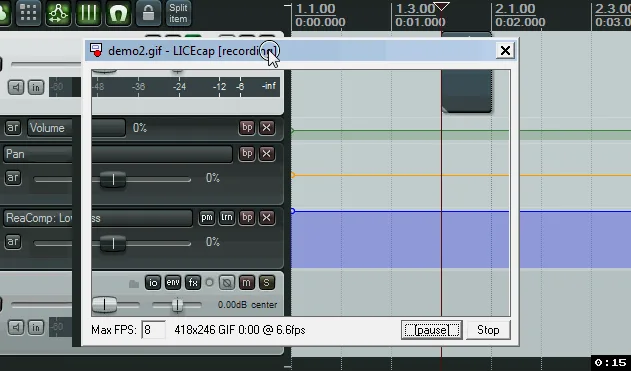
The Windows download linked here is the publisher's version 1.32 EXE installer, dated June 8, 2022. The screenshot is a frame from the publisher's older Windows demonstration, not proof of the appearance of version 1.32. This entry describes documented capabilities; the installer was not downloaded or run.
What it offers
- Capture a selected desktop area directly to animated GIF or lossless LCF.
- Move the recording frame while capturing, and pause or resume with Shift+Space.
- Insert a title frame or optional text messages during a pause.
- Set a maximum recording frame rate to limit CPU use.
- Optionally display mouse button presses and elapsed recording time.
Good to know
- GIF does not preserve LCF's more-than-256-colors-per-frame quality; choose the output format for the intended use.
- LCF needs a compatible playback or conversion workflow; the publisher directs users to REAPER rather than presenting LCF as browser-viewable GIF output.
Product images
Sources
References used for this listing. Retrieval dates do not indicate hands-on testing.
More in utilities
View category ↗
1.1.1.1 with WARP 2026.8.2115.0
Encrypt traffic from your Mac to Cloudflare’s network with WARP, or use DNS-only mode for encrypted DNS queries to the 1.1.1.1 resolver.
1.1.1.1 with WARP 2026.8.2115.0
Encrypt traffic between your Windows PC and Cloudflare, or use encrypted DNS only, with the free 1.1.1.1 with WARP app.

3uTools 9.12.005
Manage iPhone and iPad photos, music, apps and backups from Windows with 3uTools, a free utility that also includes device checks and firmware flashing tools.