
Utilities Windows
Listen N Write Free
Transcribe recordings by hand with Listen N Write Free for Windows, combining audio and video playback, keyboard controls and a built-in text editor.
- Operating system
- Windows; publisher does not specify a version range
- Architecture
- Not specified by publisher
- Download package
- ZIP archive containing the setup package
Requires a sound card and speakers or a headset. A separate portable package is available from the publisher; this link selects setup.
Link checked · Download guidance
What is Listen N Write Free?
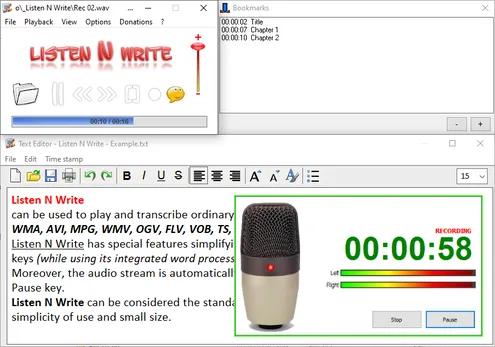
Listen N Write Free helps you type a transcript while listening to a recorded interview, lecture or meeting. It combines a media player with a text editor, so you can control playback while writing rather than switching between separate applications. Keyboard controls, short forward and backward jumps, and bookmarks help you return to passages that need another listen.
Pausing automatically rewinds the recording a short distance, making it easier to hear the last words again when playback resumes. The publisher lists audio and video formats including WAV, MP3, OGG, WMA, AVI and MPG. This is a manual transcription tool: it does not turn speech into text automatically.
The linked publisher download is the setup ZIP, not the separately offered portable package. The English publisher page identifies version 1.30.0.10 and dates its release to August 13, 2021; the Italian download page abbreviates the version as 1.30.10. The publisher lists Windows, a sound card and speakers or a headset as requirements, without specifying an architecture or a current Windows-version compatibility range.
What it offers
- Play audio and video recordings while typing in the integrated text editor.
- Control playback with keyboard shortcuts while working in the editor.
- Move forward or backward through a recording and automatically rewind a short distance when pausing.
- Insert time markers or bookmarks to revisit parts of a recording.
Good to know
- Transcription is manual; there is no automatic speech-to-text feature.
- The publisher's requirements do not specify CPU architecture or a supported Windows-version range.
Product images
Sources
References used for this listing. Retrieval dates do not indicate hands-on testing.
More in utilities
View category ↗
1.1.1.1 with WARP 2026.8.2115.0
Encrypt traffic from your Mac to Cloudflare’s network with WARP, or use DNS-only mode for encrypted DNS queries to the 1.1.1.1 resolver.
1.1.1.1 with WARP 2026.8.2115.0
Encrypt traffic between your Windows PC and Cloudflare, or use encrypted DNS only, with the free 1.1.1.1 with WARP app.

3uTools 9.12.005
Manage iPhone and iPad photos, music, apps and backups from Windows with 3uTools, a free utility that also includes device checks and firmware flashing tools.