

Utilities Windows
Lively Wallpaper for Windows
Turn videos, GIFs and webpages into animated Windows desktop backgrounds with Lively Wallpaper, a free, open-source wallpaper and screensaver app.
- Operating system
- Windows 10 version 1903 or later; Windows 11
- Architecture
- 64-bit (publisher label; installer filename contains x86)
- Download package
- EXE installer
GitHub distribution, not the Microsoft Store package. Publisher x64 label is supported by release-source configuration; binary architecture was not inspected. Setup handles required runtimes.
Link checked · Download guidance
What is Lively Wallpaper?
Lively Wallpaper replaces a static Windows background with video, GIF or web-based wallpaper. Import your own media or a webpage, choose a wallpaper from the library and manage it across your displays. It suits desktop personalization with animated scenes, interactive web content or music visualizers rather than editing a still background image.
The GitHub installer linked here also supports application and game wallpapers, a capability the Microsoft Store distribution does not include. Wallpapers can be used as screensavers, and playback controls let you pause them for fullscreen applications or while running on battery. Resource use still depends on the wallpaper: a complex web animation can demand more than a simple video.
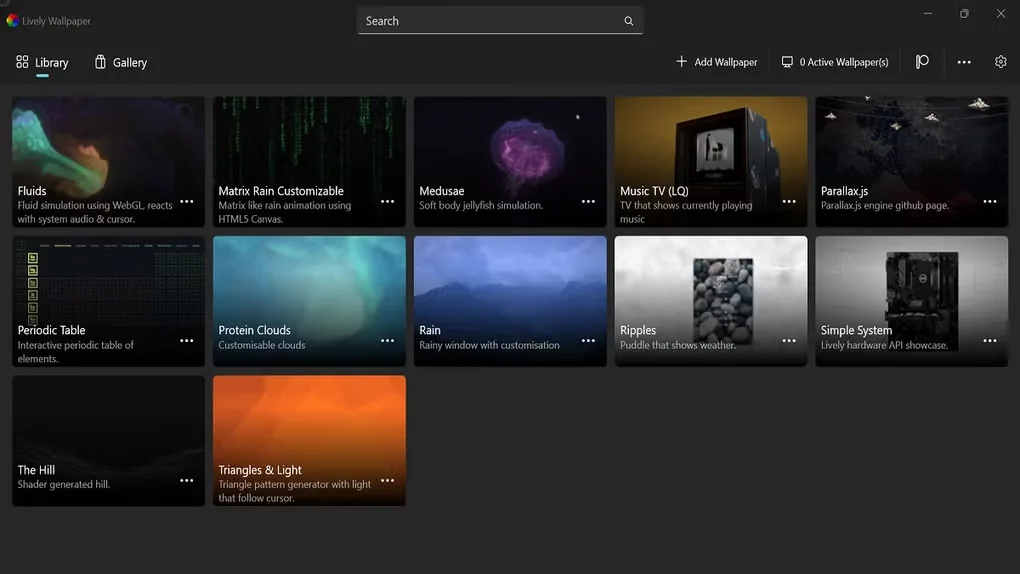
This entry links to version 2.2.1.0. The product site labels this installer Windows 64-bit, although its filename contains x86; the release source includes an x64 installer configuration. The executable was not downloaded or installed. The screenshot shows the source gallery’s Lively library interface, not a verified capture of this release.
What it offers
- Set videos, GIFs and webpages as desktop wallpapers.
- Import media or webpage addresses through drag and drop.
- Use multiple displays and turn wallpapers into Windows screensavers.
- Pause wallpaper playback for fullscreen apps or configure battery-based pauses.
- Use application and game wallpapers with the GitHub installer distribution.
Good to know
- Wallpaper resource use varies with content; complex web wallpapers can require more resources than simple video backgrounds.
- The installer requires Windows 10 version 1903 or later and additional runtime dependencies handled by setup.
- The Microsoft Store distribution does not support application/game wallpapers or additional wallpaper plugins.
Start with the kind of wallpaper you want
Lively supports several different kinds of moving background: ordinary video and GIF media, webpages and, in the installer distribution, application or game wallpapers. Dragging a media file or webpage into Lively is the project’s documented import route. A saved video and an interactive web scene are therefore not interchangeable just because both appear behind your desktop icons.
Choose video for an existing animation and web content when the wallpaper itself needs web-based interactions or custom behavior. The project also supports music visualizers and wallpaper development tools. This does not make it a general video editor or guarantee that any arbitrary webpage was designed to be an efficient background.
Installer and Microsoft Store editions have different limits
The official site presents both Microsoft Store and Windows 64-bit installer choices. This card links directly to the installer release, not the Store package. The project’s distribution guide says setup handles the installer’s runtime dependencies and requires administrator access during installation. The Store version does not require the same separate dependency setup, but its feature set differs.
In particular, the Store edition lacks application/game wallpaper support and additional wallpaper plugins according to the retained documentation. Screensaver support needs Lively running in the background. Decide based on the content you intend to run rather than choosing a distribution from a familiar-looking download button alone.
Install, stop playback or remove Lively without confusing the options
For the linked installer, check Windows 10 version 1903 (build 18362) or later and the documented hardware baseline before starting setup. Follow the dependency prompts; the project requires administrator access for this distribution. The Store route has a separately documented Windows 10 version 1809 minimum. These are publisher requirements, not results of running this installer on every supported Windows build.
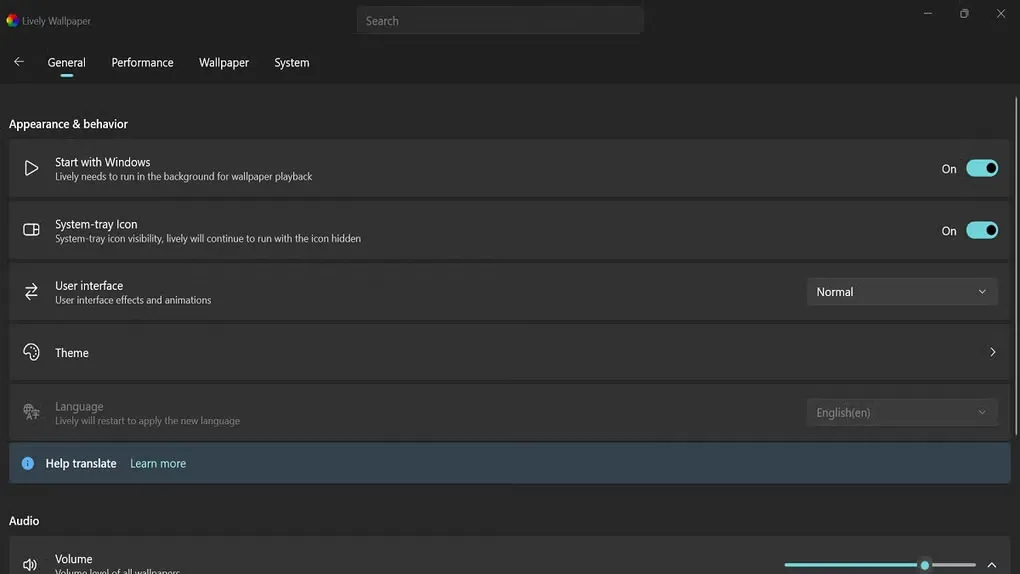
The getting-started guide says to right-click the tray icon to open or quit Lively. The General settings screenshot also shows a Start with Windows switch and warns that hiding the system-tray icon leaves Lively running. Hiding the icon is therefore not the same action as quitting; use the tray menu when you want to stop the app for the current session.
Before uninstalling, decide whether you want to keep imported wallpapers and settings. The project lists the installer’s user-data folder as %LocalAppData%\Lively Wallpaper and says its uninstaller asks whether to delete it. For the Microsoft Store distribution, the guide says user data is removed automatically without a prompt. Preserve any files you need before removing the Store app; this is the documented difference, not a tested backup or restoration guarantee.
Performance depends on the wallpaper
Lively’s performance guide separates the application from the content it hosts. Video decoding can use dedicated GPU video hardware when the media and hardware support it. Web wallpaper demand depends on the page’s design, animations, refresh frequency and frame rate. There is no single resource-use number that describes all wallpaper choices.
Fullscreen-app pausing, application-based rules and battery pause controls are documented ways to manage playback. The guide also describes a desktop-only approach that pauses when another application has focus. These settings are more informative than a blanket claim of zero resource use; no CPU, GPU, RAM or battery benchmark was performed for this page.
Multiple displays need a pause policy that matches your workspace
The project supports multiple monitors and ultrawide displays, and wallpapers can also be used as Windows screensavers. In a multi-window desktop, pausing is not always the same problem as detecting one fullscreen game: two windows side by side can cover a screen without either being fullscreen on its own.
The current performance guide describes Grid detection as the default and explains that it considers covered areas. It also lists All Process and Foreground Process algorithms, while the Direct3D mode is marked not recommended and ignores additional performance settings. Choose a documented policy appropriate to your layout rather than assuming fullscreen detection covers every window arrangement.
Check requirements for the selected distribution
The retained getting-started documentation gives the installer requirement as Windows 10 version 1903 or later, while the Store route lists Windows 10 version 1809 or later. The documented baseline includes 4 GB RAM, DirectX 10 and 1 GB storage. High Contrast mode may prevent some features from functioning properly; compatibility is not inferred solely from the screenshot’s appearance.
The linked installer is release 2.2.1.0, published September 18, 2025. Its filename contains x86 even though the official site labels it 64-bit and the tagged release source includes x64 configuration. That discrepancy is disclosed rather than presented as a binary inspection. The retained download proof is a HEAD request from October 28, 2026, not an installation test or a claim that this is the newest release.
What the library screenshot proves
The library screenshot shows Lively’s search area, Add Wallpaper controls and named preview tiles. The second screenshot shows General settings: Start with Windows, System-tray Icon, User interface, Theme and Language, plus part of the Audio section. These explain the library and background-running controls; neither is a local installation capture or evidence that all pictured artwork ships with the linked release.
These are source-gallery screenshots. Their interface and wallpaper artwork remain with the respective rights holders; no explicit redistribution permission was found. The software’s GPL license does not establish permission for all screenshot artwork. Layout and labels may differ in another release.
Product images
Sources
References used for this listing. Retrieval dates do not indicate hands-on testing.
- Lively Wallpaper - Download ↗Retrieved
- Lively Wallpaper — current product site ↗Retrieved
- Lively community — project README ↗Retrieved
- Lively Wallpaper v2.2.1.0 — release metadata and notes ↗Retrieved
- Getting Started — installer requirements ↗Retrieved
- Differences Between Distributions ↗Retrieved
- Performance — resource use and pause rules ↗Retrieved
- v2.2.1.0 source — x64 installer configuration ↗Retrieved
- Dani (rocksdanister) — founder portfolio ↗Retrieved
- Lively Performance — current pause algorithms ↗Retrieved
- Lively Wallpaper — official distribution choices, corroborating read ↗Retrieved
- Getting Started — requirements, tray controls and uninstall data handling ↗Retrieved
- Differences Between Distributions — current documentation corroboration ↗Retrieved
- Lively Wallpaper — General settings gallery screenshot ↗Retrieved
More in utilities
View category ↗
1.1.1.1 with WARP 2026.8.2115.0
Encrypt traffic from your Mac to Cloudflare’s network with WARP, or use DNS-only mode for encrypted DNS queries to the 1.1.1.1 resolver.
1.1.1.1 with WARP 2026.8.2115.0
Encrypt traffic between your Windows PC and Cloudflare, or use encrypted DNS only, with the free 1.1.1.1 with WARP app.

3uTools 9.12.005
Manage iPhone and iPad photos, music, apps and backups from Windows with 3uTools, a free utility that also includes device checks and firmware flashing tools.