
Utilities Windows
Lock Cursor Tools
Keep the mouse pointer inside a selected area, monitor or application window with Lock Cursor Tools, a freeware utility for Windows.
- Operating system
- Windows XP, Vista, 7, 8, 10 and 11, as listed by the publisher
- Architecture
- Not specified by the publisher
- Download package
- EXE download
Publisher-listed Windows support, not independently tested. A separate ZIP link is also offered.
Link checked · Download guidance
What is Lock Cursor Tools?
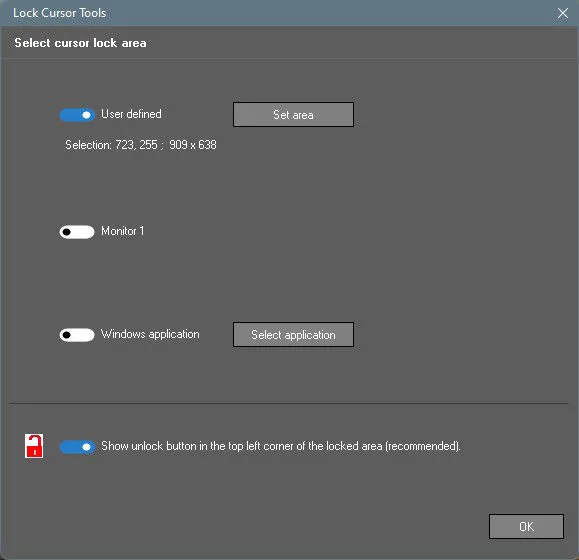
Lock Cursor Tools confines the mouse pointer to a region you choose. It is useful when working across several monitors or overlapping windows and you want the pointer to stay within one workspace. Choose a monitor, draw a custom area or select an application window from the program's selection interface. A custom area can extend across multiple monitors.
A keyboard shortcut or the taskbar icon toggles cursor locking. The publisher's settings screenshot also shows an option to display an unlock button at the top-left corner of the locked area.
There is a compatibility caveat: Softonic reports that some users could not disable the lock while using Notepad or Windows Explorer and had to end the program through Task Manager. This is a reported issue, not a problem reproduced here or confirmed for every installation. The publisher lists version 10.1 as freeware and provides the linked EXE download; CPU architecture is not specified on its product page.
What it offers
- Confine the pointer to a custom area selected with the mouse.
- Choose a primary or secondary monitor as the cursor boundary.
- Select an application window through the window-selection interface.
- Toggle locking with a keyboard shortcut or the taskbar icon.
- Optionally show an unlock button in the top-left corner of the locked area.
Good to know
- Softonic reports that some users could not disable locking in Notepad or Windows Explorer without ending the process through Task Manager; this behavior has not been independently reproduced here.
Product images
Sources
References used for this listing. Retrieval dates do not indicate hands-on testing.
More in utilities
View category ↗
1.1.1.1 with WARP 2026.8.2115.0
Encrypt traffic from your Mac to Cloudflare’s network with WARP, or use DNS-only mode for encrypted DNS queries to the 1.1.1.1 resolver.
1.1.1.1 with WARP 2026.8.2115.0
Encrypt traffic between your Windows PC and Cloudflare, or use encrypted DNS only, with the free 1.1.1.1 with WARP app.

3uTools 9.12.005
Manage iPhone and iPad photos, music, apps and backups from Windows with 3uTools, a free utility that also includes device checks and firmware flashing tools.