
Utilities Windows
Make Me Admin
Give authorized standard Windows users temporary administrator rights with Make Me Admin, a free, open-source utility with configurable time limits and access policies.
- Operating system
- Windows; Softonic lists Windows 11
- Architecture
- x64
- Download package
- MSI installer
Selected package is English (en-US). UAC must remain enabled with a supported standard-user credential prompt. No installation or runtime compatibility test was performed.
Link checked · Download guidance
What is Make Me Admin?
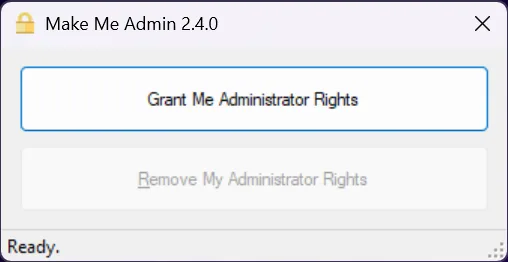
Make Me Admin lets authorized standard Windows users request temporary membership of the local Administrators group. Its desktop window provides a Grant Me Administrator Rights button; a background service adds the user to the group and removes that membership after a configurable period. The publisher documents using the user's existing Windows credentials when an elevation prompt appears.
For administrators, registry settings and Group Policy templates control who can request rights, how long they last and whether a reason is required. This is a managed elevation tool, not a way around an organization's access rules: denied users cannot obtain rights through the normal request flow. UAC must remain enabled with a supported credential-prompt setting, or elevated tasks can fail with access denied.
The linked package is the English-language x64 MSI for version 2.4.1. The publisher's documentation screenshot shows version 2.4.0, so it illustrates the request interface rather than proving the appearance of every later release.
What it offers
- Request temporary local administrator membership through a desktop button.
- Remove requested administrator membership after a configurable timeout and notify the user.
- Configure allowed and denied users or groups through registry settings or Group Policy templates.
- Set timeout overrides and optional or required reasons for elevation requests.
Good to know
- Elevation depends on authorization policies; denied users cannot request administrator rights through the normal interface.
- Windows UAC must be enabled and configured to prompt standard users for credentials; automatic denial prevents elevated tasks.
- The timeout applies to requested rights; users configured for automatic addition at logon are not subject to that timeout.
Product images
Sources
References used for this listing. Retrieval dates do not indicate hands-on testing.
- Make Me Admin - Download — observed Windows listing ↗Retrieved
- MakeMeAdmin — publisher repository ↗Retrieved
- Make Me Admin — publisher documentation and UI image ↗Retrieved
- How It Works — authorized elevation and timeout ↗Retrieved
- Registry Settings — access policy and timeout controls ↗Retrieved
- UAC Settings — required credential prompts ↗Retrieved
- Version 2.4.1 — publisher release notes ↗Retrieved
- Version 2.4.1 — original release asset listing ↗Retrieved
More in utilities
View category ↗
1.1.1.1 with WARP 2026.8.2115.0
Encrypt traffic from your Mac to Cloudflare’s network with WARP, or use DNS-only mode for encrypted DNS queries to the 1.1.1.1 resolver.
1.1.1.1 with WARP 2026.8.2115.0
Encrypt traffic between your Windows PC and Cloudflare, or use encrypted DNS only, with the free 1.1.1.1 with WARP app.


3uTools 9.12.005
Manage iPhone and iPad photos, music, apps and backups from Windows with 3uTools, a free utility that also includes device checks and firmware flashing tools.