

Utilities Windows
Mass Image Compressor for Windows
Compress, resize, convert and watermark batches of images or whole folders with Mass Image Compressor, a free, open-source Windows utility.
Version 4.2.2 · Direct publisher file
Link checked · Download guidance
What is Mass Image Compressor?
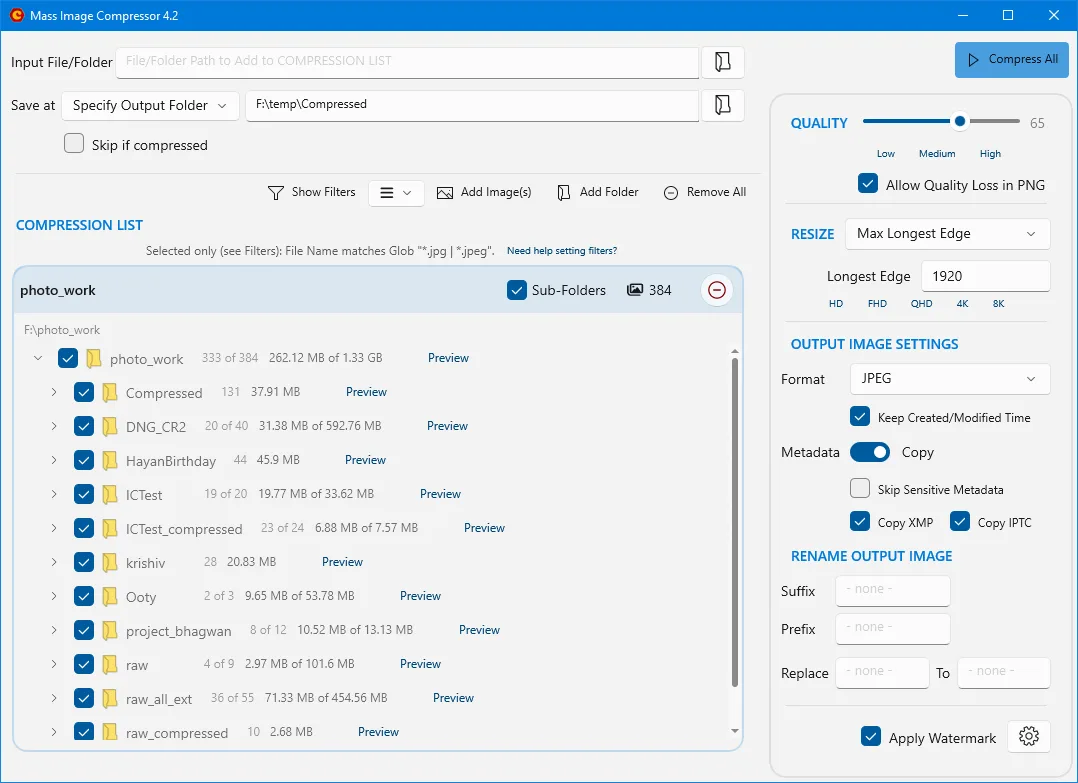
Mass Image Compressor processes batches of photos and other images for smaller files, consistent dimensions or a different output format. Add individual files or whole folders, include subfolders when needed, and choose JPEG, PNG, WebP, GIF or AVIF output. A preview with pixel-level comparison helps you evaluate compression settings before processing the batch.
The Windows application includes controls for output folders, filename prefixes and suffixes, watermarks, and metadata retention. You can copy EXIF, XMP and IPTC metadata or exclude sensitive details such as GPS coordinates. The publisher lists Windows 10 and 11 support; the current-generation application is distinct from its older Windows 7 and 8 release.
This entry links to the free 4.2.2 EXE installer from the publisher-linked GitHub repository. The publisher says the free installer is not digitally signed and may trigger Windows security prompts. A paid Microsoft Store edition offers a signed distribution and automatic updates, rather than additional editing features. Image cropping is not supported.
What it offers
- Process multiple images and folders, with optional subfolder inclusion.
- Convert images to JPEG, PNG, WebP, GIF or AVIF, including supported camera RAW inputs.
- Resize by percentage, longest edge, or fixed dimensions and compare compression settings in a preview.
- Apply watermarks and choose output folders and filename prefixes or suffixes.
- Control EXIF, XMP and IPTC copying, including exclusion of sensitive metadata.
Good to know
- The free installer is not digitally signed; the publisher warns that Windows may show security prompts.
- Image cropping is not supported.
Product images
Sources
References used for this listing. Retrieval dates do not indicate hands-on testing.
More in utilities
View category ↗
1.1.1.1 with WARP 2026.8.2115.0
Encrypt traffic from your Mac to Cloudflare’s network with WARP, or use DNS-only mode for encrypted DNS queries to the 1.1.1.1 resolver.
1.1.1.1 with WARP 2026.8.2115.0
Encrypt traffic between your Windows PC and Cloudflare, or use encrypted DNS only, with the free 1.1.1.1 with WARP app.


3uTools 9.12.005
Manage iPhone and iPad photos, music, apps and backups from Windows with 3uTools, a free utility that also includes device checks and firmware flashing tools.