
Utilities Windows
Master Key
Practice touch typing with progressive drills, custom text and individual progress history. Master Key offers a Windows trial, with registration required for all included drills.
Version 5.5.2 · Direct publisher file
Link checked · Download guidance
What is Master Key?
Master Key is a typing tutor for learning a keyboard layout or improving speed and accuracy. Its progressive drills cover QWERTY, Dvorak, AZERTY and QWERTZ, while the Drill Editor lets you build practice around your own vocabulary. You can also use plain-text files as drills; long texts are divided into pages rather than requiring you to finish an entire document in one sitting.
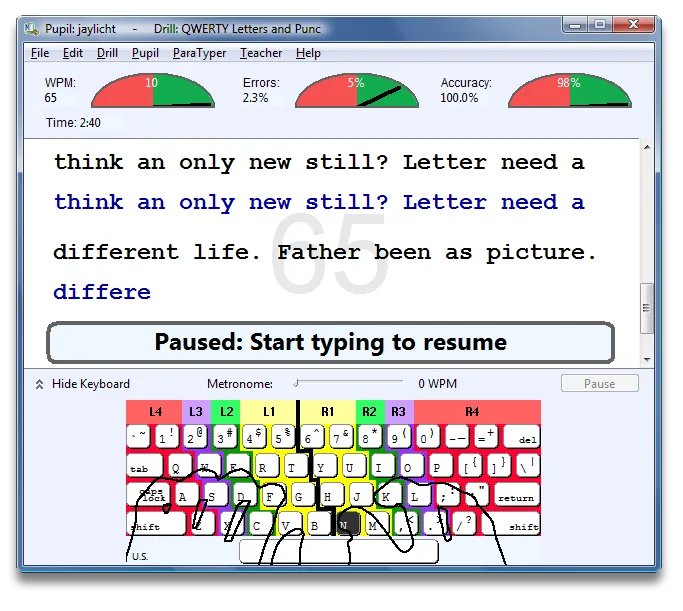
Practice can be timed or based on text length. The drill screen includes a keyboard guide, and individual scoring and history help you review progress. For classroom use, the publisher documents pupil files, group settings, class reports and shared network data across Windows and Mac computers. Classroom registration removes the five-pupil limit in the Class Editor and Class Reports.
The publisher's catalog lists the Windows installer as version 5.5.2. Version 6.2.1 on the same page is for Mac, not a newer Windows build. The pages consulted do not specify Windows version requirements or CPU architecture, so compatibility with a particular current Windows installation is unconfirmed. Master Key is paid shareware: the unregistered edition shows reminders and does not open the full set of included drills.
What it offers
- Progressive typing drills for QWERTY, Dvorak, AZERTY and QWERTZ keyboards.
- Create or edit drills using your own vocabulary and plain-text files, with pagination for long texts.
- Choose timed or text-length practice and pause a drill when needed.
- Review individual typing scores, history and mastery goals.
- Manage pupil groups and class reports, with shared network data for Windows and Mac classrooms.
Good to know
- The unregistered edition includes shareware reminders and restricts access to the complete set of typing drills.
- Class Editor and Class Reports are limited to five pupils without Classroom Edition registration.
- The publisher lists Windows version 5.5.2 separately from Mac version 6.2.1; Windows OS requirements and CPU architecture are not specified on the consulted pages.
Product images
Sources
References used for this listing. Retrieval dates do not indicate hands-on testing.
- Windows/Mac Typing Tutor - Master Key ↗Retrieved
- Download Master Key ↗Retrieved
- Purchase Master Key ↗Retrieved
- Master Key Help ↗Retrieved
- Master Key Screenshots ↗Retrieved
More in utilities
View category ↗
1.1.1.1 with WARP 2026.8.2115.0
Encrypt traffic from your Mac to Cloudflare’s network with WARP, or use DNS-only mode for encrypted DNS queries to the 1.1.1.1 resolver.
1.1.1.1 with WARP 2026.8.2115.0
Encrypt traffic between your Windows PC and Cloudflare, or use encrypted DNS only, with the free 1.1.1.1 with WARP app.


3uTools 9.12.005
Manage iPhone and iPad photos, music, apps and backups from Windows with 3uTools, a free utility that also includes device checks and firmware flashing tools.