
Utilities macOS
Master PDF Editor
Edit PDF text and images, annotate documents, manage pages and work with interactive forms on Mac. The commercial editor offers a demo that adds a watermark to output files.
- Operating system
- macOS 12.0 (publisher-listed requirement)
- Architecture
- Intel or Apple M1, as labeled by the publisher
- Download package
- DMG disk image
One publisher macOS link is labeled for Intel or M1. The package was not downloaded or inspected, so native/universal binary composition is not verified.
Link checked · Download guidance
What is Master PDF Editor?
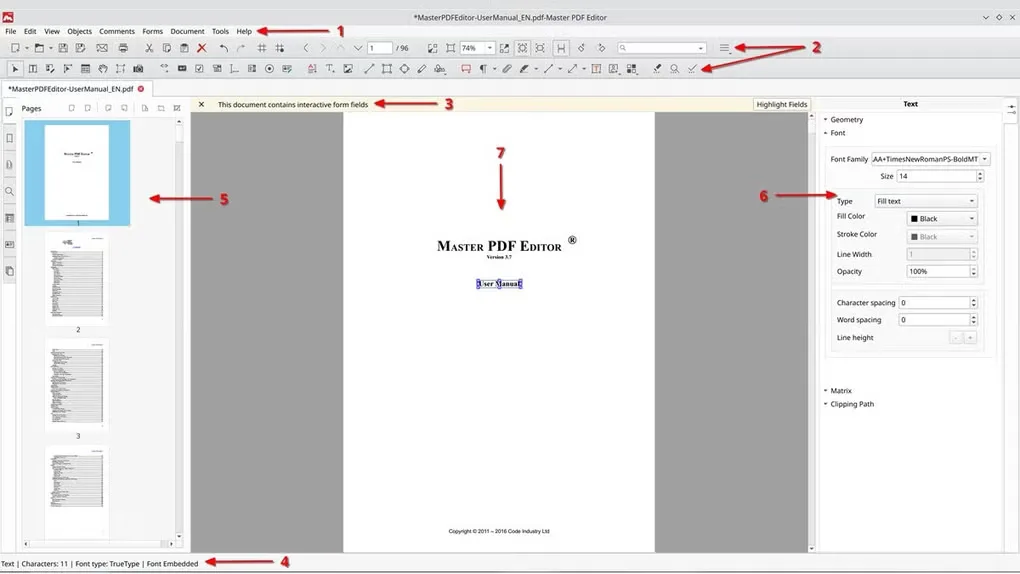
Master PDF Editor for Mac brings text editing, document review and page management into one PDF workspace. You can change existing text, insert images, move objects and add comments or highlights without treating the document as a flat picture. It also supports interactive form fields and OCR for searching and editing scanned material.
For document assembly, the editor can merge files, split a PDF and insert, remove or rotate pages. Bookmarks help organize longer documents, while digital certificate support provides signing tools for users who already have a signing certificate.
This is commercial software with a downloadable demo, not unrestricted free editing: the publisher says demo output receives a watermark. The virtual PDF printer advertised for the product is Windows-only and is not included in the Mac feature set. The linked DMG is the publisher’s macOS download, labeled for Intel or M1 with macOS 12.0. The gallery image is an annotated cross-platform interface illustration from the Mac source listing, not a verified capture of the current macOS build.
What it offers
- Edit existing PDF text, insert images and move or resize document objects.
- Add sticky notes, highlights, underlines, shapes and other review annotations.
- Create and edit interactive form fields, including JavaScript-based calculations and validation.
- Use OCR to search and edit scanned documents; merge, split, insert, remove or rotate PDF pages.
- Create bookmarks and sign PDF documents using a digital signing certificate.
Good to know
- The demo adds a watermark to output files; the product is commercial software.
- Digital signing requires a digital signing certificate.
- The virtual PDF printer is Windows-only, not a feature of this Mac download.
Product images
Sources
References used for this listing. Retrieval dates do not indicate hands-on testing.
More in utilities
View category ↗
1.1.1.1 with WARP 2026.8.2115.0
Encrypt traffic from your Mac to Cloudflare’s network with WARP, or use DNS-only mode for encrypted DNS queries to the 1.1.1.1 resolver.
1.1.1.1 with WARP 2026.8.2115.0
Encrypt traffic between your Windows PC and Cloudflare, or use encrypted DNS only, with the free 1.1.1.1 with WARP app.

3uTools 9.12.005
Manage iPhone and iPad photos, music, apps and backups from Windows with 3uTools, a free utility that also includes device checks and firmware flashing tools.