

Development Windows
Mattermost for Windows
Connect to your team’s Mattermost workspaces on Windows, with server switching, desktop notifications and unread-message badges.
- Operating system
- Windows 11 or later
- Architecture
- x64 (Intel/AMD 64-bit)
- Download package
- MSI installer
This link selects the x64 installer. The publisher offers a separate ARM64 MSI and Microsoft Store distribution. Requires a Mattermost server account.
Link checked · Download guidance
What is Mattermost?
Mattermost Desktop brings your organization’s Mattermost conversations into a dedicated Windows application. It is useful when you work across several servers or want desktop notifications and unread-channel or mention badges without keeping each workspace in a browser tab. The app also opens Mattermost links directly and can keep running in the background.
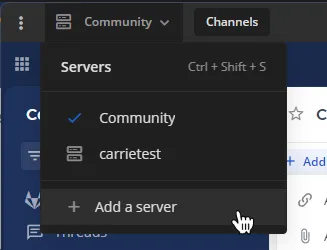
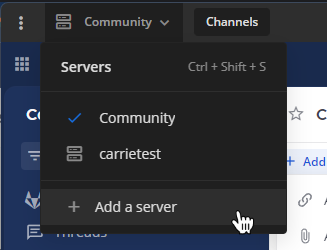
To get started, obtain your organization’s Mattermost server URL and sign-in credentials. Add the server with a display name, then switch between configured workspaces from the server list. Supported desktop versions also let you work in multiple tabs and move a tab into its own window.
This entry links to the publisher’s version 6.3.1 x64 MSI installer, not the ARM64 package or Microsoft Store edition. The desktop client does not create or host a Mattermost server. Install it on a local drive: network-share installations are not supported. Review the Advanced settings if your organization restricts error reporting or server-requested device and network attributes.
What it offers
- Connect to multiple Mattermost servers and switch workspaces from one desktop interface.
- Receive desktop notifications and see badges for unread channels and mentions.
- Open Mattermost links directly in the desktop app.
- Use multiple workspace tabs and move tabs into separate windows.
- Keep the app running in the background.
Good to know
- Requires access to a Mattermost server and valid sign-in credentials; the desktop client does not host a server.
- Network-share installation is not supported; use a local drive.
- Error reporting and session attribute reporting are enabled by default; review Advanced settings to disable them if required by your organization.
Product images
Sources
References used for this listing. Retrieval dates do not indicate hands-on testing.
- Mattermost - Download — Windows catalog and gallery ↗Retrieved
- Mattermost Desktop — publisher repository and README ↗Retrieved
- Mattermost Desktop — Apache License 2.0 and copyright ↗Retrieved
- Mattermost Desktop v6.3.1 (2026-10-15) — publisher release ↗Retrieved
- Install the Mattermost desktop app ↗Retrieved
- Mattermost software and hardware requirements — desktop apps ↗Retrieved
- Connect to multiple Mattermost workspaces — desktop server menu screenshot ↗Retrieved
- Desktop App Deployment — Windows distribution and data handling ↗Retrieved
More in development
View category ↗
010 Editor 17.0
Inspect and edit binary files on Mac with 010 Editor, a paid text and hex editor with Binary Templates, file comparison and a 30-day trial.
010 Editor 17.0
Inspect and edit binary files with 010 Editor for Windows, a text and hex editor with Binary Templates, file comparison and scripting. Includes a 30-day trial.
10x Editor
Edit and navigate C++ projects on Windows with a built-in parser, workspace search and Visual Studio project support. A paid license is required after the 30-day trial.