
Utilities Windows
MemPad
Organize plain-text notes in a tree with MemPad, a free Windows outliner that stores its pages together in one file.
- Operating system
- Windows; supported releases not specified on the publisher product page
- Architecture
- 32-bit selected download
- Download package
- ZIP archive
Publisher offers a separate 64-bit ZIP. No installation or Windows-version compatibility test was performed.
Link checked · Download guidance
What is MemPad?
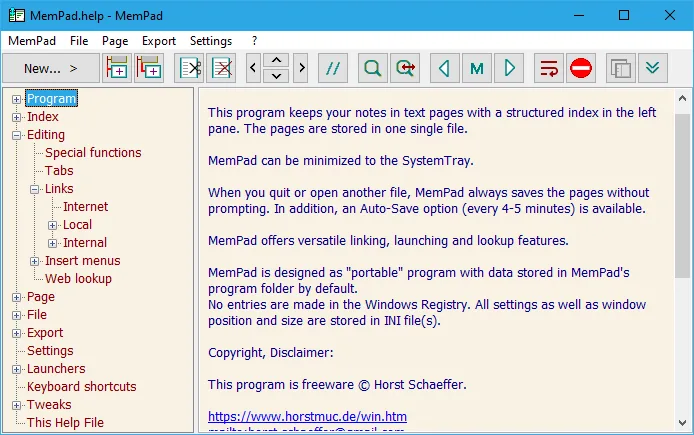
MemPad keeps notes in text pages arranged under a structured index. Use the tree to group subjects, move pages between branches and find related information without maintaining a separate text file for every note. It supports Unicode, internal page links, web links and links to local or network files and folders. Search can cover all pages or a selected node, while diary tools create a year/month/day structure.
The publisher lists import and export tools, automatic backups, password-protected encryption and an optional autosave interval. MemPad stores settings in INI files rather than the Windows Registry. Its editor is for plain text, not rich-text document layout. It also saves without asking when you close the program or open another file; account for that behavior when making changes you may not want to keep. This entry links to the publisher's 32-bit ZIP; a separate 64-bit package is available on the same product page. The publisher does not specify supported Windows releases there.
What it offers
- Arrange plain-text pages in a hierarchical index and store them together in one file.
- Use Unicode text, internal page links, web links and local or network file links.
- Search all pages or a selected node, replace text and sort sibling nodes.
- Create a diary with year, month and day branches, and import or export notes.
- Use automatic backups, optional autosave and password-protected encryption.
Good to know
- The editor is plain text rather than a rich-text document layout tool.
- Closing MemPad or opening another file saves changes without prompting.
- The publisher's product page does not specify supported Windows releases; current OS compatibility has not been tested here.
Product images
Sources
References used for this listing. Retrieval dates do not indicate hands-on testing.
More in utilities
View category ↗
1.1.1.1 with WARP 2026.8.2115.0
Encrypt traffic from your Mac to Cloudflare’s network with WARP, or use DNS-only mode for encrypted DNS queries to the 1.1.1.1 resolver.
1.1.1.1 with WARP 2026.8.2115.0
Encrypt traffic between your Windows PC and Cloudflare, or use encrypted DNS only, with the free 1.1.1.1 with WARP app.


3uTools 9.12.005
Manage iPhone and iPad photos, music, apps and backups from Windows with 3uTools, a free utility that also includes device checks and firmware flashing tools.