
Development Windows
MemPro
Trace C++ allocations, compare memory snapshots and investigate leaks with MemPro, a Windows memory profiler with a 30-day trial.
- Operating system
- Windows; minimum Windows version not specified by the reviewed publisher pages
- Architecture
- x64 download; profiles x86 and x64 applications
- Download package
- EXE installer
Selected publisher endpoint names MemPro_x64_setup.exe. Other supported target platforms do not imply a native non-Windows profiler interface.
Link checked · Download guidance
What is MemPro?
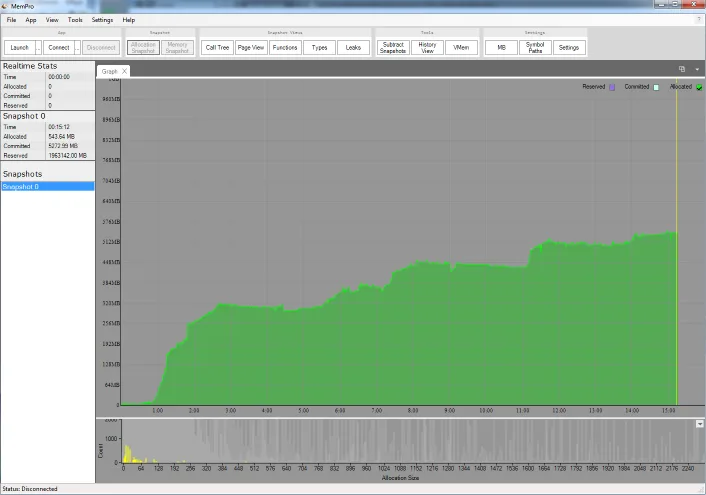
MemPro helps C++ developers find where their application allocates memory and what remains allocated over time. Its Windows interface connects to an instrumented application and presents allocation callstacks, memory graphs and snapshots. It is a development profiler, not a general-purpose RAM cleaner.
Start by integrating the publisher’s MemPro code into the application you want to profile. The documented simple setup assumes you have not already overridden new and delete; projects with custom allocation routines need explicit allocation and free tracking. Launch or connect to the instrumented application from MemPro, take a snapshot, then inspect the Call Tree view to identify allocation origins.
To investigate growth across an operation, compare snapshots from before and after it. MemPro’s subtraction view isolates allocations present in the second snapshot but not the first. Allocation history and memory rewind provide another way to examine changes over time. These are publisher-documented capabilities, not results of a hands-on software test.
The profiler interface runs on Windows even when the application being profiled runs on another supported platform. Meaningful Windows callstacks require PDB files that match the executable. This entry links to the publisher’s x64 EXE trial endpoint, listed by its catalog as version 1.6.11.0; Softonic’s different version and Free label do not describe the selected publisher download. Continued use after the 30-day trial requires a purchased license.
What it offers
- Track C++ allocations and frees with their allocation callstacks.
- Compare snapshots to isolate allocations added between two points in time.
- Inspect memory through call tree, types and memory-layout views.
- Review allocation history and rewind memory to investigate earlier states.
Good to know
- Requires integration into the application being profiled; custom allocators need explicit tracking hooks.
- The MemPro interface runs only on Windows, even when profiling applications on other platforms.
- The free trial lasts 30 days from first installation; continued use requires a purchased license.
- Windows PDB symbol files must match the executable to resolve allocation callstacks.
Product images
Sources
References used for this listing. Retrieval dates do not indicate hands-on testing.
- MemPro - Download (normal browser observation) ↗Retrieved
- PureDev Software — MemPro C++ Memory Profiler ↗Retrieved
- PureDev Software — MemPro trial download catalog ↗Retrieved
- PureDev Software — MemPro License ↗Retrieved
- PureDev Software — MemPro frequently asked questions ↗Retrieved
- MemPro User Guide — Quick Start ↗Retrieved
- PureDev Software — Terms of Service ↗Retrieved
More in development
View category ↗

010 Editor 17.0
Inspect and edit binary files on Mac with 010 Editor, a paid text and hex editor with Binary Templates, file comparison and a 30-day trial.
010 Editor 17.0
Inspect and edit binary files with 010 Editor for Windows, a text and hex editor with Binary Templates, file comparison and scripting. Includes a 30-day trial.
10x Editor
Edit and navigate C++ projects on Windows with a built-in parser, workspace search and Visual Studio project support. A paid license is required after the 30-day trial.